



JuliaSetPlot
JuliaSetPlot[f,z]
plots the Julia set of the rational function f of the variable z.
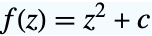
JuliaSetPlot[c]
plots the Julia set of the function  .
.
Details and Options
- The Julia set of a function f is the closure of the set of all repelling fixed points of f.
- JuliaSetPlot has the same options as Graphics, with the following additions and changes: [List of all options]
-
AspectRatio Automatic ratio of height to width of the plot Axes False whether to include axes ColorFunction Automatic how to color the exterior ColorFunctionScaling True whether to scale arguments to ColorFunction Frame True whether to include a frame ImageResolution Automatic resolution of points in the Julia set MaxIterations Automatic how many iterations to allow for each point Method Automatic the method to generate the image PerformanceGoal $PerformanceGoal aspects of performance to try to optimize PlotLegends None legends for the number of interations PlotRange Automatic range of values to include PlotRangeClipping True whether to clip at the plot range PlotStyle Automatic graphics directives to specify the style for each point PlotTheme $PlotTheme theme to use for styles and appearances - The possible methods are "InverseIteration", "EscapeTime", and "OrbitDetection".
- With Method->"InverseIteration", JuliaSetPlot produces a ListPlot showing individual points of the Julia set.
- With Method->"EscapeTime" or with Method->"OrbitDetection", JuliaSetPlot produces a Graphics object containing a Raster primitive.
- With ColorFunction->f, where f is a function, the argument of f is a real number in
 proportional to the number of iterates, and f must return color directives, such as RGBColor and Hue, or named colors, such as Red and Blue.
 - ColorFunction->"name" is equivalent to ColorFunction->(If[#1,Black,ColorData["name"][#]]&).
- The list of possible color function names is given by ColorData["Gradients"].
- With ColorFunctionNone, the default color used by PlotStyle is given by ColorData["DefaultPlotColors",1].
List of all options
Examples
open all close allBasic Examples (4)
Generate the filled Julia set of  :
:
JuliaSetPlot[-1]JuliaSetPlot[-1, ColorFunction -> None]Show the filled Julia set with the points in the Julia set:
JuliaSetPlot[-1, PlotStyle -> White]Show a legend of the number of iterations:
JuliaSetPlot[0.365 - 0.37I, PlotLegends -> Automatic]Scope (7)
JuliaSetPlot[c] generates the Julia set of a function of the form  :
:
JuliaSetPlot[-0.77 + 0.22I]JuliaSetPlot[z^2 - 0.77 + 0.22I, z]Generate the Julia set of a polynomial:
JuliaSetPlot[z^2 - z - 0.125, z]Generate the filled Julia set of a rational function:
JuliaSetPlot[z ^ 2 / (z ^ 2 - 1), z]JuliaSetPlot[z^2 - 0.77 + 0.22I, z, ColorFunction -> Hue]Show the points in the Julia set:
JuliaSetPlot[z^2 - 0.77 + 0.22I, z, ColorFunction -> Hue, PlotStyle -> Opacity[0.2, Black]]JuliaSetPlot[z^2 - 0.77 + 0.22I, z, ColorFunction -> None, PlotStyle -> Opacity[0.2, StandardBlue]]Use a theme with simple ticks in a high-contrast color scheme:
JuliaSetPlot[-0.77 + 0.22I, PlotTheme -> "Web"]Options (71)
AspectRatio (4)
By default, the ratio of the height to width for the plot is determined automatically:
JuliaSetPlot[z^2 - z - 1, z]Use a numerical value to specify the height-to-width ratio:
JuliaSetPlot[z^2 - z - 1, z, AspectRatio -> 1 / 2]Make the height the same as the width with AspectRatio1:
JuliaSetPlot[z^2 - z - 1, z, AspectRatio -> 1]AspectRatioFull adjusts the height and width to tightly fit inside other constructs:
plot = JuliaSetPlot[z^2 - z - 1, z, AspectRatio -> Full];
{Framed[Pane[plot, {75, 100}]], Framed[Pane[plot, {100, 100}]], Framed[Pane[plot, {100, 75}]]}
Axes (3)
By default, JuliaSetPlot uses a frame instead of axes:
JuliaSetPlot[-0.77 + 0.22I]JuliaSetPlot[-0.77 + 0.22I, Frame -> False, Axes -> True]Turn on each axis individually:
{JuliaSetPlot[-0.77 + 0.22I, Frame -> False, Axes -> {True, False}], JuliaSetPlot[-0.77 + 0.22I, Frame -> False, Axes -> {False, True}]}AxesLabel (3)
No axes labels are drawn by default:
JuliaSetPlot[-0.77 + 0.22I, Frame -> False, Axes -> True]
JuliaSetPlot[-0.77 + 0.22I, Frame -> False, Axes -> True, AxesLabel -> y]JuliaSetPlot[-0.77 + 0.22I, Frame -> False, Axes -> True, AxesLabel -> {x, y}]AxesOrigin (2)
AxesStyle (4)
Change the style for the axes:
JuliaSetPlot[-0.77 + 0.22I, Frame -> False, Axes -> True, AxesStyle -> Magenta]Specify the style of each axis:
JuliaSetPlot[-0.77 + 0.22I, Frame -> False, Axes -> True, AxesStyle -> {{Thick, Magenta}, {Thick, Blue}}]Use different styles for the ticks and the axes:
JuliaSetPlot[-0.77 + 0.22I, Frame -> False, Axes -> True, AxesStyle -> Orange, TicksStyle -> Green]Use different styles for the labels and the axes:
JuliaSetPlot[-0.77 + 0.22I, Frame -> False, Axes -> True, AxesStyle -> Orange, LabelStyle -> Green]Background (1)
ColorFunction (3)
Use a built-in color function to color by a scaled number of iterations:
JuliaSetPlot[-1, ColorFunction -> Hue]Zoom in to a region to see more details:
JuliaSetPlot[-1, ColorFunction -> Hue, PlotRange -> {{0.3, 0.45}, {0.35, 0.5}}]JuliaSetPlot[-1, Method -> "EscapeTime", ColorFunction -> "GreenPinkTones"]Write a custom color function:
JuliaSetPlot[-1, ColorFunction -> (If[#3 == 1, Purple, RGBColor[(1 - #3)^2, (1 - #3)^3, 1 - #3]]&)]Frame (4)
JuliaSetPlot uses a frame by default:
JuliaSetPlot[-0.125 + 0.75 I]Use FrameFalse to turn off the frame:
JuliaSetPlot[-0.125 + 0.75 I, Frame -> False]Draw a frame on the left and right edges:
JuliaSetPlot[-0.125 + 0.75 I, Frame -> {{True, True}, {False, False}}]Draw a frame on the left and bottom edges:
JuliaSetPlot[-0.125 + 0.75 I, Frame -> {{True, False}, {True, False}}]FrameLabel (4)
Place a label along the bottom frame of a plot:
JuliaSetPlot[-0.125 + 0.75 I, FrameLabel -> {"label"}]Frame labels are placed on the bottom and left frame edges by default:
JuliaSetPlot[-0.125 + 0.75 I, FrameLabel -> {"Bottom", "Left"}]Place labels on each of the edges in the frame:
JuliaSetPlot[-0.125 + 0.75 I, FrameLabel -> {{"left", "right"}, {"bottom", "top"}}]Use a customized style for both labels and frame tick labels:
JuliaSetPlot[-0.125 + 0.75 I, FrameLabel -> {{"left", "right"}, {"bottom", "top"}}, LabelStyle -> Directive[Bold, StandardGray]]FrameStyle (2)
Specify the style of the frame:
JuliaSetPlot[-0.125 + 0.75 I, FrameStyle -> Directive[StandardGray, Thick]]Specify the style for each frame edge:
JuliaSetPlot[-0.125 + 0.75 I, FrameStyle -> {{Directive[Green, Thick], Directive[Red]}, {Directive[Orange, Thick], Directive[Blue]}}]FrameTicks (9)
Frame ticks are placed automatically by default:
JuliaSetPlot[-0.125 + 0.75 I]JuliaSetPlot[-0.125 + 0.75 I, FrameTicks -> None]Use frame ticks on the bottom edge:
JuliaSetPlot[-0.125 + 0.75 I, FrameTicks -> {{None, None}, {Automatic, None}}]By default, the top and right edges have tick marks but no tick labels:
JuliaSetPlot[-0.125 + 0.75 I, FrameTicks -> Automatic]Use All to include tick labels on all edges:
JuliaSetPlot[-0.125 + 0.75 I, FrameTicks -> All]Place tick marks at specific positions:
JuliaSetPlot[-0.125 + 0.75 I, FrameTicks -> {{{-1, 0, 1}, Automatic}, {{-1, 1}, Automatic}}]Draw frame tick marks at the specified positions with specific labels:
JuliaSetPlot[-0.125 + 0.75 I, FrameTicks -> {{{{-1, -a}, {0, 0}, {1, a}}, Automatic}, {{{-1, -a}, {1, a}}, Automatic}}]Specify the lengths for tick marks as a fraction of the graphics size:
JuliaSetPlot[-0.125 + 0.75 I, FrameTicks -> {{{{-1, -a, .1}, {0, 0, .1}, {1, a, .1}}, Automatic}, {{{-1, -a, .2}, {1, a, .2}}, Automatic}}]Use different sizes in the positive and negative directions for each tick mark:
JuliaSetPlot[-0.125 + 0.75 I, FrameTicks -> {{{{-1, -a, {.1, .1}}, {0, 0, {.1, .2}}, {1, a, {.1, .25}}}, Automatic}, {Automatic, Automatic}}]Specify a style for each frame tick:
JuliaSetPlot[-0.125 + 0.75 I, FrameTicks -> {{{{-1, -a, {.1, .1}, Directive[Green, Thick, Dashed]}, {0, 0, {.1, .2}, Directive[Red]}, {1, a, {.1, .25}, Directive[Red, Thick, Dashed]}}, Automatic}, {Automatic, Automatic}}]Construct a function that places frame ticks at the midpoint and extremes of the frame edge:
minMeanMax[min_, max_] := {{min, min}, {(max + min) / 2, (max + min) / 2}, {max, max}}JuliaSetPlot[-0.125 + 0.75 I, FrameTicks -> {{minMeanMax, None}, {minMeanMax, None}}, PlotRangePadding -> None]FrameTicksStyle (3)
By default, the frame ticks and frame tick labels use the same styles as the frame:
JuliaSetPlot[-0.125 + 0.75 I, FrameStyle -> Directive[Red]]Specify an overall style for the ticks, including the labels:
JuliaSetPlot[-0.125 + 0.75 I, FrameTicksStyle -> Directive[Blue, Thick]]Use different style for the different frame edges:
JuliaSetPlot[-0.125 + 0.75 I, FrameTicksStyle -> {{Directive[StandardGray, Thick], Blue}, {Red, Green}}]ImageResolution (1)
Increase ImageResolution for finer plots:
Table[JuliaSetPlot[-1, ImageResolution -> ir], {ir, 50, 300, 50}]ImageSize (7)
Use named sizes such as Tiny, Small, Medium and Large:
{JuliaSetPlot[z^2 - z - 1, z, ImageSize -> Tiny], JuliaSetPlot[z^2 - z - 1, z, ImageSize -> Small]}Specify the width of the plot:
{JuliaSetPlot[z^2 - z - 1, z, ImageSize -> 150], JuliaSetPlot[z^2 - z - 1, z, AspectRatio -> 1.5, ImageSize -> 150]}Specify the height of the plot:
{JuliaSetPlot[z^2 - z - 1, z, ImageSize -> {Automatic, 100}], JuliaSetPlot[z^2 - z - 1, z, AspectRatio -> 2, ImageSize -> {Automatic, 100}]}Allow the width and height to be up to a certain size:
{JuliaSetPlot[z^2 - z - 1, z, ImageSize -> UpTo[200]], JuliaSetPlot[z^2 - z - 1, z, AspectRatio -> 2, ImageSize -> UpTo[200]]}Specify the width and height for a graphic, padding with space if necessary:
JuliaSetPlot[z^2 - z - 1, z, ImageSize -> {200, 200}, Background -> StandardGray]Setting AspectRatioFull will fill the available space:
JuliaSetPlot[z^2 - z - 1, z, AspectRatio -> Full, ImageSize -> {200, 200}, Background -> StandardGray]Use maximum sizes for the width and height:
{JuliaSetPlot[z^2 - z - 1, z, ImageSize -> {UpTo[150], UpTo[100]}], JuliaSetPlot[z^2 - z - 1, z, AspectRatio -> 2, ImageSize -> {UpTo[150], UpTo[100]}]}Use ImageSizeFull to fill the available space in an object:
Framed[Pane[JuliaSetPlot[z^2 - z - 1, z, ImageSize -> Full, Background -> StandardGray], {200, 150}]]Specify the image size as a fraction of the available space:
Framed[Pane[JuliaSetPlot[z^2 - z - 1, z, ImageSize -> {Scaled[0.5], Scaled[0.5]}, Background -> StandardGray], {200, 100}]]PerformanceGoal (2)
PlotLegends (1)
PlotRange (2)
The plot range is chosen automatically, based on the Julia set:
JuliaSetPlot[-1]JuliaSetPlot[-2 / 3]Zoom in to a region to see more details:
JuliaSetPlot[-1, PlotRange -> {{0.3, 0.45}, {0.35, 0.5}}]JuliaSetPlot[-1, PlotRange -> {{0.33, 0.35}, {0.44, 0.46}}]PlotStyle (2)
By default, the points are not shown unless ColorFunction->None:
{JuliaSetPlot[-1], JuliaSetPlot[-1, ColorFunction -> None]}{JuliaSetPlot[-1, PlotStyle -> Orange], JuliaSetPlot[-1, PlotStyle -> Orange, ColorFunction -> None]}PlotTheme (1)
Ticks (9)
Ticks are placed automatically in each plot:
JuliaSetPlot[-0.125 + 0.75 I, Frame -> False, Axes -> True]Use TicksNone to draw axes without any tick marks:
JuliaSetPlot[-0.125 + 0.75 I, Frame -> False, Axes -> True, Ticks -> None]Use ticks on the  axis, but not the
  axis:
axis:
JuliaSetPlot[-0.125 + 0.75 I, Frame -> False, Axes -> True, Ticks -> {Automatic, None}]Place tick marks at specific positions:
JuliaSetPlot[-0.125 + 0.75 I, Frame -> False, Axes -> True, Ticks -> {{-1, .6, 1}, {-1.1, 1.1}}]Draw tick marks at the specified positions with the specified labels:
JuliaSetPlot[-0.125 + 0.75 I, Frame -> False, Axes -> True, Ticks -> {{{-1, -a}, {.6, b}, {1, a}}, {{-1.1, -c}, {1.1, c}}}]Use specific ticks on one axis and automatic ticks on the other:
JuliaSetPlot[-0.125 + 0.75 I, Frame -> False, Axes -> True, Ticks -> {{{-1, -a}, {.6, b}, {1, a}}, Automatic}]Specify the lengths for ticks as a fraction of the graphics size:
JuliaSetPlot[-0.125 + 0.75 I, Frame -> False, Axes -> True, Ticks -> {{{-1, -a, .1}, {.6, b, .1}, {1, a, .1}}, Automatic}]Use different sizes in the positive and negative directions for each tick:
JuliaSetPlot[-0.125 + 0.75 I, Frame -> False, Axes -> True, Ticks -> {{{-1, -a, {.1, .3}}, {.6, b, {.1, .3}}, {1, a, {.1, .3}}}, Automatic}]Specify a style for each tick:
JuliaSetPlot[-0.125 + 0.75 I, Frame -> False, Axes -> True, Ticks -> {{{-1, -a, .1, Red}, {.6, b, .1, Directive[Blue, Thick]}, {1, a, .1, Directive[Thick, Dashed, Red]}}, Automatic}]Construct a function that places ticks at the midpoint and extremes of the axis:
minMeanMax[min_, max_] := {{min, min}, {(max + min) / 2, (max + min) / 2}, {max, max}}JuliaSetPlot[-0.125 + 0.75 I, Frame -> False, Axes -> True, Ticks -> {minMeanMax, minMeanMax}, PlotRangePadding -> None]TicksStyle (4)
By default, the ticks and tick labels use the same style as the axis:
JuliaSetPlot[-0.125 + 0.75 I, Frame -> False, Axes -> True, AxesStyle -> Red]Specify an overall tick style, including the tick labels:
JuliaSetPlot[-0.125 + 0.75 I, Frame -> False, Axes -> True, TicksStyle -> Red]Specify the tick style for each of the axes:
JuliaSetPlot[-0.125 + 0.75 I, Frame -> False, Axes -> True, TicksStyle -> {Directive[White, Thick], Directive[Red, Bold]}]Use a different style for the tick labels and tick marks:
JuliaSetPlot[-0.125 + 0.75 I, Frame -> False, Axes -> True, TicksStyle -> Directive[Red, Thick], LabelStyle -> White]Possible Issues (4)
JuliaSetPlot only works with rational functions:
JuliaSetPlot[Sin[z], z]
When using orbit detection, sometimes no attractive orbits are detected:
JuliaSetPlot[z / (z ^ 2 - 1), z, Method -> "OrbitDetection"]

If the value of the "Bound" method option is too low for a rational function, no points may be returned:
JuliaSetPlot[(500 / z ^ 2 - 1), z]JuliaSetPlot[(500 / z ^ 2 - 1), z, Method -> {"Bound" -> 9}, Axes -> True, PlotStyle -> Automatic, ColorFunction -> None]Some very large Julia sets can take a long time to compute:
AbsoluteTiming[JuliaSetPlot[(z ^ 2 - 5 / 19/z ^ 2 + 5 / 19), z, PlotStyle -> Automatic, ColorFunction -> None]]Text
Wolfram Research (2014), JuliaSetPlot, Wolfram Language function, https://reference.wolfram.com/language/ref/JuliaSetPlot.html.
CMS
Wolfram Language. 2014. "JuliaSetPlot." Wolfram Language & System Documentation Center. Wolfram Research. https://reference.wolfram.com/language/ref/JuliaSetPlot.html.
APA
Wolfram Language. (2014). JuliaSetPlot. Wolfram Language & System Documentation Center. Retrieved from https://reference.wolfram.com/language/ref/JuliaSetPlot.html