---
title: "PairwiseProbabilityPlot"
language: "en"
type: "Symbol"
summary: "PairwiseProbabilityPlot[{{y11, ..., y 1 n}, ..., {y m 1, ..., ymn}}] plots a CDF of columns in the data against each other."
keywords: 
- splom
- scatterplot array
- scatter plot matrix
- pairwise plot
- ggpairs
- pairs
- pairwise p-p plot
- p-p plot array
canonical_url: "https://reference.wolfram.com/language/ref/PairwiseProbabilityPlot.html"
source: "Wolfram Language Documentation"
related_guides: 
  - 
    title: "High-Dimensional Visualization"
    link: "https://reference.wolfram.com/language/guide/HighDimensionalVisualization.en.md"
related_functions: 
  - 
    title: "PairwiseQuantilePlot"
    link: "https://reference.wolfram.com/language/ref/PairwiseQuantilePlot.en.md"
  - 
    title: "PairwiseListPlot"
    link: "https://reference.wolfram.com/language/ref/PairwiseListPlot.en.md"
  - 
    title: "ProbabilityPlot"
    link: "https://reference.wolfram.com/language/ref/ProbabilityPlot.en.md"
  - 
    title: "PairwiseDensityHistogram"
    link: "https://reference.wolfram.com/language/ref/PairwiseDensityHistogram.en.md"
  - 
    title: "PairwiseSmoothDensityHistogram"
    link: "https://reference.wolfram.com/language/ref/PairwiseSmoothDensityHistogram.en.md"
  - 
    title: "ParallelAxisPlot"
    link: "https://reference.wolfram.com/language/ref/ParallelAxisPlot.en.md"
  - 
    title: "RadialAxisPlot"
    link: "https://reference.wolfram.com/language/ref/RadialAxisPlot.en.md"
  - 
    title: "BoxWhiskerChart"
    link: "https://reference.wolfram.com/language/ref/BoxWhiskerChart.en.md"
  - 
    title: "ListPlot"
    link: "https://reference.wolfram.com/language/ref/ListPlot.en.md"
---
[EXPERIMENTAL]

# PairwiseProbabilityPlot

PairwiseProbabilityPlot[{{y11, …, y1n}, …, {ym1, …, ymn}}] plots a CDF of columns in the data against each other.

## Details and Options

* ``PairwiseProbabilityPlot`` is also known as a P-P plot matrix.

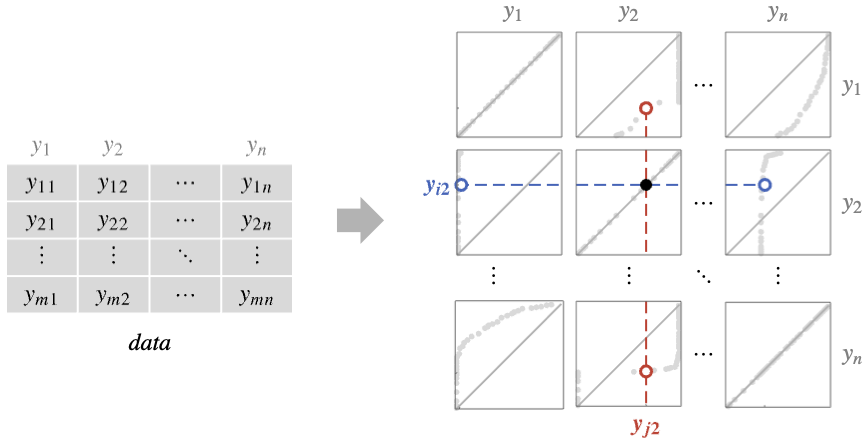
* It plots high-dimensional data by creating a grid of individual plots of just two data columns at a time.

* The plot compares column ``yi = {y1i, y2i, …, ymi}`` against column ``yj = {y1j, y2j, …, ymj}`` by plotting a a probability-probability plot of ``yi`` against reference data ``yj`` in panel ``{i, j}``.

[image]

* The plot in panel $\{i,j\}$ consists of points whose coordinates are $\left\{p_j,p_i\right\}$, where $p_i$ is the probability that a value in ``yi`` is less than the ``k``$$^{\text{th}}$$-smallest value in ``yj``, for $k=\left\lceil p_j n\right\rceil$.

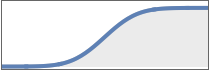
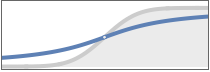
* Probability plots can help identify the shapes of the distributions of the data column ``yi`` relative to column ``yj`` :

|         |         |                                                                                              |
| ------- | ------- | -------------------------------------------------------------------------------------------- |
| [image] | [image] | yi and yj are similarly distributed                                                          |
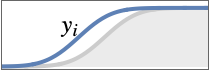
| [image] | [image] | the probability that values are less than x is higher for yi than yj                         |
| [image] | [image] | the probability that values are less than x is lower for yi than yj                          |
| [image] | [image] | the probability that values are less than x is higher for yi than yj for smaller values of x |
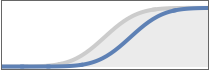
| [image] | [image] | the probability that values are less than x is higher for yi than yj for larger values of x  |

* ``PairwiseProbabilityPlot[Tabular[…] -> cspec]`` extracts and plots values from the tabular object using the column specification ``cspec``.

* The following forms of column specifications ``cspec`` are allowed for plotting tabular data:

{Subscript[``col``, ``y``1], …, Subscript[``col``, ``yn``]}	plot the ``colyi`` against ``colyj`` in a pairwise manner

* ``PairwiseProbabilityPlot`` takes the same options as ``ProbabilityPlot``, with the following changes and additions: []

|                       |                   |                                                    |
| --------------------- | ----------------- | -------------------------------------------------- |
| AspectRatio           | 1                 | ratio of height to width for each panel            |
| Background            | None              | background to use for each plot                    |
| Frame                 | Automatic         | whether to draw frames around each panel           |
| FrameTicks            | Automatic         | whether to label frame edges with ticks and labels |
| GridLines             | Automatic         | whether to include gridlines in panels             |
| GridLinesStyle        | Automatic         | style for gridlines                                |
| HeaderAlignment       | Center            | horizontal and vertical alignments of headers      |
| HeaderBackground      | Automatic         | background colors to use for headers               |
| HeaderDisplayFunction | Automatic         | function to use to format headers                  |
| Headers               | Automatic         | labels to use for each data column yi              |
| HeaderStyle           | None              | styles to use for headers                          |
| PerformanceGoal       | \$PerformanceGoal | aspects of performance to try to optimize          |
| PlotHighlighting      | Automatic         | highlighting effect for points                     |
| PlotLayout            | Automatic         | how to arrange the panels                          |
| PlotLegends           | Automatic         | legends for data                                   |
| PlotMarkers           | None              | markers to use to indicate each point              |
| PlotStyle             | Automatic         | graphics directives to determine styles of points  |
| PlotTheme             | \$PlotTheme       | overall theme for the plot                         |
| Spacings              | Automatic         | horizontal and vertical spacings                   |

* ``PlotLayout`` can have the following settings:

|         |                        |                                          |
| ------- | ---------------------- | ---------------------------------------- |
| [image] | "Descending"           | data columns going down and to the right |
| [image] | "Ascending"            | data columns going up and to the right   |
| [image] | "DescendingHalfMatrix" | lower half of the descending layout      |
| [image] | "AscendingHalfMatrix"  | upper half of the ascending layout       |

* Headers specifies the labels to use for each column in the data, and will generally be displayed above each column and after each row in the final plot.

* Possible settings include:

|                       |                                           |
| --------------------- | ----------------------------------------- |
| None                  | leave the plot columns and rows unlabeled |
| Automatic             | automatically label columns and rows      |
| All                   | always include column and row labels      |
| "Indexed"             | number the columns and rows 1, 2, …, n    |
| {lbl1, lbl2, …, lbln} | use the given labels lbli                 |

* ``HeaderAlignment`` determines how data column labels are aligned with regard to the plot columns and rows.

* ``HeaderAlignment`` can take the following forms:

|              |                                                                        |
| ------------ | ---------------------------------------------------------------------- |
| Center       | center the labels in the header positions                              |
| {h, v}       | separate horizontal and vertical alignments within the header position |
| {cols, rows} | use col for plot columns and row for plot rows                         |

* ``HeaderBackground`` and ``HeaderStyle`` can take the following forms:

|                       |                                                 |
| --------------------- | ----------------------------------------------- |
| None                  | use ambient styling                             |
| sty                   | use the style sty for all headers               |
| {sty1, sty2, …, styn} | use the given styles styifor successive headers |
| {cols, rows}          | use col for plot columns and row for plot rows  |

* ``HeaderDisplayFunction`` determines how headers are displayed.

* Possible settings are:

|           |                        |
| --------- | ---------------------- |
| Automatic | automatic formatting   |
| None      | use unprocessed labels |

* ``ColorData["DefaultPlotColors"]`` gives the default sequence of colors used by ``PlotStyle``.

* The arguments to ``ColorFunction`` are ``yi1, yi2, …, yin``. By default, the color function arguments are scaled per data column to be between 0 and 1.

* Use ``ColorFunctionScaling -> None`` to use unscaled values, or ``ColorFunctionScaling -> {cfsc1, cfsc2, …}`` to selectively scale column values.

* Possible settings for ``PlotHighlighting`` include:

|           |                                                 |
| --------- | ----------------------------------------------- |
| Automatic | automatically highlight positions in the panels |
| None      | disable interactive highlighting                |

### List of all options

|                        |                   |                                                                                    |
| ---------------------- | ----------------- | ---------------------------------------------------------------------------------- |
| AlignmentPoint         | Center            | the default point in the graphic to align with                                     |
| AspectRatio            | 1                 | ratio of height to width for each panel                                            |
| Axes                   | False             | whether to draw axes                                                               |
| AxesLabel              | None              | axes labels                                                                        |
| AxesOrigin             | Automatic         | where axes should cross                                                            |
| AxesStyle              | {}                | style specifications for the axes                                                  |
| Background             | None              | background to use for each plot                                                    |
| BaselinePosition       | Automatic         | how to align with a surrounding text baseline                                      |
| BaseStyle              | {}                | base style specifications for the graphic                                          |
| ClippingStyle          | Automatic         | what to draw where curves are clipped                                              |
| ColorFunction          | Automatic         | how to determine the coloring of curves                                            |
| ColorFunctionScaling   | True              | whether to scale arguments to ColorFunction                                        |
| ContentSelectable      | Automatic         | whether to allow contents to be selected                                           |
| CoordinatesToolOptions | Automatic         | detailed behavior of the coordinates tool                                          |
| Epilog                 | {}                | primitives rendered after the main plot                                            |
| Filling                | None              | filling to insert under each curve                                                 |
| FillingStyle           | Automatic         | style to use for filling                                                           |
| FormatType             | TraditionalForm   | the default format type for text                                                   |
| Frame                  | Automatic         | whether to draw frames around each panel                                           |
| FrameLabel             | None              | frame labels                                                                       |
| FrameStyle             | {}                | style specifications for the frame                                                 |
| FrameTicks             | Automatic         | whether to label frame edges with ticks and labels                                 |
| FrameTicksStyle        | {}                | style specifications for frame ticks                                               |
| GridLines              | Automatic         | whether to include gridlines in panels                                             |
| GridLinesStyle         | Automatic         | style for gridlines                                                                |
| HeaderAlignment        | Center            | horizontal and vertical alignments of headers                                      |
| HeaderBackground       | Automatic         | background colors to use for headers                                               |
| HeaderDisplayFunction  | Automatic         | function to use to format headers                                                  |
| Headers                | Automatic         | labels to use for each data column yi                                              |
| HeaderStyle            | None              | styles to use for headers                                                          |
| ImageMargins           | 0.                | the margins to leave around the graphic                                            |
| ImagePadding           | All               | what extra padding to allow for labels etc.                                        |
| ImageSize              | Automatic         | the absolute size at which to render the graphic                                   |
| Joined                 | Automatic         | whether to join points                                                             |
| LabelStyle             | {}                | style specifications for labels                                                    |
| Mesh                   | None              | how many mesh points to draw on each curve                                         |
| MeshFunctions          | {#1&}             | how to determine the placement of mesh points                                      |
| MeshShading            | None              | how to shade regions between mesh points                                           |
| MeshStyle              | Automatic         | the style for mesh points                                                          |
| Method                 | Automatic         | methods to use                                                                     |
| PerformanceGoal        | \$PerformanceGoal | aspects of performance to try to optimize                                          |
| PlotHighlighting       | Automatic         | highlighting effect for points                                                     |
| PlotLabel              | None              | an overall label for the plot                                                      |
| PlotLayout             | Automatic         | how to arrange the panels                                                          |
| PlotLegends            | Automatic         | legends for data                                                                   |
| PlotMarkers            | None              | markers to use to indicate each point                                              |
| PlotRange              | Automatic         | range of values to include                                                         |
| PlotRangeClipping      | True              | whether to clip at the plot range                                                  |
| PlotRangePadding       | Automatic         | how much to pad the range of values                                                |
| PlotRegion             | Automatic         | the final display region to be filled                                              |
| PlotStyle              | Automatic         | graphics directives to determine styles of points                                  |
| PlotTheme              | \$PlotTheme       | overall theme for the plot                                                         |
| PreserveImageOptions   | Automatic         | whether to preserve image options when displaying new versions of the same graphic |
| Prolog                 | {}                | primitives rendered before the main plot                                           |
| ReferenceLineStyle     | Automatic         | style for the reference line                                                       |
| RotateLabel            | True              | whether to rotate y labels on the frame                                            |
| ScalingFunctions       | None              | how to scale individual coordinates                                                |
| Spacings               | Automatic         | horizontal and vertical spacings                                                   |
| Ticks                  | Automatic         | axes ticks                                                                         |
| TicksStyle             | {}                | style specifications for axes ticks                                                |
| WorkingPrecision       | MachinePrecision  | the precision used in internal computations for symbolic distributions             |

---

## Examples (53)

### Basic Examples (3)

Create an array of probability plots from data with labeled columns:

```wl
In[1]:= PairwiseProbabilityPlot[IconizedObject[«crab data»]]

Out[1]= [image]
```

---

Compare all columns in a dataset:

```wl
In[1]:= PairwiseProbabilityPlot[IconizedObject[«iris data»]]

Out[1]= [image]
```

---

Provide header names for the data:

```wl
In[1]:= PairwiseProbabilityPlot[IconizedObject[«iris data»], Headers -> {"sepal length", "sepal width", "petal length", "petal width"}]

Out[1]= [image]
```

### Scope (3)

#### Data (2)

Plot datasets:

```wl
In[1]:= Take[IconizedObject[«medical data»], 5]

Out[1]=
Dataset[{Association["age" -> 63, "cholesterol" -> 233, "blood sugar" -> 162], 
  Association["age" -> 67, "cholesterol" -> 286, "blood sugar" -> 89], 
  Association["age" -> 67, "cholesterol" -> 229, "blood sugar" -> 111], 
  Association["age" -> 37, "cholesterol" -> 250, "blood sugar" -> 117], 
  Association["age" -> 41, "cholesterol" -> 204, "blood sugar" -> 83]}]

In[2]:= PairwiseProbabilityPlot[IconizedObject[«medical data»]]

Out[2]= [image]
```

---

Plot arrays of values:

```wl
In[1]:= Take[IconizedObject[«iris data»], 5]

Out[1]= {{5.1, 3.5, 1.4, 0.2}, {4.9, 3., 1.4, 0.2}, {4.7, 3.2, 1.3, 0.2}, {4.6, 3.1, 1.5, 0.2}, {5., 3.6, 1.4, 0.2}}

In[2]:= PairwiseProbabilityPlot[IconizedObject[«iris data»]]

Out[2]= [image]
```

#### Tabular Data (1)

Get tabular data:

```wl
In[1]:= iris = ResourceData["Sample Tabular Data: Fisher Iris"]

Out[1]=
Tabular[Association["RawSchema" -> Association["ColumnProperties" -> 
     Association["Species" -> Association["ElementType" -> "String"], 
      "SepalLength" -> Association["ElementType" -> TypeSpecifier["Quantity"]["Real64", 
          "Centime ...     Quantity[2.3, "Centimeters"], Quantity[2.5, "Centimeters"], Quantity[2.3, 
             "Centimeters"], Quantity[1.9, "Centimeters"], Quantity[2., "Centimeters"], 
            Quantity[2.3, "Centimeters"], Quantity[1.8, "Centimeters"]}]]}}]]]]
```

Create a pairwise array of probability plots:

```wl
In[2]:= PairwiseProbabilityPlot[iris -> {"SepalLength", "SepalWidth", "PetalLength", "PetalWidth"}]

Out[2]= [image]
```

Use a different theme for the plot:

```wl
In[3]:= PairwiseProbabilityPlot[iris -> {"SepalLength", "SepalWidth", "PetalLength", "PetalWidth"}, PlotTheme -> "Marketing"]

Out[3]= [image]
```

### Options (47)

#### AspectRatio (2)

By default, ``PairwiseProbabilityPlot`` uses an equal height-to-width ratio:

```wl
In[1]:= PairwiseProbabilityPlot[IconizedObject[«iris data»]]

Out[1]= [image]
```

---

Use a fixed height-to-width ratio:

```wl
In[1]:= PairwiseProbabilityPlot[IconizedObject[«iris data»], AspectRatio -> 1 / 2]

Out[1]= [image]
```

#### Axes (3)

By default, ``Frame`` is used instead of ``Axes`` :

```wl
In[1]:= PairwiseProbabilityPlot[IconizedObject[«iris data»]]

Out[1]= [image]
```

---

Use ``Axes -> True`` to turn on axes:

```wl
In[1]:= PairwiseProbabilityPlot[IconizedObject[«iris data»], Frame -> False, Axes -> True]

Out[1]= [image]
```

---

Turn each axis on independently for all subplots:

```wl
In[1]:= {PairwiseProbabilityPlot[IconizedObject[«iris data»], ImageSize -> Small, Frame -> False, Axes -> {True, False}], PairwiseProbabilityPlot[IconizedObject[«iris data»], ImageSize -> Small, Frame -> False, Axes -> {False, True}]}

Out[1]= [image]
```

#### AxesStyle (3)

Change the style for the axes:

```wl
In[1]:= PairwiseProbabilityPlot[IconizedObject[«iris data»], ImageSize -> Medium, Frame -> False, Axes -> True, AxesStyle -> Red]

Out[1]= [image]
```

---

Specify the style of each axis:

```wl
In[1]:= PairwiseProbabilityPlot[IconizedObject[«iris data»], ImageSize -> Medium, Frame -> False, Axes -> True, AxesStyle -> {Directive[Thick, Red], Directive[Thick, Blue]}]

Out[1]= [image]
```

---

Use different styles for the ticks and the axes:

```wl
In[1]:= PairwiseProbabilityPlot[IconizedObject[«iris data»], ImageSize -> Medium, Frame -> False, Axes -> True, AxesStyle -> Green, TicksStyle -> Black]

Out[1]= [image]
```

#### Background (2)

By default, ``PairwiseProbabilityPlot`` has a white background:

```wl
In[1]:= PairwiseProbabilityPlot[IconizedObject[«iris data»], ImageSize -> Medium]

Out[1]= [image]
```

---

Set a background color:

```wl
In[1]:= PairwiseProbabilityPlot[IconizedObject[«iris data»], ImageSize -> Medium, Background -> GrayLevel[.9]]

Out[1]= [image]
```

#### ColorFunction (3)

Color by scaled $x$ and $y$ coordinates:

```wl
In[1]:= Table[PairwiseProbabilityPlot[IconizedObject[«iris data»], ImageSize -> Small, ColorFunction -> f, PlotLabel -> f[x, y]], {f, {Hue[#]&, Hue[#2]&}}]

Out[1]= {[image], [image]}
```

---

Color with a named color scheme:

```wl
In[1]:= PairwiseProbabilityPlot[IconizedObject[«iris data»], ImageSize -> Medium, ColorFunction -> "DarkRainbow"]

Out[1]= [image]
```

---

``ColorFunction`` has higher priority than ``PlotStyle`` for coloring:

```wl
In[1]:= PairwiseProbabilityPlot[IconizedObject[«iris data»], ImageSize -> Medium, ColorFunction -> "DarkRainbow", PlotStyle -> Directive[Red, Thick]]

Out[1]= [image]
```

#### Frame (2)

On ``PairwiseProbabilityPlot``, a frame is drawn on each subplot by default:

```wl
In[1]:= PairwiseProbabilityPlot[IconizedObject[«iris data»]]

Out[1]= [image]
```

---

Draw a frame on the left and bottom edges of the panels:

```wl
In[1]:= PairwiseProbabilityPlot[IconizedObject[«iris data»], Frame -> {{True, False}, {True, False}}]

Out[1]= [image]
```

#### FrameStyle (2)

Specify the style of the frame:

```wl
In[1]:= PairwiseProbabilityPlot[IconizedObject[«iris data»], ImageSize -> Medium, FrameStyle -> Directive[Black, Thick]]

Out[1]= [image]
```

---

Specify the style for each frame edge:

```wl
In[1]:= PairwiseProbabilityPlot[IconizedObject[«iris data»], ImageSize -> Medium, FrameStyle -> {{Directive[Black, Thick], Red}, {Directive[Gray, Thick], Blue}}]

Out[1]= [image]
```

#### GridLines (2)

By default, ``PairwiseProbabilityPlot`` does not draw gridlines:

```wl
In[1]:= PairwiseProbabilityPlot[IconizedObject[«iris data»]]

Out[1]= [image]
```

---

Draw a background grid:

```wl
In[1]:= PairwiseProbabilityPlot[IconizedObject[«iris data»], GridLines -> Automatic, Background -> GrayLevel[.9]]

Out[1]= [image]
```

#### HeaderBackground (2)

By default, ``PairwiseProbabilityPlot`` uses a white header background:

```wl
In[1]:= PairwiseProbabilityPlot[IconizedObject[«iris data»], Headers -> "Indexed"]

Out[1]= [image]
```

---

Set a header background color:

```wl
In[1]:= PairwiseProbabilityPlot[IconizedObject[«iris data»], Headers -> Automatic, HeaderBackground -> GrayLevel[.9]]

Out[1]= [image]
```

#### Headers (3)

By default, ``PairwiseProbabilityPlot`` does not label headers:

```wl
In[1]:= PairwiseProbabilityPlot[IconizedObject[«iris data»]]

Out[1]= [image]
```

---

Number the columns for unlabeled data:

```wl
In[1]:= PairwiseProbabilityPlot[IconizedObject[«iris data»], Headers -> "Indexed"]

Out[1]= [image]
```

---

Provide header names for the columns:

```wl
In[1]:= PairwiseProbabilityPlot[IconizedObject[«iris data»], Headers -> {"a", "b", "c", "d"}]

Out[1]= [image]
```

#### ImageSize (6)

Use named sizes such as ``Tiny``, ``Small``, ``Medium``, and ``Large`` :

```wl
In[1]:= {PairwiseProbabilityPlot[IconizedObject[«iris data»], ImageSize -> Tiny], PairwiseProbabilityPlot[IconizedObject[«iris data»], ImageSize -> Medium]}

Out[1]= [image]
```

---

Specify the width of the plot:

```wl
In[1]:= {PairwiseProbabilityPlot[IconizedObject[«iris data»], ImageSize -> 200], PairwiseProbabilityPlot[IconizedObject[«iris data»], AspectRatio -> 1.5, ImageSize -> 200]}

Out[1]= [image]
```

Specify the height of the plot:

```wl
In[2]:= {PairwiseProbabilityPlot[IconizedObject[«iris data»], ImageSize -> {Automatic, 200}], PairwiseProbabilityPlot[IconizedObject[«iris data»], AspectRatio -> 1.5, ImageSize -> {Automatic, 200}]}

Out[2]= [image]
```

---

Allow the width and height to be up to a certain size:

```wl
In[1]:= {PairwiseProbabilityPlot[IconizedObject[«iris data»], ImageSize -> UpTo[250]], PairwiseProbabilityPlot[IconizedObject[«iris data»], AspectRatio -> 1.5, ImageSize -> UpTo[250]]}

Out[1]= [image]
```

---

Specify the width and height for a graphic, padding with space if necessary:

```wl
In[1]:= PairwiseProbabilityPlot[IconizedObject[«iris data»], AspectRatio -> 1.5, Background -> LightBlue, ImageSize -> {250, 250}]

Out[1]= [image]
```

Setting ``AspectRatio -> Full`` will fill the available space:

```wl
In[2]:= PairwiseProbabilityPlot[IconizedObject[«iris data»], Background -> LightBlue, ImageSize -> {250, 250}, AspectRatio -> Full]

Out[2]= [image]
```

---

Use maximum sizes for the width and height:

```wl
In[1]:= {PairwiseProbabilityPlot[IconizedObject[«iris data»], Background -> LightBlue, ImageSize -> {UpTo[300], UpTo[200]}], PairwiseProbabilityPlot[IconizedObject[«iris data»], Background -> LightBlue, AspectRatio -> 2, ImageSize -> {UpTo[300], UpTo[200]}]}

Out[1]= [image]
```

---

Use ``ImageSize -> Full`` to fill the available space in an object:

```wl
In[1]:= Framed[Pane[PairwiseProbabilityPlot[IconizedObject[«iris data»], Background -> LightBlue, ImageSize -> Full], {200, 150}]]

Out[1]= [image]
```

#### Joined (2)

Data is not joined by default:

```wl
In[1]:= PairwiseProbabilityPlot[IconizedObject[«iris data»], ImageSize -> Medium]

Out[1]= [image]
```

---

Join the points:

```wl
In[1]:= PairwiseProbabilityPlot[IconizedObject[«iris data»], ImageSize -> Medium, Joined -> True]

Out[1]= [image]
```

#### PlotLayout (3)

Switch the orientation of the diagonal elements:

```wl
In[1]:= PairwiseProbabilityPlot[IconizedObject[«iris data»], PlotLayout -> "Ascending"]

Out[1]= [image]
```

---

Show plots below the diagonal:

```wl
In[1]:= PairwiseProbabilityPlot[IconizedObject[«iris data»], PlotLayout -> "DescendingHalfMatrix"]

Out[1]= [image]
```

---

Only show plots above the diagonal:

```wl
In[1]:= PairwiseProbabilityPlot[IconizedObject[«iris data»], PlotLayout -> "AscendingHalfMatrix"]

Out[1]= [image]
```

#### PlotLabel (1)

Add an overall label to the plot:

```wl
In[1]:= PairwiseProbabilityPlot[IconizedObject[«iris data»], ImageSize -> Medium, PlotLabel -> "My data"]

Out[1]= [image]
```

#### PlotMarkers (3)

Use open markers:

```wl
In[1]:= PairwiseProbabilityPlot[IconizedObject[«iris data»], PlotMarkers -> "OpenMarkers"]

Out[1]= [image]
```

---

Change the size of the default plot markers:

```wl
In[1]:= Table[PairwiseProbabilityPlot[IconizedObject[«iris data»], ImageSize -> Small, PlotMarkers -> {Automatic, s}], {s, {Tiny, Small}}]

Out[1]= {[image], [image]}
```

---

Use explicit graphics for plot markers:

```wl
In[1]:= PairwiseProbabilityPlot[IconizedObject[«iris data»], ImageSize -> Medium, PlotMarkers -> {Graphics[{Red, Circle[{0, 0}, 1]}], 0.05}]

Out[1]= [image]
```

#### PlotStyle (1)

Style the data using ``PlotStyle`` :

```wl
In[1]:= PairwiseProbabilityPlot[IconizedObject[«Iris»], PlotStyle -> Directive[Red, PointSize[Small]]]

Out[1]= [image]
```

#### PlotTheme (2)

Use a theme to customize the plot:

```wl
In[1]:= PairwiseProbabilityPlot[IconizedObject[«iris data»], PlotTheme -> "Backdrop"]

Out[1]= [image]
```

---

Change the color scheme:

```wl
In[1]:= PairwiseProbabilityPlot[IconizedObject[«iris data»], PlotTheme -> "Business", PlotStyle -> 96]

Out[1]= [image]
```

#### ReferenceLineStyle (4)

``ReferenceLineStyle`` by default uses a ``Dotted`` form of ``PlotStyle`` :

```wl
In[1]:= PairwiseProbabilityPlot[IconizedObject[«iris data»], ImageSize -> Medium]

Out[1]= [image]
```

---

Draw a dotted red reference line:

```wl
In[1]:= PairwiseProbabilityPlot[IconizedObject[«iris data»], ImageSize -> Medium, ReferenceLineStyle -> Red]

Out[1]= [image]
```

---

Draw a solid red reference line:

```wl
In[1]:= PairwiseProbabilityPlot[IconizedObject[«iris data»], ImageSize -> Medium, ReferenceLineStyle -> Directive[Red, Dashing[0]]]

Out[1]= [image]
```

---

Use ``None`` to turn off the reference line:

```wl
In[1]:= PairwiseProbabilityPlot[IconizedObject[«iris data»], ImageSize -> Medium, ReferenceLineStyle -> None]

Out[1]= [image]
```

#### Spacings (1)

Change the space between the plots:

```wl
In[1]:= Table[PairwiseProbabilityPlot[IconizedObject[«iris data»], ImageSize -> Small, Spacings -> s], {s, {0, 10}}]

Out[1]= [image]
```

## See Also

* [`PairwiseQuantilePlot`](https://reference.wolfram.com/language/ref/PairwiseQuantilePlot.en.md)
* [`PairwiseListPlot`](https://reference.wolfram.com/language/ref/PairwiseListPlot.en.md)
* [`ProbabilityPlot`](https://reference.wolfram.com/language/ref/ProbabilityPlot.en.md)
* [`PairwiseDensityHistogram`](https://reference.wolfram.com/language/ref/PairwiseDensityHistogram.en.md)
* [`PairwiseSmoothDensityHistogram`](https://reference.wolfram.com/language/ref/PairwiseSmoothDensityHistogram.en.md)
* [`ParallelAxisPlot`](https://reference.wolfram.com/language/ref/ParallelAxisPlot.en.md)
* [`RadialAxisPlot`](https://reference.wolfram.com/language/ref/RadialAxisPlot.en.md)
* [`BoxWhiskerChart`](https://reference.wolfram.com/language/ref/BoxWhiskerChart.en.md)
* [`ListPlot`](https://reference.wolfram.com/language/ref/ListPlot.en.md)

## Related Guides

* [High-Dimensional Visualization](https://reference.wolfram.com/language/guide/HighDimensionalVisualization.en.md)

## History

* [Introduced in 2024 (14.0)](https://reference.wolfram.com/language/guide/SummaryOfNewFeaturesIn140.en.md) \| [Updated in 2025 (14.2)](https://reference.wolfram.com/language/guide/SummaryOfNewFeaturesIn142.en.md)