



SliceContourPlot3D
SliceContourPlot3D[f,surf,{x,xmin,xmax},{y,ymin,ymax},{z,zmin,zmax}]
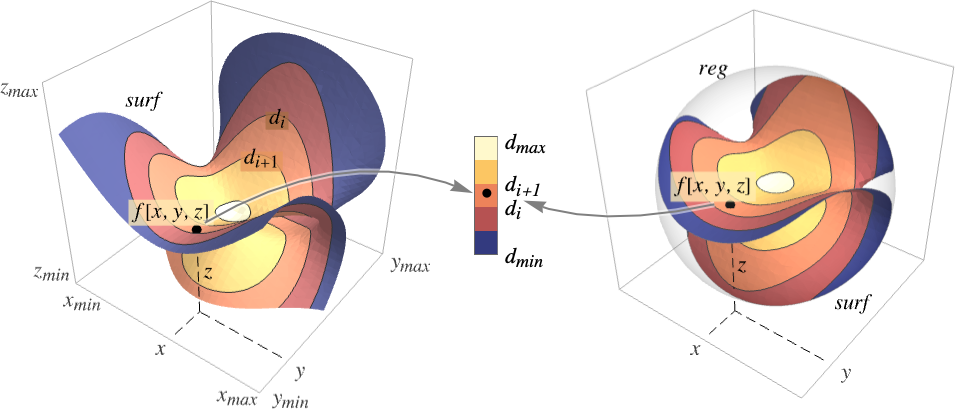
generates a contour plot of f over the slice surface surf as a function of x, y, and z.
SliceContourPlot3D[f,surf,{x,y,z}∈reg]
restricts the surface to be within region reg.
SliceContourPlot3D[f,{surf1,surf2,…},…]
generates contour plots over several slices.
Details and Options
- SliceContourPlot3D constructs contour curves on the surface surf corresponding to the level sets where f[x,y,z] has constant values d1, d2, etc. By default, the regions between the curves are shaded to more easily identify regions whose values are between di and di+1.
- It visualizes the areas
 .
. - The following basic slice surfaces surfi can be given:
-
Automatic automatically determine slice surfaces 
"CenterPlanes" coordinate planes through the center 
"BackPlanes" coordinate planes at the back of the plot 
"XStackedPlanes" coordinate planes stacked along  axis
axis
"YStackedPlanes" coordinate planes stacked along  axis
axis
"ZStackedPlanes" coordinate planes stacked along  axis
axis
"DiagonalStackedPlanes" planes stacked diagonally 
"CenterSphere" a sphere in the center 
"CenterCutSphere" a sphere with a cutout wedge 
"CenterCutBox" a box with a cutout octant - SliceContourPlot3D[f,{x,xmin,xmax},…] is equivalent to SliceContourPlot3D[f,Automatic,{x,xmin,xmax},…] etc.
- The following parametrizations can be used for basic slice surfaces:
-
{"XStackedPlanes",n}, generate n equally spaced planes {"XStackedPlanes",{x1,x2,…}} generate planes for 
{"CenterCutSphere",ϕopen} cut angle ϕopen facing the view point {"CenterCutSphere",ϕopen,ϕcenter} cut angle ϕopen with center angle ϕcenter in the  plane
plane - "YStackedPlanes", "ZStackedPlanes" follow the specifications for "XStackedPlanes", with additional features shown in the scope examples.
- The following general slice surfaces surfi can be used:
-
expr0 implicit equation in x, y, and z, e.g. x y z-10 surfaceregion a two-dimensional region in 3D, e.g. Hyperplane volumeregion a three-dimensional region in 3D where surfi is taken as the boundary surface, e.g. Cuboid - The following wrappers can be used for slice surfaces surfi:
-
Annotation[surf,label] provide an annotation Button[surf,action] define an action to execute when the surface is clicked EventHandler[surf,…] define a general event handler for the surface Hyperlink[surf,uri] make the surface act as a hyperlink PopupWindow[surf,cont] attach a popup window to the surface StatusArea[surf,label] display in status area when the surface is moused over Tooltip[surf,label] attach an arbitrary tooltip to the surface - SliceContourPlot3D has the same options as Graphics3D, with the following additions and changes: [List of all options]
-
Axes True whether to draw axes BoundaryStyle Automatic how to style surface boundaries BoxRatios {1,1,1} bounding 3D box ratios ClippingStyle None how to draw values clipped by PlotRange ColorFunction Automatic how to color the plot ColorFunctionScaling True whether to scale the arguments to ColorFunction Contours Automatic how many or what contours to show ContourShading Automatic how to shade regions between contours ContourStyle Automatic the style for contour lines PerformanceGoal $PerformanceGoal aspects of performance to optimize PlotLegends None legends for color gradients PlotPoints Automatic initial number of samples for the function f and slice surfaces surfi in each direction PlotRange {Full,Full,Full,Automatic} range of f or other values to include PlotTheme $PlotTheme overall theme for the plot RegionFunction (True&) how to determine whether a point should be included ScalingFunctions None how to scale individual coordinates TargetUnits Automatic desired units to use WorkingPrecision MachinePrecision the precision used in internal computations - ColorFunction is by default supplied with the scaled value of f.
- RegionFunction is by default supplied with x, y, z and f.
- Possible settings for ScalingFunctions include:
-
sf scale the f contour values {sx,sy,sz} scale x, y and z axes {sx,sy,sz,sf} scale x, y and z axes and f contour values - Common built-in scaling functions s include:
-
"Log" 
log scale with automatic tick labeling "Log10" 
base-10 log scale with powers of 10 for ticks "SignedLog" 
log-like scale that includes 0 and negative numbers "Reverse" 
reverse the coordinate direction "Infinite" 
infinite scale
List of all options
Examples
open all close allBasic Examples (2)
Plot the contours of the function  over slice planes through the center:
SliceContourPlot3D[Exp[-(x ^ 2 + y ^ 2 + z ^ 2)], "CenterPlanes", {x, -2, 2}, {y, -2, 2}, {z, -2, 2}]Plot the contours over the surface  :
:
SliceContourPlot3D[Exp[-(x ^ 2 + y ^ 2 + z ^ 2)], x ^ 3 + y ^ 2 - z ^ 2 == 0, {x, -2, 2}, {y, -2, 2}, {z, -2, 2}]Scope (24)
Surfaces (9)
Generate a contour plot over standard slice surfaces:
Table[SliceContourPlot3D[Sin[x] + y ^ 2 - z ^ 3, sl, {x, -1, 1}, {y, -1, 1}, {z, -1, 1}, PlotLabel -> sl], {sl, {"CenterPlanes", "BackPlanes", "DiagonalStackedPlanes"}}]Standard axis-aligned stacked slice surfaces:
Table[SliceContourPlot3D[Sin[x] + y ^ 2 - z ^ 3, sl, {x, -1, 1}, {y, -1, 1}, {z, -1, 1}, PlotLabel -> sl], {sl, {"XStackedPlanes", "YStackedPlanes", "ZStackedPlanes"}}]Table[SliceContourPlot3D[Sin[x] + y ^ 2 - z ^ 3, sl, {x, -1, 1}, {y, -1, 1}, {z, -1, 1}, PlotLabel -> sl], {sl, {"CenterSphere", "CenterCutSphere", "CenterCutBox"}}]Plot the contours over any surface region:
SliceContourPlot3D[x + y + z, HalfPlane[{{0, 0, 0}, {1, 0, 0}}, {0, 1, 1}], {x, -1, 1}, {y, -1, 1}, {z, -1, 1}]Plotting over a volume primitive is equivalent to plotting over RegionBoundary[reg]:
SliceContourPlot3D[x + y + z, Cylinder[], {x, -1, 1}, {y, -1, 1}, {z, -1, 1}]Plot the contours over the surface  :
:
SliceContourPlot3D[Sin[x y z], x ^ 3 + y ^ 2 - z ^ 2 == 0, {x, -2, 2}, {y, -2, 2}, {z, -2, 2}]Plot the contours over multiple surfaces:
SliceContourPlot3D[Sin[x y z], {Cylinder[], "BackPlanes"}, {x, -2, 2}, {y, -2, 2}, {z, -2, 2}, Contours -> 3]Specify the number of stacked planes:
SliceContourPlot3D[x + y + z, {"XStackedPlanes", 7}, {x, -2, 2}, {y, -2, 2}, {z, -2, 2}]Specify the cutting angle for a center-cut sphere slice:
SliceContourPlot3D[Sin[x y z], {"CenterCutSphere", 2Pi / 3}, {x, -2, 2}, {y, -2, 2}, {z, -2, 2}]Sampling (4)
Use Contours to specify the number of contours:
SliceContourPlot3D[x + y + z, "BackPlanes", {x, -2, 2}, {y, -2, 2}, {z, -2, 2}, Contours -> 5]Or the list of function values  to put contours:
SliceContourPlot3D[x + y + z, "BackPlanes", {x, -2, 2}, {y, -2, 2}, {z, -2, 2}, Contours -> {-1, 0, 1}]Areas where the function becomes nonreal are excluded:
SliceContourPlot3D[Sqrt[x y z], "CenterSphere", {x, -1, 1}, {y, -1, 1}, {z, -1, 1}]Use RegionFunction to expose obscured slices:
SliceContourPlot3D[x ^ 2 + y ^ 2 + z ^ 2, "ZStackedPlanes", {x, -2, 2}, {y, -2, 2}, {z, -2, 2}, RegionFunction -> Function[{x, y, z}, x < 0 || y > 0]]The domain may be specified by a region including Cone:
SliceContourPlot3D[x + y + z, "CenterPlanes", {x, y, z}∈Cone[]]A formula region including ImplicitRegion:
ℛ = ImplicitRegion[(x ^ 2 + (9 / 4)y ^ 2 + z ^ 2 - 1) ^ 3 - x ^ 2z ^ 3 - (9 / 80)y ^ 2z ^ 3 <= 0, {{x, -1.2, 1.2}, {y, -0.7, 0.7}, {z, -1, 1.3}}];SliceContourPlot3D[x + y + z, "CenterPlanes", {x, y, z}∈ℛ]A mesh-based region including BoundaryMeshRegion:
ℛ = ConvexHullMesh[RandomReal[1, {25, 3}]]SliceContourPlot3D[x + y + z, "CenterPlanes", {x, y, z}∈ℛ]Presentation (11)
Use PlotTheme to immediately get overall styling:
Table[SliceContourPlot3D[x ^ 2 + y ^ 2 + z ^ 2, "CenterPlanes", {x, -1, 1}, {y, -1, 1}, {z, -1, 1}, PlotLabel -> t, PlotTheme -> t], {t, {"Minimal", "Scientific", "Marketing"}}]Use PlotLegends to get a color bar for the different values:
SliceContourPlot3D[x ^ 2 + y ^ 2 + z ^ 2, "CenterPlanes", {x, -1, 1}, {y, -1, 1}, {z, -1, 1}, PlotLegends -> Automatic]Control the display of axes with Axes:
Table[SliceContourPlot3D[x + y + z, "CenterPlanes", {x, -2, 2}, {y, -2, 2}, {z, -2, 2}, PlotLabel -> a, Axes -> a], {a, {True, False, {True, False, True}}}]Label axes using AxesLabel and the whole plot using PlotLabel:
SliceContourPlot3D[x ^ 2 + y ^ 2 + z ^ 2, "CenterPlanes", {x, -2, 2}, {y, -2, 2}, {z, -2, 2}, Ticks -> None, AxesLabel -> {x, y, z}, PlotLabel -> x ^ 2 + y ^ 2 + z ^ 2]Color the plot by the function values with ColorFunction:
Table[SliceContourPlot3D[Sin[3x y z], "ZStackedPlanes", {x, -1, 1}, {y, -1, 1}, {z, -1, 1}, PlotLabel -> c, ColorFunction -> c], {c, {Hue, "BlueGreenYellow"}}]Style regions between contours with ContourShading:
SliceContourPlot3D[Exp[-(x ^ 2 + y ^ 2 + z ^ 2)], "CenterPlanes", {x, -1, 1}, {y, -1, 1}, {z, -1, 1}, Contours -> 9, BoundaryStyle -> None, ContourShading -> {Orange, None, Blue}]Use ContourStyle to style the contour lines:
SliceContourPlot3D[x ^ 4 + y ^ 4 + z ^ 4 - x ^ 2 - y ^ 2 - z ^ 2, "CenterSphere", {x, -1, 1}, {y, -1, 1}, {z, -1, 1}, ContourStyle -> Dotted]Style the slice surface boundaries with BoundaryStyle:
SliceContourPlot3D[Exp[-(x ^ 2 + y ^ 2 + z ^ 2)], "CenterPlanes", {x, -2, 2}, {y, -2, 2}, {z, -2, 2}, BoundaryStyle -> Gray]TargetUnits specifies which units to use in the visualization:
SliceContourPlot3D[Quantity[-(x ^ 2 + y ^ 2 + z ^ 2), "kg/m^3"], "CenterPlanes", {x, -2, 2}, {y, -2, 2}, {z, -2, 2}, AxesLabel -> Automatic, PlotLegends -> Automatic, TargetUnits -> {"Feet", "Feet", "Feet", "g/ft^3"}]Create a plot with a log-scaled  axis:
axis:
SliceContourPlot3D[x + y + z, {x, 1, 100}, {y, 1, 100}, {z, 1, 100}, ScalingFunctions -> {"Log", None, None}]Reverse the coordinate direction in the  direction:
SliceContourPlot3D[x + y + z, {x, 1, 100}, {y, 1, 100}, {z, 1, 100}, ScalingFunctions -> {None, None, "Reverse"}]Options (69)
Axes (3)
SliceContourPlot3D[-(x ^ 2 + y ^ 2 + z ^ 2), "CenterPlanes", {x, -2, 2}, {y, -2, 2}, {z, -2, 2}]Use Axes->False to remove the axes:
SliceContourPlot3D[-(x ^ 2 + y ^ 2 + z ^ 2), "CenterPlanes", {x, -2, 2}, {y, -2, 2}, {z, -2, 2}, Axes -> False]Turn on each axis individually:
{SliceContourPlot3D[-(x ^ 2 + y ^ 2 + z ^ 2), "CenterPlanes", {x, -2, 2}, {y, -2, 2}, {z, -2, 2}, Axes -> {False, False, True}], SliceContourPlot3D[-(x ^ 2 + y ^ 2 + z ^ 2), "CenterPlanes", {x, -2, 2}, {y, -2, 2}, {z, -2, 2}, Axes -> {False, True, False}], SliceContourPlot3D[-(x ^ 2 + y ^ 2 + z ^ 2), "CenterPlanes", {x, -2, 2}, {y, -2, 2}, {z, -2, 2}, Axes -> {True, False, False}]}AxesLabel (4)
No axes labels are drawn by default:
SliceContourPlot3D[-(x ^ 2 + y ^ 2 + z ^ 2), "CenterPlanes", {x, -2, 2}, {y, -2, 2}, {z, -2, 2}]
SliceContourPlot3D[-(x ^ 2 + y ^ 2 + z ^ 2), "CenterPlanes", {x, -2, 2}, {y, -2, 2}, {z, -2, 2}, AxesLabel -> "height"]Use specific labels for each axis:
SliceContourPlot3D[-(x ^ 2 + y ^ 2 + z ^ 2), "CenterPlanes", {x, -2, 2}, {y, -2, 2}, {z, -2, 2}, AxesLabel -> {"width", "depth", "height"}]Use labels based on variables specified in SliceContourPlot3D:
SliceContourPlot3D[-(x ^ 2 + y ^ 2 + z ^ 2), "CenterPlanes", {x, -2, 2}, {y, -2, 2}, {z, -2, 2}, AxesLabel -> Automatic]AxesOrigin (2)
The position of the axes is determined automatically:
SliceContourPlot3D[-(x ^ 2 + y ^ 2 + z ^ 2), "CenterPlanes", {x, -2, 2}, {y, -2, 2}, {z, -2, 2}]Specify an explicit origin for the axes:
SliceContourPlot3D[-(x ^ 2 + y ^ 2 + z ^ 2), "CenterPlanes", {x, -2, 2}, {y, -2, 2}, {z, -2, 2}, AxesOrigin -> {2, -2, 2}]AxesStyle (3)
Change the style for the axes:
SliceContourPlot3D[-(x ^ 2 + y ^ 2 + z ^ 2), "CenterPlanes", {x, -2, 2}, {y, -2, 2}, {z, -2, 2}, AxesStyle -> Red]Specify the style of each axis:
SliceContourPlot3D[-(x ^ 2 + y ^ 2 + z ^ 2), "CenterPlanes", {x, -2, 2}, {y, -2, 2}, {z, -2, 2}, AxesStyle -> {{Thick, Brown}, {Thick, Blue}, {Thick, Green}}]Use different styles for the ticks and the axes:
SliceContourPlot3D[-(x ^ 2 + y ^ 2 + z ^ 2), "CenterPlanes", {x, -2, 2}, {y, -2, 2}, {z, -2, 2}, AxesStyle -> Green, TicksStyle -> Blue]BoundaryStyle (1)
Style the slice surface boundaries with BoundaryStyle:
SliceContourPlot3D[-(x ^ 2 + y ^ 2 + z ^ 2), "CenterPlanes", {x, -2, 2}, {y, -2, 2}, {z, -2, 2}, BoundaryStyle -> Gray]BoxRatios (3)
By default, the edges of the bounding box have the same length:
SliceContourPlot3D[x y z, "CenterSphere", {x, 0, 1}, {y, 0, 1}, {z, -1, 2}]Use BoxRatios->Automatic to show the natural scale of the 3D coordinate values:
SliceContourPlot3D[x y z, "CenterSphere", {x, 0, 1}, {y, 0, 1}, {z, -1, 2}, BoxRatios -> Automatic]Use custom length ratios for each side of the bounding box:
SliceContourPlot3D[x y z, "CenterSphere", {x, 0, 1}, {y, 0, 1}, {z, -1, 2}, BoxRatios -> {1, 2, 2}]ClippingStyle (2)
SliceContourPlot3D[Exp[-(x ^ 2 + y ^ 2 + z ^ 2)], "CenterPlanes", {x, -2, 2}, {y, -2, 2}, {z, -2, 2}, PlotRange -> {0.09, 0.72}, ClippingStyle -> {Gray, Green}]Remove clipped regions with None:
SliceContourPlot3D[Exp[-(x ^ 2 + y ^ 2 + z ^ 2)], "CenterPlanes", {x, -2, 2}, {y, -2, 2}, {z, -2, 2}, PlotRange -> {0.09, 0.72}, ClippingStyle -> None]ColorFunction (3)
Color the contours according to the  values:
SliceContourPlot3D[x + y z, "ZStackedPlanes", {x, -1, 1}, {y, -1, 1}, {z, -1, 1}, ColorFunction -> Hue]SliceContourPlot3D[x ^ 2 + y ^ 2 + z ^ 2, "CenterPlanes", {x, -2, 2}, {y, -2, 2}, {z, -2, 2}, ColorFunction -> "IslandColors"]
SliceContourPlot3D[Sin[2 x y z], "ZStackedPlanes", {x, -2, 2}, {y, -2, 2}, {z, -2, 2}, ColorFunction -> Function[f, If[f < 0, Red, Green]],
	ColorFunctionScaling -> False, Contours -> 3]
ColorFunctionScaling (2)
By default, scaled values are used:
SliceContourPlot3D[x y z, "BackPlanes", {x, -2, 2}, {y, -2, 2}, {z, -2, 2}, ColorFunction -> Hue]Use ColorFunctionScalingFalse to get unscaled values:
SliceContourPlot3D[x y z, "BackPlanes", {x, -2, 2}, {y, -2, 2}, {z, -2, 2}, ColorFunction -> (If[# <= 0, Red, Green]&), ColorFunctionScaling -> False]Contours (4)
Use 5 equally spaced contours:
SliceContourPlot3D[x ^ 3 + y ^ 2 - z ^ 2, "BackPlanes", {x, -2, 2}, {y, -2, 2}, {z, -2, 2}, Contours -> 5]Use automatic contour selection:
SliceContourPlot3D[x ^ 3 + y ^ 2 - z ^ 2, "BackPlanes", {x, -2, 2}, {y, -2, 2}, {z, -2, 2}, Contours -> Automatic]Specify an explicit set of contours:
SliceContourPlot3D[x ^ 3 + y ^ 2 - z ^ 2, "BackPlanes", {x, -2, 2}, {y, -2, 2}, {z, -2, 2}, Contours -> {-1, 1}]Use specific contours with specific styles:
SliceContourPlot3D[x ^ 3 + y ^ 2 - z ^ 2, "BackPlanes", {x, -2, 2}, {y, -2, 2}, {z, -2, 2}, Contours -> {{-1, Green}, {1, Dashed}}]ContourStyle (1)
ContourShading (4)
ContourShadingAutomatic computes contour region shading from the ColorFunction:
SliceContourPlot3D[Exp[-(x ^ 2 + y ^ 2 + z ^ 2)], "CenterPlanes", {x, -1, 1}, {y, -1, 1}, {z, -1, 1}, Contours -> 9, BoundaryStyle -> None, ContourShading -> Automatic, ColorFunction -> "BrightBands"]Cyclically repeat shading styles:
SliceContourPlot3D[Exp[-(x ^ 2 + y ^ 2 + z ^ 2)], "CenterPlanes", {x, -1, 1}, {y, -1, 1}, {z, -1, 1}, Contours -> 9, BoundaryStyle -> None, ContourShading -> {Orange, Blue}]Leave every third contour region empty, starting from the second:
SliceContourPlot3D[Exp[-(x ^ 2 + y ^ 2 + z ^ 2)], "CenterPlanes", {x, -1, 1}, {y, -1, 1}, {z, -1, 1}, Contours -> 9, BoundaryStyle -> None, ContourShading -> {Orange, None, Blue}]Leave the regions between contours blank:
SliceContourPlot3D[Exp[-(x ^ 2 + y ^ 2 + z ^ 2)], "CenterPlanes", {x, -1, 1}, {y, -1, 1}, {z, -1, 1}, Contours -> 9, BoundaryStyle -> None, ContourShading -> None]ImageSize (7)
Use named sizes such as Tiny, Small, Medium and Large:
{SliceContourPlot3D[-(x ^ 2 + y ^ 2 + z ^ 2), "CenterPlanes", {x, -2, 2}, {y, -2, 2}, {z, -2, 2}, ImageSize -> Tiny], SliceContourPlot3D[-(x ^ 2 + y ^ 2 + z ^ 2), "CenterPlanes", {x, -2, 2}, {y, -2, 2}, {z, -2, 2}, ImageSize -> Small]}Specify the width of the plot:
{SliceContourPlot3D[-(x ^ 2 + y ^ 2 + z ^ 2), "CenterPlanes", {x, -2, 2}, {y, -2, 2}, {z, -2, 2}, ImageSize -> 150], SliceContourPlot3D[-(x ^ 2 + y ^ 2 + z ^ 2), "CenterPlanes", {x, -2, 2}, {y, -2, 2}, {z, -2, 2}, AspectRatio -> 1.5, ImageSize -> 150]}Specify the height of the plot:
{SliceContourPlot3D[-(x ^ 2 + y ^ 2 + z ^ 2), "CenterPlanes", {x, -2, 2}, {y, -2, 2}, {z, -2, 2}, ImageSize -> {Automatic, 150}], SliceContourPlot3D[-(x ^ 2 + y ^ 2 + z ^ 2), "CenterPlanes", {x, -2, 2}, {y, -2, 2}, {z, -2, 2}, AspectRatio -> 2, ImageSize -> {Automatic, 150}]}Allow the width and height to be up to a certain size:
{SliceContourPlot3D[-(x ^ 2 + y ^ 2 + z ^ 2), "CenterPlanes", {x, -2, 2}, {y, -2, 2}, {z, -2, 2}, ImageSize -> UpTo[200]], SliceContourPlot3D[-(x ^ 2 + y ^ 2 + z ^ 2), "CenterPlanes", {x, -2, 2}, {y, -2, 2}, {z, -2, 2}, AspectRatio -> 2, ImageSize -> UpTo[200]]}Specify the width and height for a graphic, padding with space if necessary:
SliceContourPlot3D[-(x ^ 2 + y ^ 2 + z ^ 2), "CenterPlanes", {x, -2, 2}, {y, -2, 2}, {z, -2, 2}, ImageSize -> {200, 250}, Background -> StandardGray]Setting AspectRatioFull will fill the available space:
SliceContourPlot3D[-(x ^ 2 + y ^ 2 + z ^ 2), "CenterPlanes", {x, -2, 2}, {y, -2, 2}, {z, -2, 2}, AspectRatio -> Full, ImageSize -> {200, 250}, Background -> StandardGray]Use maximum sizes for the width and height:
{SliceContourPlot3D[-(x ^ 2 + y ^ 2 + z ^ 2), "CenterPlanes", {x, -2, 2}, {y, -2, 2}, {z, -2, 2}, ImageSize -> {UpTo[150], UpTo[100]}], SliceContourPlot3D[-(x ^ 2 + y ^ 2 + z ^ 2), "CenterPlanes", {x, -2, 2}, {y, -2, 2}, {z, -2, 2}, AspectRatio -> 2, ImageSize -> {UpTo[150], UpTo[100]}]}Use ImageSizeFull to fill the available space in an object:
Framed[Pane[SliceContourPlot3D[-(x ^ 2 + y ^ 2 + z ^ 2), "CenterPlanes", {x, -2, 2}, {y, -2, 2}, {z, -2, 2}, ImageSize -> Full, Background -> StandardGray], {200, 200}]]Specify the image size as a fraction of the available space:
Framed[Pane[SliceContourPlot3D[-(x ^ 2 + y ^ 2 + z ^ 2), "CenterPlanes", {x, -2, 2}, {y, -2, 2}, {z, -2, 2}, AspectRatio -> Full, ImageSize -> {Scaled[0.5], Scaled[0.5]}, Background -> StandardGray], {200, 200}]]PerformanceGoal (2)
Generate a higher-quality plot:
Timing[SliceContourPlot3D[x ^ 2 + y ^ 2 + z ^ 2, "CenterPlanes", {x, -2, 2}, {y, -2, 2}, {z, -2, 2}, PerformanceGoal -> "Quality"]]Emphasize performance, possibly at the cost of quality:
Timing[SliceContourPlot3D[x ^ 2 + y ^ 2 + z ^ 2, "CenterPlanes", {x, -2, 2}, {y, -2, 2}, {z, -2, 2}, PerformanceGoal -> "Speed"]]PlotLegends (4)
Add a color bar for the different values:
SliceContourPlot3D[Sin[x]Sin[y]Sin[z], "BackPlanes", {x, -1, 1}, {y, -1, 1}, {z, -1, 1}, PlotLegends -> Automatic]PlotLegends automatically picks up Contours and ContourShading values:
SliceContourPlot3D[Sin[x]Sin[y]Sin[z], "BackPlanes", {x, -2, 2}, {y, -2, 2}, {z, -2, 2}, ContourShading -> {Red, Green, Blue, Yellow}, Contours -> 3, PlotLegends -> Automatic]With the setting ContourShadingAutomatic, the colors are derived from ColorFunction:
SliceContourPlot3D[Sin[x]Sin[y]Sin[z], "BackPlanes", {x, -2, 2}, {y, -2, 2}, {z, -2, 2}, ColorFunction -> "Rainbow", PlotLegends -> Automatic]Control placement of the legend with Placed:
SliceContourPlot3D[Sin[x]Sin[y]Sin[z], "BackPlanes", {x, -2, 2}, {y, -2, 2}, {z, -2, 2}, PlotLegends -> Placed[Automatic, Above]]PlotPoints (1)
PlotRange (3)
Show All contours by default:
SliceContourPlot3D[Sin[3x y z], "CenterSphere", {x, -1, 1}, {y, -1, 1}, {z, -1, 1}]SliceContourPlot3D[Sin[3x y z], "CenterSphere", {x, -1, 1}, {y, -1, 1}, {z, -1, 1}, PlotRange -> {All, All, {0, 2}}, BoxRatios -> Automatic]Show only function values between 0 and 2:
SliceContourPlot3D[x + y + z, "CenterPlanes", {x, -1, 1}, {y, -1, 1}, {z, -1, 1}, PlotRange -> {0, 2}]This is equivalent to the fully qualified form:
SliceContourPlot3D[x + y + z, "CenterPlanes", {x, -1, 1}, {y, -1, 1}, {z, -1, 1}, PlotRange -> {All, All, All, {0, 2}}]PlotTheme (3)
Use a theme with detailed grid lines, ticks, and legends:
SliceContourPlot3D[-(x ^ 2 + y ^ 2 + z ^ 2), "CenterPlanes", {x, -2, 2}, {y, -2, 2}, {z, -2, 2}, PlotTheme -> "Detailed"]Any option setting overrides PlotTheme settings, in this case removing face grids:
SliceContourPlot3D[-(x ^ 2 + y ^ 2 + z ^ 2), "CenterPlanes", {x, -2, 2}, {y, -2, 2}, {z, -2, 2}, PlotTheme -> "Detailed", FaceGrids -> None]Compare different plot themes:
Table[SliceContourPlot3D[x ^ 2 + y ^ 2 + z ^ 2, "CenterPlanes", {x, -2, 2}, {y, -2, 2}, {z, -2, 2}, PlotLabel -> t, PlotTheme -> t, ImageSize -> 130], {t, {"Scientific", "Monochrome", "Minimal", "Web", "Working", "Classic", "Business", "Marketing", "Detailed"}}]RegionFunction (2)
Include only the contours where  or
or  :
:
SliceContourPlot3D[x ^ 2 + y ^ 2 + z ^ 2, "ZStackedPlanes", {x, -2, 2}, {y, -2, 2}, {z, -2, 2}, RegionFunction -> Function[{x, y, z, f}, x < 0 || y > 0]]Include only the contours where  :
:
SliceContourPlot3D[x ^ 2 + y ^ 2 + z ^ 2, "CenterPlanes", {x, -2, 2}, {y, -2, 2}, {z, -2, 2}, RegionFunction -> Function[{x, y, z, f}, f > 2]]ScalingFunctions (5)
By default, plots have linear scales in all directions:
SliceContourPlot3D[x + y + z, {x, 1, 20}, {y, 1, 20}, {z, 1, 20}]Create a plot with a log-scaled  axis:
axis:
SliceContourPlot3D[x + y + z, {x, 1, 50}, {y, 1, 50}, {z, 1, 50}, ScalingFunctions -> {"Log", None, None}]Use ScalingFunctions to scale to reverse the coordinate direction in the  direction:
SliceContourPlot3D[x + y + z, {x, 1, 100}, {y, 1, 100}, {z, 1, 100}, ScalingFunctions -> {None, None, "Reverse"}]Use a scale defined by a function and its inverse:
SliceContourPlot3D[x + y + z, {x, 1, 100}, {y, 1, 100}, {z, 1, 100}, ScalingFunctions -> {None, None, {-Log[#]&, Exp[-#]&}}]Slice surfaces that are defined relative to the bounding box are unaffected by scaling functions:
SliceContourPlot3D[x + y + z, "CenterCutSphere", {x, 1, 100}, {y, 1, 100}, {z, 1, 100}, ScalingFunctions -> {None, None, "Log"}]Ticks (6)
Ticks are placed automatically in each plot:
SliceContourPlot3D[Exp[-(x ^ 2 + y ^ 2 + z ^ 2)], "CenterPlanes", {x, -2, 2}, {y, -2, 2}, {z, -2, 2}]Use TicksNone to not draw any tick marks:
SliceContourPlot3D[Exp[-(x ^ 2 + y ^ 2 + z ^ 2)], "CenterPlanes", {x, -2, 2}, {y, -2, 2}, {z, -2, 2}, Ticks -> None]Place tick marks at specific positions:
SliceContourPlot3D[Exp[-(x ^ 2 + y ^ 2 + z ^ 2)], "CenterPlanes", {x, -2, 2}, {y, -2, 2}, {z, -2, 2}, Ticks -> {{-1.5, 0, 1.5}, {-1.5, 0, 1.5}, {-1.5, 0, 1.5}}]Draw tick marks at the specified positions with the specified labels:
SliceContourPlot3D[Exp[-(x ^ 2 + y ^ 2 + z ^ 2)], "CenterPlanes", {x, -2, 2}, {y, -2, 2}, {z, -2, 2}, Ticks -> {{{-1.5, -a}, {0, 0}, {1.5, a}}, {{-1.5, -a}, {0, 0}, {1.5, a}}, {{-1.5, -a}, {0, 0}, {1.5, a}}}]Specify tick marks with scaled lengths:
SliceContourPlot3D[Exp[-(x ^ 2 + y ^ 2 + z ^ 2)], "CenterPlanes", {x, -2, 2}, {y, -2, 2}, {z, -2, 2}, Ticks -> {{{-1.5, -a, .1}, {0, 0, .1}, {1.5, a, .1}}, {{-1.5, -a, .05}, {0, 0, .05}, {1.5, a, .05}}, {{-1.5, -a, .15}, {0, 0, .15}, {1.5, a, .15}}}]Customize each tick with position, length, labeling and styling:
SliceContourPlot3D[Exp[-(x ^ 2 + y ^ 2 + z ^ 2)], "CenterPlanes", {x, -2, 2}, {y, -2, 2}, {z, -2, 2}, Ticks -> {{{-1.5, -a, .1, Directive[Red, Dashed, Thick]}, {0, 0, .1, Directive[Red, Dashed]}, {1.5, a, .1, Directive[Red]}}, {{-1.5, -a, .05, Directive[Blue, Dashed, Thick]}, {0, 0, .05, Directive[Blue, Dashed]}, {1.5, a, .05, Directive[Blue]}}, {{-1.5, -a, .15, Directive[Darker@Green, Dashed, Thick]}, {0, 0, .15, Directive[Darker@Green, Dashed]}, {1.5, a, .15, Directive[Darker@Green]}}}]TicksStyle (3)
By default, the ticks and tick labels use the same styles as the axis:
SliceContourPlot3D[Exp[-(x ^ 2 + y ^ 2 + z ^ 2)], "CenterPlanes", {x, -2, 2}, {y, -2, 2}, {z, -2, 2}, AxesStyle -> Directive[Bold, Red]]Specify the overall tick style, including the tick labels:
SliceContourPlot3D[Exp[-(x ^ 2 + y ^ 2 + z ^ 2)], "CenterPlanes", {x, -2, 2}, {y, -2, 2}, {z, -2, 2}, TicksStyle -> Directive[Bold, Red]]Specify the tick style for each of the axes:
SliceContourPlot3D[Exp[-(x ^ 2 + y ^ 2 + z ^ 2)], "CenterPlanes", {x, -2, 2}, {y, -2, 2}, {z, -2, 2}, TicksStyle -> {Directive[Green, Bold], Directive[Bold, Red], Directive[Bold, Blue]}]Applications (17)
Elementary Functions (4)

SliceContourPlot3D[x, "BackPlanes", {x, -2, 2}, {y, -2, 2}, {z, -2, 2}]

{SliceContourPlot3D[y, "BackPlanes", {x, -2, 2}, {y, -2, 2}, {z, -2, 2}],
	SliceContourPlot3D[z, "BackPlanes", {x, -2, 2}, {y, -2, 2}, {z, -2, 2}]}

{SliceContourPlot3D[x + y, "BackPlanes", {x, -2, 2}, {y, -2, 2}, {z, -2, 2}],
	SliceContourPlot3D[y + z, "BackPlanes", {x, -2, 2}, {y, -2, 2}, {z, -2, 2}]}

{SliceContourPlot3D[x + y + z, "BackPlanes", {x, -2, 2}, {y, -2, 2}, {z, -2, 2}],
	SliceContourPlot3D[x - y + z, "BackPlanes", {x, -2, 2}, {y, -2, 2}, {z, -2, 2}]}

{SliceContourPlot3D[x ^ 2 + y ^ 2, "CenterPlanes", {x, -2, 2}, {y, -2, 2}, {z, -2, 2}, Contours -> 5], SliceContourPlot3D[y ^ 2 + z ^ 2, "CenterPlanes", {x, -2, 2}, {y, -2, 2}, {z, -2, 2}, Contours -> 5]}

{SliceContourPlot3D[x ^ 2 + y ^ 2 + z ^ 2, "CenterPlanes", {x, -2, 2}, {y, -2, 2}, {z, -2, 2}, Contours -> 5], SliceContourPlot3D[x ^ 2 + y ^ 2 + 2z ^ 2, "CenterPlanes", {x, -2, 2}, {y, -2, 2}, {z, -2, 2}, Contours -> 5]}Plot  , a product of univariate functions:
surf = {{"XStackedPlanes", {-0.5, 0.5}}, {"ZStackedPlanes", {-0.5, 0.5}}};SliceContourPlot3D[Sin[π x]Sin[π y]Sin[π z], surf, {x, -1, 1}, {y, -1, 1}, {z, -1, 1}, Contours -> 5]Plot  and
and  , univariate and bivariate functions:
{SliceContourPlot3D[Sin[π x]Sin[π (y + z)], surf, {x, -1, 1}, {y, -1, 1}, {z, -1, 1}, Contours -> 5], SliceContourPlot3D[Sin[π (x + y)]Sin[π z], surf, {x, -1, 1}, {y, -1, 1}, {z, -1, 1}, Contours -> 5]}
SliceContourPlot3D[Sin[π (x + y + z)], surf, {x, -1, 1}, {y, -1, 1}, {z, -1, 1}, Contours -> 5]![sum_ialpha_i exp(-TemplateBox[{{p, -, {p, _, i}}}, Norm]^2)](Files/SliceContourPlot3D.en/51.png "sum_ialpha_i exp(-TemplateBox[{{p, -, {p, _, i}}}, Norm]^2)")
f = Exp[-Norm[{x, y, z} - {-1, -1, -1}]^2] + Exp[-Norm[{x, y, z} - {1, 1, 1}]^2];SliceContourPlot3D[f, {{"XStackedPlanes", {1, -1}}, {"YStackedPlanes", {1, -1}}, {"ZStackedPlanes", {-1, 1}}}, {x, -3, 3}, {y, -3, 3}, {z, -3, 3}, Contours -> 5, PlotRange -> {0.1, 1.1}]Pick the points  randomly in a box:
f = Sum[Exp[-2Norm[{x, y, z} - pi]^2], {pi, RandomPoint[Cuboid[{-1, -1, -1}, {1, 1, 1}], 10]}];SliceContourPlot3D[f, "CenterPlanes", {x, -3, 3}, {y, -3, 3}, {z, -3, 3}, Contours -> 5, PlotRange -> {0.1, 4}]Distribution Functions (6)
Plot the PDF of a distribution:
𝒟 = MultinormalDistribution[{0, 0, 0}, {{1, 0.5, 0}, {0.5, 1, 0}, {0, 0, 1}}];
f = PDF[𝒟, {x, y, z}];d = SliceContourPlot3D[f, "CenterPlanes", {x, -2, 2}, {y, -2, 2}, {z, -2, 2}, ColorFunction -> (ColorData["SunsetColors"][1 - #]&)]Simulate the distribution and show point distribution:
pts = RandomVariate[𝒟, 10 ^ 4];Show[d, Graphics3D[{Green, AbsolutePointSize[1], Point[pts]}]]Plot the CDF of a distribution:
𝒟 = MultinormalDistribution[{0, 0, 0}, {{1, 0.5, 0}, {0.5, 1, 0}, {0, 0, 1}}];
cdf = CDF[𝒟, {x, y, z}];SliceContourPlot3D[cdf, {x == y, x == 2, y == 2}, {x, -2, 2}, {y, -2, 2}, {z, -1, 2}, Contours -> 5, PlotRange -> {0.1, 1}]The SurvivalFunction:
sf = SurvivalFunction[𝒟, {x, y, z}];SliceContourPlot3D[sf, {x == y, x == -2, y == -2}, {x, -2, 2}, {y, -2, 2}, {z, -1, 2}, Contours -> 5, PlotRange -> {0.1, 1}]The HazardFunction:
hf = HazardFunction[𝒟, {x, y, z}];SliceContourPlot3D[hf, {x == y, x == 2, y == 2}, {x, -2, 2}, {y, -2, 2}, {z, -1, 2}, Contours -> 5, PlotRange -> {1, 8}]Explore Correlation parameters for a MultinormalDistribution, where ρab is the correlation between a and b:
cov[{σx_, σy_, σz_}, {ρxy_, ρyz_, ρxz_}] := {{σx^2, σx σy ρxy, σx σz ρxz}, {σx σy ρxy, σy^2, σy σz ρyz}, {σx σz ρxz, σy σz ρyz, σz^2}};Correlation between x and y only:
Σ = cov[{1, 1, 1}, {0.5, 0, 0}];
f = PDF[MultinormalDistribution[{0, 0, 0}, Σ], {x, y, z}];SliceContourPlot3D[f, "CenterPlanes", {x, -2, 2}, {y, -2, 2}, {z, -2, 2}, ColorFunction -> (ColorData["SunsetColors"][1 - #]&)]Correlation between y and z only:
Σ = cov[{1, 1, 1}, {0, 0.5, 0}];
f = PDF[MultinormalDistribution[{0, 0, 0}, Σ], {x, y, z}];SliceContourPlot3D[f, "CenterPlanes", {x, -2, 2}, {y, -2, 2}, {z, -2, 2}, ColorFunction -> (ColorData["SunsetColors"][1 - #]&)]Correlation between y and z only, but larger variance  in the z component:
Σ = cov[{1, 1, 2}, {0, 0.5, 0}];
f = PDF[MultinormalDistribution[{0, 0, 0}, Σ], {x, y, z}];SliceContourPlot3D[f, "CenterPlanes", {x, -2, 2}, {y, -2, 2}, {z, -4, 4}, BoxRatios -> Automatic, ColorFunction -> (ColorData["SunsetColors"][1 - #]&)]Visualize the PDF of a ProductDistribution:
𝒟 = ProductDistribution[{NormalDistribution[0, 1], 3}];
f = PDF[𝒟, {x, y, z}]SliceContourPlot3D[f, "CenterPlanes", {x, -2, 2}, {y, -2, 2}, {z, -2, 2}, ColorFunction -> (ColorData["SunsetColors"][1 - #]&)]A product of three different distributions:
𝒟 = ProductDistribution[NormalDistribution[], LaplaceDistribution[], WeibullDistribution[1, 1]];
f = PDF[𝒟, {x, y, z}]SliceContourPlot3D[f, {{"XStackedPlanes", {0}}, {"YStackedPlanes", {0}}, {"ZStackedPlanes", {0}}}, {x, -2, 2}, {y, -2, 2}, {z, 0, 2}, Contours -> 5, ColorFunction -> (ColorData["SunsetColors"][1 - #]&)]A product of bivariate and univariate distributions:
𝒟 = ProductDistribution[BinormalDistribution[1 / 2], ExponentialDistribution[3]];
f = PDF[𝒟, {x, y, z}]SliceContourPlot3D[f, {x == y, x == -y, z == 0}, {x, -2, 2}, {y, -2, 2}, {z, 0, 1}, ColorFunction -> (ColorData["SunsetColors"][1 - #]&)]Plot the PDF of a CopulaDistribution:
𝒟 = CopulaDistribution[{"Frank", 1}, {GammaDistribution[3, 2 / 3], ExponentialDistribution[2], NormalDistribution[]}];
f = PDF[𝒟, {x, y, z}]SliceContourPlot3D[f, {y == 0, z == 0, {"YStackedPlanes", 5}}, {x, 0, 6}, {y, 0, 1.1}, {z, -3, 3}, Contours -> 7, PlotRange -> {0.1, 0.4}]Visualize the PDF of a kernel density estimate of some trivariate data:
data = RandomVariate[NormalDistribution[], {10 ^ 4, 3}];
f = PDF[SmoothKernelDistribution[data], {x, y, z}];SliceContourPlot3D[f, "CenterPlanes", {x, -3, 3}, {y, -3, 3}, {z, -3, 3}, Contours -> 7, PlotRange -> {0.01, 0.1}]Potential and Wave Functions (4)
Plot the phase using color on the isosurface of a quadrupole potential:
f = (((x y) Exp[I ((6π/5) - π Sqrt[x^2 + y^2 + z^2])]) (-1 + 2 I + (3 + I/Sqrt[x^2 + y^2 + z^2]))/(x^2 + y^2 + z^2) Sqrt[x^2 + y^2 + z^2]);SliceContourPlot3D[Arg[f], Abs[f] == (Abs[f] /. {x -> 0.2, y -> 0.1, z -> 0.1}), {x, -.25, .25}, {y, -.25, .25}, {z, -.25, .25}, Contours -> {0}]Alternatively, show the ![17<=TemplateBox[{f}, Abs]<=21](Files/SliceContourPlot3D.en/54.png "17<=TemplateBox[{f}, Abs]<=21") on several planes:
on several planes:
SliceContourPlot3D[Abs[f], {"ZStackedPlanes", 20}, {x, -.25, .25}, {y, -.25, .25}, {z, -.25, .25}, Contours -> {17, 21}, ContourShading -> Red, ClippingStyle -> None, PlotRange -> {All, All, All, {17, 21}}, BoundaryStyle -> None]Plot spherical waves ![cos(omega TemplateBox[{{p, -, {p, _, i}}}, Norm])](Files/SliceContourPlot3D.en/55.png "cos(omega TemplateBox[{{p, -, {p, _, i}}}, Norm])") from three sources
from three sources  in space:
f = Sum[Cos[10 Norm[{x, y, z} - {Sin[θ], Cos[θ], 0}]], {θ, 0, 2 π - (2 π/3), (2 π/3)}]SliceContourPlot3D[f, "CenterPlanes",
{x, -2, 2}, {y, -2, 2}, {z, -2, 2}, Contours -> 3, PlotTheme -> "Minimal"]Plot hydrogen orbital densities for quantum numbers  ,
,  ,
,  :
:
a0 = Quantity["BohrRadius"] / Quantity["Meters"]ψ[{n_, l_, m_}, {r_, θ_, ϕ_}] := With[{ρ = 2r / (n a0)}, Sqrt[((2/n a0))^3((n - l - 1)!/2n(n + l)!)]Exp[-ρ / 2]ρ^lLaguerreL[n - l - 1, 2l + 1, ρ]SphericalHarmonicY[l, m, θ, ϕ]]
SliceContourPlot3D[(Abs@ψ[{2, 1, 0}, {Sqrt[x^2 + y^2 + z^2], ArcTan[z, Sqrt[x^2 + y^2]], ArcTan[x, y]}])^2, "CenterCutSphere", {x, -5 a0, 5 a0}, {y, -5 a0, 5 a0}, {z, -5 a0, 5 a0}, Contours -> 5, PlotLegends -> Automatic]
Grid@(Flatten /@ Table[SliceContourPlot3D[(Abs@ψ[{n, l, m}, {Sqrt[x^2 + y^2 + z^2], ArcTan[z, Sqrt[x^2 + y^2]], ArcTan[x, y]}])^2, "CenterCutSphere", {x, -5 a0, 5 a0}, {y, -5 a0, 5 a0}, {z, -5 a0, 5 a0}, Contours -> 5, PlotLabel -> {n, l, m}, Axes -> None, Boxed -> False, ImageSize -> Tiny], {n, 1, 3}, {l, 0, n - 1}, {m, -l, l}])An electrostatic potential built from a collection of point charges  at positions
  :
:
ElectroStaticPotential[ql_, pl_, r_] := Sum[ (ql[[i]]/Norm[r - pl[[i]]]), {i, Length[ql]}]ElectroStaticPotential[{Subscript[q, 1], Subscript[q, 2]}, {{Subscript[x, 1], Subscript[y, 1], Subscript[z, 1]}, {Subscript[x, 2], Subscript[y, 2], Subscript[z, 2]}}, {x, y, z}]//TraditionalForm

p1 = SliceContourPlot3D[Evaluate[Clip@ElectroStaticPotential[{1, -1}, {{-1, -1, 0}, {1, 1, 0}}, {x, y, z}]], "ZStackedPlanes", {x, -2, 2}, {y, -2, 2}, {z, -2, 2}, ColorFunction -> "Rainbow", PlotLegends -> Automatic, PlotPoints -> 50]p2 = ContourPlot3D[Evaluate[ElectroStaticPotential[{1, -1}, {{-1, -1, 0}, {1, 1, 0}}, {x, y, z}]], {x, -2, 2}, {y, -2, 2}, {z, -2, 2}, Contours -> {-0.3, 0, 0.3}, Mesh -> None, ContourStyle -> Opacity[0.8]]Show[p1, p2]Partial Differential Equations (3)
Visualize a nonlinear sine-Gordon equation in two spatial dimensions with periodic boundary conditions with time represented along the z axis:
L = 4;
usol = NDSolveValue[{D[u[t, x, y], t, t] == D[u[t, x, y], x, x] + D[u[t, x, y], y, y] + Sin[u[t, x, y]], u[t, -L, y] == u[t, L, y], u[t, x, -L] == u[t, x, L], u[0, x, y] == Exp[-(x ^ 2 + y ^ 2)], Derivative[1, 0, 0][u][0, x, y] == 0}, u, {t, 0, L / 2}, {x, -L, L}, {y, -L, L}]
The solution evolves in time along the z axis:
SliceContourPlot3D[usol[t, x, y], "CenterCutSphere", {x, -L, L}, {y, -L, L}, {t, 0, L / 2}, AxesLabel -> Automatic, PlotLegends -> Automatic]Visualize Wolfram's nonlinear wave equation in two spatial dimensions with time represented along the z axis:
usol = NDSolveValue[{D[u[t, x, y], t, t] == D[u[t, x, y], x, x] + D[u[t, x, y], y, y] / 2 + (1 - u[t, x, y] ^ 2)(1 + 2u[t, x, y]), u[0, x, y] == E^-(x^2 + y^2), u[t, -5, y] == u[t, 5, y], u[t, x, -5] == u[t, x, 5], u^(1, 0, 0)[0, x, y] == 0}, u, {t, 0, 4}, {x, -5, 5}, {y, -5, 5}]SliceContourPlot3D[usol[t, x, y], "CenterCutSphere", {x, -5, 5}, {y, -5, 5}, {t, 1, 4}, AxesLabel -> Automatic, ColorFunction -> "BrightBands", PlotLegends -> Automatic]Visualize solutions to 3D partial differential equations. In this case, a Poisson equation over a Ball and Dirichlet boundary conditions:
usol = NDSolveValue[{Subsuperscript[∇, {x, y, z}, 2]u[x, y, z] == 1, DirichletCondition[u[x, y, z] == x y z, True]}, u, {x, y, z}∈Ball[]]SliceContourPlot3D[usol[x, y, z], "XStackedPlanes", {x, y, z}∈Ball[]]Properties & Relations (5)
Use SliceDensityPlot3D for continuous densities on surfaces:
{SliceDensityPlot3D[x ^ 2 + y ^ 2 + z ^ 2, "BackPlanes", {x, -2, 2}, {y, -2, 2}, {z, -2, 2}], SliceContourPlot3D[x ^ 2 + y ^ 2 + z ^ 2, "BackPlanes", {x, -2, 2}, {y, -2, 2}, {z, -2, 2}]}Use ContourPlot3D for constant value surfaces:
{ContourPlot3D[x ^ 2 + y ^ 2 + z ^ 2, {x, -2, 2}, {y, -2, 2}, {z, -2, 2}], SliceContourPlot3D[x ^ 2 + y ^ 2 + z ^ 2, "CenterPlanes", {x, -2, 2}, {y, -2, 2}, {z, -2, 2}, Contours -> 3]}Use DensityPlot3D for full volume visualization of the function values:
{DensityPlot3D[x y z, {x, -2, 2}, {y, -2, 2}, {z, -2, 2}], SliceContourPlot3D[x y z, "BackPlanes", {x, -2, 2}, {y, -2, 2}, {z, -2, 2}]}Use ListSliceContourPlot3D for data:
data = Table[Sin[x] + y ^ 2 - z ^ 3, {z, -1, 1, 0.1}, {y, -1, 1, 0.1}, {x, -1, 1, 0.1}];{ListSliceContourPlot3D[data, "BackPlanes"], SliceContourPlot3D[Sin[x] + y ^ 2 - z ^ 3, "BackPlanes", {x, -1, 1}, {y, -1, 1}, {z, -1, 1}]}Use ContourPlot for contour plots in 2D:
{ContourPlot[x ^ 2 + y ^ 2, {x, -1, 1}, {y, -1, 1}], SliceContourPlot3D[x ^ 2 + y ^ 2, "BackPlanes", {x, -1, 1}, {y, -1, 1}, {z, -1, 1}]}Possible Issues (1)
Slice surfaces with a constant value may appear noisy:
SliceContourPlot3D[x ^ 2 + y ^ 2 + z ^ 2, "CenterSphere", {x, -1, 1}, {y, -1, 1}, {z, -1, 1}]The function  is constant on the chosen slice surface:
ContourPlot3D[x ^ 2 + y ^ 2 + z ^ 2 == 1, {x, -1, 1}, {y, -1, 1}, {z, -1, 1}]Choosing a different slice surface gives a reasonable picture of the function:
SliceContourPlot3D[x ^ 2 + y ^ 2 + z ^ 2, "CenterPlanes", {x, -1, 1}, {y, -1, 1}, {z, -1, 1}]Text
Wolfram Research (2015), SliceContourPlot3D, Wolfram Language function, https://reference.wolfram.com/language/ref/SliceContourPlot3D.html (updated 2022).
CMS
Wolfram Language. 2015. "SliceContourPlot3D." Wolfram Language & System Documentation Center. Wolfram Research. Last Modified 2022. https://reference.wolfram.com/language/ref/SliceContourPlot3D.html.
APA
Wolfram Language. (2015). SliceContourPlot3D. Wolfram Language & System Documentation Center. Retrieved from https://reference.wolfram.com/language/ref/SliceContourPlot3D.html