

URLSaveAsynchronous
URLSaveAsynchronous["url","file",func]
イベントが起ると func を呼び,バックグラウンドで"file"にダウンロードする.
詳細とオプション
- 起り得るイベントタイプ
-
"data" 接続が完了したことを示すために使える空リストを返す "progress" 現行接続に関する情報を{dlnow,dltotal,ulnow,ultotal}の形で返す "error" URLに接続を試みた際にエラーが起ったことを示す "headers" Webサーバから受け取ったヘッダ "cookies" 既知のクッキーすべてのリスト "statuscode" サーバから返されたステータスコード - 使用可能なオプション
-
Method "GET" リクエストに使用するメソッド "Parameters" {} リクエストに送られるパラメータ "Body" "" 送信するメッセージ本体のコンテンツ "MultipartElements" {} 送信する複数部分からなるデータのリスト "Username" "" リクエストに使用するユーザ名 "Password" "" リクエストに使用するパスワード "Headers" {} HTTPサーバにマニュアルで送るヘッダ "Cookies" Automatic サーバに渡すクッキー "StoreCookies" True 受信したクッキーを保存するかどうか "VerifyPeer" True SSL認証を使って信頼性を証明 "UserAgent" Automatic 送信するユーザエージェント文字列 "ReadTimeout" 0 データのアップロード/ダウンロードに許容する時間 "ConnectTimeout" 0 サーバへの接続に許容する時間 "Progress" False "progress"イベントを引き起すかどうか "Transfer" Automatic Automaticのときは,"data"イベントが1回返され,ダウンロードされたすべてのデータを返す."Chunks"であれば,最後のイベントが引き起こされた後でダウンロードされたデータを使って"data"イベントが何回も引き起される "UserData" None このオプションに渡された式はいかなるものも,イベント関数の中のAsynchronousTaskObjectで使うために保存される.データは,イベント関数に渡されたAsynchronousTaskObjectのオプションを調べることで見付けることができる BinaryFormat True 新規行あるいは他のデータのテキスト解釈を避けるかどうか "FollowRedirects" True リダイレクトに従うかどうか - イベントが起ると,URLSaveAsynchronousに渡されたイベント関数が実行される.イベント関数には,AsynchronousTaskObject,イベント名,イベントから受け取ったデータの3つの引数が渡される.イベント関数はURLSaveAsynchronousから受け取ったデータを処理する唯一のメソッドである.
例題
すべて開く すべて閉じる例 (1)
URLからファイルにコンテンツをダウンロードしている間,進行状態をモニターする:
url = "http://exampledata.wolfram.com/10mb.dat";
progress = 0.;
progFunction[_, "progress", {dlnow_, dltotal_, _, _}] := Quiet[progress = dlnow / dltotal]Dynamic[ProgressIndicator[progress]]URLSaveAsynchronous[url, FileNameJoin[{$TemporaryDirectory, "10mb.dat"}], progFunction, "Progress" -> True]オプション (15)
"Method" (1)
"Parameters" (1)
"VerifyPeer" (1)
statusData;
tmpFile = FileNameJoin[{$TemporaryDirectory, "tmp.txt"}];
eventFunction[_, "statuscode", status_] := statusData = status;
URLSaveAsynchronous["https://wolfram.com", tmpFile, eventFunction, "VerifyPeer" -> True]statusData"Username" (1)

"Password" (1)

"UserAgent" (1)

"Cookies" (1)
URLSaveAsynchronousが使うクッキーを手動で制御する:
tmpFile = FileNameJoin[{$TemporaryDirectory, "tmp.txt"}];
URLSaveAsynchronous["http://exampledata.wolfram.com/cookies.php", tmpFile, Null, "Cookies" -> {{"Domain" -> ".exampledata.wolfram.com", "Path" -> "/", "Secure" -> "FALSE", "Expires" -> DateString[{2020, 1, 1, 0, 0, 0}], "Name" -> "MyCookie", "Value" -> "CookieData"}}]FilePrint[tmpFile]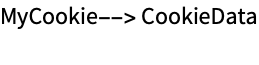
"StoreCookies" (1)
Falseの場合,"StoreCookies"はサイトに接続中に見付かった任意の新たなクッキーを大域的クッキー共有には置かない:
cookiesData;
tmpFile = FileNameJoin[{$TemporaryDirectory, "tmp.txt"}];
eventFunction[_, "cookies", cookies_] := cookiesData = cookies
URLSaveAsynchronous["http://wolfram.com/", tmpFile, eventFunction, "StoreCookies" -> False]cookiesData$HTTPCookies"Headers" (1)
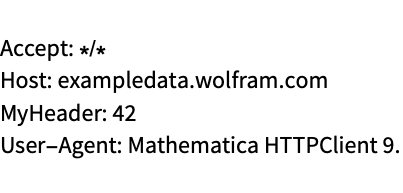
"BodyData" (1)

"MultipartData" (1)
tmpFile = FileNameJoin[{$TemporaryDirectory, "tmp.txt"}];
URLSaveAsynchronous["http://exampledata.wolfram.com/multipartdata.php", tmpFile, Null, "MultipartData" -> {{"partName", "mime/type", {1, 2, 3, 4, 5}}}];FilePrint[tmpFile]
"ReadTimeout" (1)
サーバからのダウンロードを終了するまでの最大割当て時間を秒で指定する:
errorString;
eventFunction[_, "error", error_] := errorString = error
tmpFile = FileNameJoin[{$TemporaryDirectory, "tmp.txt"}];
URLSaveAsynchronous["http://exampledata.wolfram.com/50mb.dat", tmpFile, eventFunction, "ReadTimeout" -> 1];errorString"ConnectTimeout" (1)
サーバへの接続を確立するまでの最大割当て時間を秒で指定する:
errorString;
eventFunction[_, "error", error_] := errorString = error
tmpFile = FileNameJoin[{$TemporaryDirectory, "tmp.txt"}];
URLSaveAsynchronous["http://127.0.0.1", tmpFile, eventFunction, "ConnectTimeout" -> 1];errorString"Progress" (1)
Trueの場合,"progress"イベントが引き起こされ,実行中のダウンロードについてダウンロードおよびアップロードされた情報が返される:
progressData = {};tmpFile = FileNameJoin[{$TemporaryDirectory, "tmp.txt"}];
progressFunction[_, "progress", progress_] := progressData = progress
URLSaveAsynchronous["http://exampledata.wolfram.com/5mb.dat", tmpFile, progressFunction, "Progress" -> True];
Dynamic[progressData]"UserData" (1)
"UserData"はイベントが呼ばれた場合に入手可能になる情報を含む任意の式である:
dataString;
tmpFile = FileNameJoin[{$TemporaryDirectory, "tmp.txt"}];
eventFunction[async_, "statuscode", data_] := dataString = "UserData" /. Options[async]
URLSaveAsynchronous["http://wolfram.com", tmpFile, eventFunction, "UserData" -> "stored data"];dataString特性と関係 (1)
URLFetchAsynchronousを使って直接Wolfram言語にコンテンツをロードする:
constitution;
f[_, "data", document_] := constitution = FromCharacterCode[document]
URLFetchAsynchronous["http://exampledata.wolfram.com/USConstitution.txt", f];Short[constitution]テキスト
Wolfram Research (2012), URLSaveAsynchronous, Wolfram言語関数, https://reference.wolfram.com/language/ref/URLSaveAsynchronous.html.
CMS
Wolfram Language. 2012. "URLSaveAsynchronous." Wolfram Language & System Documentation Center. Wolfram Research. https://reference.wolfram.com/language/ref/URLSaveAsynchronous.html.
APA
Wolfram Language. (2012). URLSaveAsynchronous. Wolfram Language & System Documentation Center. Retrieved from https://reference.wolfram.com/language/ref/URLSaveAsynchronous.html