

DateDifference
DateDifference[date1,date2]
给出从 date1到 date2 的天数.
DateDifference[date1,date2,"unit"]
按指定的单位给出 date1 和 date2 之间的差值.
DateDifference[date1,date2,{"unit1","unit2",…}]
以列表形式给出对应于 "uniti" 的差值.
更多信息和选项
- DateDifference 计算两个给定日期之间的时间量,将结果表示为物理持续时间或日历步长.
- DateDifference 返回 Quantity 对象.
- 日期可以被指定为如下的形式:
-
DateObject[…] 日期对象 {y,m,d} 年、月、日 {y,m} 指定月份的第一天 {y} y 年的1月1号 "string" 以字符串形式给出的日期 ("Jan. 1, 2022") {y,m,d,h,m,s} 精确时间 time 绝对的时间规范 - 可能的单位有 "Year"、"Quarter"、"Month"、"Week"、"Day"、"Hour"、"Minute"、"Second".
- {y,m,d} 被视为等价于 {y,m,d,0,0,0}.
- DateDifference 使用下列选项:
-
DayCountConvention "ActualActual" 计数惯例,以此计算差值 Method Automatic 使用的日期算术方法 - 对于具有可变持续时间(例如 "Month")的添加时间步长,日期算术可以将这些步长转换为物理持续时间(连续算术)或将其全部视为离散日历步长(离散算术).
- 选项值 Method"Continuous" 实现连续运算. 离散算术通过 Methodrolling 实现,可能的滚动方法是"RollForward"、"RollBackward" 和 "RollOver",默认为 "RollBackward".
- 例如,对于离散算术,添加一个月可能会导致日期不存在(例如 2 月 30 日). 在这种情况下,对于如何解决该日期,有三种可能的选择:
-
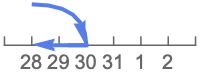
"RollBackward" 回滚到最后一个存在的日期(2 月 28 日) 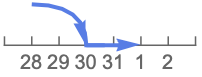
"RollForward" 前滚到下一个存在的日期(3 月 1 日) 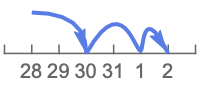
"RollOver" 从下一个存在的日期开始递增(3 月 …) - DateDifference(以天数列举)遵循天数计算惯例,不管差值的幅度.
- DateDifference[date2] 给出从当前时间直到 date2 的带小数点的天数.
范例
打开所有单元 关闭所有单元基本范例 (4)
DateDifference[DateObject[{2022, 1, 1}, "Day"], DateObject[{2022, 7, 4}, "Day"]]DateDifference[{2022, 8, 29}, {2023, 1, 1}]DateDifference[DateObject[{2022, 1, 1}, "Day"], DateObject[{2022, 7, 4}, "Day"], "Week"]DateDifference[DateObject[{2022, 1, 1}, "Day"], DateObject[{2022, 7, 4}, "Day"], {"Day", "Hour", "Minute"}]范围 (8)
DateDifference[DateObject[{2022, 7, 4}, "Day"], DateObject[{2022, 1, 1}, "Day"]]If only one date is given, then the difference from the current date will be returned:
DateDifference[Yesterday]日期格式 (3)
给出 DateString 支持的任何形式的日期:
DateDifference["May 9, 2021", "Nov 4, 2021"]DateDifference["May 9, 2021", DateObject[{2021, 11, 4}, "Day"]]DateDifference 可以使用按 {y,m,d,h,m,s} 形式给出的时间:
DateDifference[{2022, 1, 1, 5, 16, 17}, {2022, 1, 5, 7, 8, 11}]单位 (3)
DateDifference[DateObject[{2022, 1, 1}, "Day"], DateObject[{2022, 6, 1}, "Day"], "Hour"]DateDifference[DateObject[{1936, 8, 14}, "Day"], DateObject[{2000, 12, 1}, "Day"], "Year"]DateDifference[DateObject[{2023, 8, 14}, "Day"], DateObject[{2024, 12, 1}, "Day"], {"Month", "Day"}]选项 (6)
DayCountConvention (2)
Table[DateDifference[DateObject[{2022, 1, 31}, "Day"], DateObject[{2023, 1, 31}, "Day"], DayCountConvention -> i] + DateDifference[DateObject[{2023, 1, 31}, "Day"], DateObject[{2023, 2, 28}, "Day"], DayCountConvention -> i], {i, {"ThirtyEPlus360", "Thirty360", "Thirty360US"}}]DateDifference[DateObject[{2022, 1, 31}, "Day"], DateObject[{2023, 3, 31}, "Day"], "Year", DayCountConvention -> "Thirty360"]CalendarType (2)
Method (2)
默认情况下,3 月 31 日是 6 月 30 日之前的三个月:
DateDifference[DateObject[{2022, 3, 31}, "Day"], DateObject[{2022, 6, 30}, "Day"], {"Month", "Day"}]使用 Method"RollForward",则日期相隔两个月零30天:
DateDifference[DateObject[{2022, 3, 31}, "Day"], DateObject[{2022, 6, 30}, "Day"], {"Month", "Day"}, Method -> "RollForward"]DateDifference[DateObject[{2020, 1, 30}], DateObject[{2023, 3, 1}], {"Month", "Day"}, Method -> #]& /@ {"Continuous", "RollForward", "RollBackward", "RollOver"}应用 (2)
DateDifference[DateObject[{2000}, "Year", "Gregorian", -6.], DateObject[], {"Month", "Day", "Year"}]在 3 月 21 日与 9 月 21 日之间总是间隔着 184 天:
DateDifference[{2022, 3, 21}, {2022, 9, 21}]如果不是闰年的话,9 月 21 日至下一年的 3 月 21 日之间间隔着 181 天:
DateDifference[{2022, 9, 21}, {2023, 3, 21}]LeapYearQ[{2022, 3, 21}]DateDifference[{2023, 9, 21}, {2024, 3, 21}]LeapYearQ[{2020, 3, 21}]属性和关系 (1)
DatePlus 对日期加上所给的时间段,而 DateDifference 计算日期之间的时间段:
DateDifference[DateObject[{2022, 1}, "Month"], DateObject[{2022, 3}, "Month"], "Month"]DatePlus[DateObject[{2022, 1}, "Month"], %]DatePlus[DateObject[{2022, 1}, "Month"], {2, "Month"}]DateDifference[DateObject[{2022, 1}, "Month"], %, "Month"]可能存在的问题 (2)
DateDifference["2/4/99", "Feb. 23, 1999"]
利用 DateList 消除不同解释所造成的歧义:
DateDifference[DateObject[{"2/4/99", {"Day", "Month", "YearShort"}}], "Feb. 23, 1999"]在先前发布的 Wolfram 语言版本中,DateDifference 返回的是纯数学结果. 可以通过 SetSystemOptions 启用该功能:
DateDifference[Yesterday, Tomorrow]SetSystemOptions["DataOptions" -> "ReturnQuantities" -> False];DateDifference[Yesterday, Tomorrow]通过将同一个系统选项值设置为 True,重新得到 Quantity 结果:
SetSystemOptions["DataOptions" -> "ReturnQuantities" -> True];DateDifference[Yesterday, Tomorrow]文本
Wolfram Research (2007),DateDifference,Wolfram 语言函数,https://reference.wolfram.com/language/ref/DateDifference.html (更新于 2022 年).
CMS
Wolfram 语言. 2007. "DateDifference." Wolfram 语言与系统参考资料中心. Wolfram Research. 最新版本 2022. https://reference.wolfram.com/language/ref/DateDifference.html.
APA
Wolfram 语言. (2007). DateDifference. Wolfram 语言与系统参考资料中心. 追溯自 https://reference.wolfram.com/language/ref/DateDifference.html 年