

---
title: "VideoJoin"
language: "en"
type: "Symbol"
summary: "VideoJoin[video1, video2, ...] concatenates all videoi and returns a video object."
keywords: 
- video join
- video combine
- video sequence
- video editing
- video concatenate
- chain video
canonical_url: "https://reference.wolfram.com/language/ref/VideoJoin.html"
source: "Wolfram Language Documentation"
related_guides: 
  - 
    title: "Video Editing"
    link: "https://reference.wolfram.com/language/guide/VideoEditing.en.md"
  - 
    title: "Video Computation: Update History"
    link: "https://reference.wolfram.com/language/guide/VideoComputation-UpdateHistory.en.md"
---
[EXPERIMENTAL]

# VideoJoin

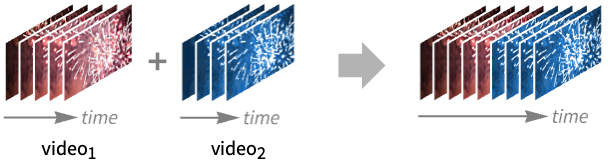
VideoJoin[video1, video2, …] concatenates all videoi and returns a video object.

## Details and Options

* ``VideoJoin`` is typically used to combine multiple video files in a sequence.

[image]

* Video objects ``videoi`` may have different properties, including frame size and frame rate. The properties are conformed before joining.

* Video objects may have different numbers of tracks. Corresponding tracks are joined together.

* By default, ``VideoJoin`` places the new video under the ``"Video"`` directory in ``\$WolframDocumentsDirectory``.

* The following options can be specified:

|                         |                          |                                                             |
| ----------------------- | ------------------------ | ----------------------------------------------------------- |
| AudioEncoding           | Automatic                | audio encoding to use                                       |
| CompressionLevel        | Automatic                | compression level to use                                    |
| ConformationMethod      | Automatic                | how to conform frames of different sizes                    |
| FrameRate               | Automatic                | frame rate to use                                           |
| GeneratedAssetFormat    | Automatic                | the file format of the result                               |
| GeneratedAssetLocation  | \$GeneratedAssetLocation | location of the generated asset                             |
| OverwriteTarget         | Automatic                | whether to overwrite an existing file                       |
| RasterSize              | Automatic                | raster size of video frames                                 |
| SampleRate              | Automatic                | sample rate to use                                          |
| SubtitleEncoding        | Automatic                | subtitle encoding to use                                    |
| TransitionDirection     | Automatic                | direction of the transition                                 |
| TransitionDuration      | Automatic                | duration of the transition                                  |
| TransitionEffect        | Automatic                | transition effect to use                                    |
| VideoEncoding           | Automatic                | video encoding to use                                       |
| VideoTransparency       | False                    | whether the output video should have a transparency channel |

* By default, videos are joined without any transition effect.

* Using ``TransitionDuration -> dur``, videos are overlapped by the specified duration ``dur`` during which the transition happens.

* Supported settings for ``TransitionEffect`` are:

|        |                                                    |
| ------ | -------------------------------------------------- |
| None   | update instantly without a visual effect           |
| "Fade" | fade from old content to new                       |
| "Push" | have new content push old content away             |
| "Wipe" | fade from old content to new using a wiping effect |
---

## Examples (20)

### Basic Examples (1)

Join two videos:

```wl
In[1]:=
v1 = Video["ExampleData/fish.mp4"];
v2 = Video["ExampleData/rule30.mp4"];

In[2]:= VideoJoin[v1, v2]

Out[2]= \!\(\*VideoBox["![Embedded Video Player](video://content-lz8l6)"]\)
```

### Scope (2)

Join videos with similar properties:

```wl
In[1]:=
v = Video["ExampleData/Caminandes.mp4"];
segments = VideoTrim[v, {{10, 20}, {30, 35}}]

Out[1]= {\!\(\*VideoBox[...]\), \!\(\*VideoBox[...]\)}

In[2]:= Duration /@ segments

Out[2]= {Quantity[10., "Seconds"], Quantity[5., "Seconds"]}

In[3]:= VideoJoin[segments]

Out[3]= \!\(\*VideoBox["![Embedded Video Player](video://content-m4vqy)"]\)
```

---

Join videos with different properties:

```wl
In[1]:=
v1 = Video["ExampleData/fish.mp4"];
v2 = Video["ExampleData/bullfinch.mkv"];

In[2]:= Information[#, {"Duration", "OriginalRasterSize"}]& /@ {v1, v2}

Out[2]= {{Quantity[3.4, "Seconds"], <|1 -> {320, 180}|>}, {Quantity[15.022, "Seconds"], <|1 -> {640, 360}|>}}
```

Properties of the resulting video are chosen such that most input data can be stored in the output:

```wl
In[3]:=
VideoJoin[v1, v2];
Information[%]

Out[3]=
InformationData[Association["ObjectType" -> "Video", "Duration" -> Quantity[18.42, "Seconds"], 
  "RasterSize" -> Automatic, "BitRate" -> Quantity[990837, "Bits"/"Seconds"], 
  "VideoTracks" -> Dataset[Association[1 -> Association["OriginalRasterSi ... itiesDump`rest___]] :> Quantity[NumberForm[
            N[Video`VideoUtilitiesDump`x], {10, 2}], Video`VideoUtilitiesDump`rest]] & )]], 
  "ResourcePath" -> 
   File["/Users/shadi/Documents/Wolfram/Video/VideoJoin-2024-10-30T22-59-52.mp4"]], True]
```

### Options (17)

#### AudioEncoding (1)

Specify the audio encoding to use:

```wl
In[1]:= v1 = Video["ExampleData/Caminandes.mp4"];

In[2]:= v2 = Video["ExampleData/bullfinch.mkv"];

In[3]:= Information[VideoJoin[v1, v2, AudioEncoding -> "LIBMP3LAME"], "AudioTracks"]

Out[3]=
Dataset[Association[1 -> Association["AudioEncoding" -> "MP3FLOAT", "AudioChannels" -> 2, 
    "AudioBitDepth" -> 32, "SampleRate" -> Quantity[48000, "Samples"/"Seconds"]], 
  2 -> Association["AudioEncoding" -> "MP3FLOAT", "AudioChannels" -> 1, "AudioBitDepth" -> 32, 
    "SampleRate" -> Quantity[44100, "Samples"/"Seconds"]], 
  3 -> Association["AudioEncoding" -> "MP3FLOAT", "AudioChannels" -> 1, "AudioBitDepth" -> 32, 
    "SampleRate" -> Quantity[44100, "Samples"/"Seconds"]]]]
```

#### CompressionLevel (1)

Join videos using default compression:

```wl
In[1]:= v1 = Video["ExampleData/Caminandes.mp4"];

In[2]:= v2 = Video["ExampleData/bullfinch.mkv"];

In[3]:= FileSize[Information[VideoJoin[v1, v2], "ResourcePath"]]

Out[3]= Quantity[32.923082, "Megabytes"]
```

Use maximum compression:

```wl
In[4]:= FileSize[Information[VideoJoin[v1, v2, CompressionLevel -> 1], "ResourcePath"]]

Out[4]= Quantity[3.058478, "Megabytes"]
```

The choice of encoders affects the amount by which a file can be compressed:

```wl
In[5]:= FileSize[Information[VideoJoin[v1, v2, VideoEncoding -> "LIBVPX-VP9"], "ResourcePath"]]

Out[5]= Quantity[7.42751, "Megabytes"]

In[6]:= FileSize[Information[VideoJoin[v1, v2, VideoEncoding -> "LIBVPX-VP9", CompressionLevel -> 1], "ResourcePath"]]

Out[6]= Quantity[7.085496999999999, "Megabytes"]
```

#### ConformationMethod (2)

By default, black padding is used when images are not stretched to fit the common image size:

```wl
In[1]:= {v1, v2} = SlideShowVideo[#, IconizedObject[«dur»]]& /@ {[image], [image]};
```

By default, a common frame size is used and videos are made to fit in the frame:

```wl
In[2]:= VideoJoin[v1, v2]//VideoFrameList[#, 2]&

Out[2]= {[image], [image]}
```

Use ``"Fill"`` fitting to fill the whole canvas for all frames:

```wl
In[3]:= VideoJoin[v1, v2, ConformationMethod -> "Fill"]//VideoFrameList[#, 2]&

Out[3]= {[image], [image]}
```

Use ``"Stretch"`` fitting to resize the frames:

```wl
In[4]:= VideoJoin[v1, v2, ConformationMethod -> "Stretch"]//VideoFrameList[#, 2]&

Out[4]= {[image], [image]}
```

Perform windowboxing when fitting frames:

```wl
In[5]:= VideoJoin[v1, v2, ConformationMethod -> "Windowbox"]//VideoFrameList[#, 2]&

Out[5]= {[image], [image]}
```

Specify a padding value:

```wl
In[6]:= VideoJoin[v1, v2, ConformationMethod -> {"Windowbox", Padding -> Green}]//VideoFrameList[#, 2]&

Out[6]= {[image], [image]}
```

---

Use the ``RasterSize`` option to specify the desired frame dimensions:

```wl
In[1]:= {v1, v2} = SlideShowVideo[#, IconizedObject[«dur»]]& /@ {[image], [image]};
```

By default, a common frame size is used and videos are made to fit in the frame:

```wl
In[2]:= VideoJoin[v1, v2, RasterSize -> {200, 100}]//VideoFrameList[#, 2]&

Out[2]= {[image], [image]}
```

Specify the padding value:

```wl
In[3]:= VideoJoin[v1, v2, RasterSize -> {200, 100}, ConformationMethod -> Padding -> Green]//VideoFrameList[#, 2]&

Out[3]= {[image], [image]}
```

Specify a different fitting scheme:

```wl
In[4]:= VideoJoin[v1, v2, RasterSize -> {200, 100}, ConformationMethod -> "Stretch"]//VideoFrameList[#, 2]&

Out[4]= {[image], [image]}
```

#### FrameRate (1)

By default, the largest frame rate (rounded to the nearest integer value) is used:

```wl
In[1]:= v1 = Video["ExampleData/Caminandes.mp4"];

In[2]:= v2 = Video["ExampleData/bullfinch.mkv"];

In[3]:= Information[#, "VideoTracks"]& /@ {v1, v2}

Out[3]=
{Dataset[Association[1 -> Association["OriginalRasterSize" -> {852, 480}, "VideoEncoding" -> "H264", 
    "BitDepth" -> 8, "ColorSpace" -> "RGB", "FrameRate" -> Quantity[24, "Frames"/"Seconds"]]]], Dataset[Association[1 -> Association["OriginalRasterSize" -> {640, 360}, "VideoEncoding" -> "VP9", 
    "BitDepth" -> 8, "ColorSpace" -> "RGB", "FrameRate" -> Quantity[Rational[30000, 1001], 
      "Frames"/"Seconds"]]]]}

In[4]:= Information[VideoJoin[v1, v2], "VideoTracks"]

Out[4]=
Dataset[Association[1 -> Association["OriginalRasterSize" -> {852, 480}, "VideoEncoding" -> "H264", 
    "BitDepth" -> 8, "ColorSpace" -> "RGB", "FrameRate" -> Quantity[30, "Frames"/"Seconds"]]]]
```

Specify the frame rate to use:

```wl
In[5]:= Information[VideoJoin[v1, v2, FrameRate -> 15], "VideoTracks"]

Out[5]=
Dataset[Association[1 -> Association["OriginalRasterSize" -> {852, 480}, "VideoEncoding" -> "H264", 
    "BitDepth" -> 8, "ColorSpace" -> "RGB", "FrameRate" -> Quantity[15, "Frames"/"Seconds"]]]]
```

#### GeneratedAssetLocation (1)

By default, generated video files are stored in ``\$WolframDocumentsDirectory`` :

```wl
In[1]:= v1 = Video["ExampleData/Caminandes.mp4"];

In[2]:= v2 = Video["ExampleData/bullfinch.mkv"];

In[3]:= Information[VideoJoin[v1, v2], "ResourcePath"]

Out[3]= File["F:\\Documents\\Wolfram\\Video\\VideoJoin-f5875d50-6bc3-4e0f-b391-c369f52b6cfd.mp4"]
```

Specify the output file directory:

```wl
In[4]:= Information[VideoJoin[v1, v2, GeneratedAssetLocation -> $TemporaryDirectory], "ResourcePath"]

Out[4]= File["C:\\Users\\piotr\\AppData\\Local\\Temp\\VideoJoin-bcc05a55-623f-4781-8fce-61440c3caac0.mp4"]
```

Specify the output file path:

```wl
In[5]:= Information[VideoJoin[v1, v2, GeneratedAssetLocation -> FileNameJoin[{$TemporaryDirectory, "out.mkv"}]], "ResourcePath"]

Out[5]= File["C:\\Users\\user\\AppData\\Local\\Temp\\out.mkv"]
```

#### OverwriteTarget (1)

By default, existing files are not overwritten:

```wl
In[1]:= v1 = Video["ExampleData/Caminandes.mp4"];

In[2]:= v2 = Video["ExampleData/bullfinch.mkv"];

In[3]:= Information[VideoJoin[v1, v2, GeneratedAssetLocation -> FileNameJoin[{$TemporaryDirectory, "out.mkv"}]], "ResourcePath"]

Out[3]= File["C:\\Users\\user\\AppData\\Local\\Temp\\out.mkv"]

In[4]:= VideoJoin[v1, v2, GeneratedAssetLocation -> FileNameJoin[{$TemporaryDirectory, "out.mkv"}]]//Head

```

VideoJoin::filex: C:\Users\user\AppData\Local\Temp\out.mkv already exists.

```wl
Out[4]= VideoJoin
```

Overwrite existing file:

```wl
In[5]:= Information[VideoJoin[v1, v2, GeneratedAssetLocation -> FileNameJoin[{$TemporaryDirectory, "out.mkv"}], OverwriteTarget -> True], "ResourcePath"]

Out[5]= File["C:\\Users\\user\\AppData\\Local\\Temp\\out.mkv"]
```

#### RasterSize (1)

By default, the largest raster size is used:

```wl
In[1]:= v1 = Video["ExampleData/Caminandes.mp4"];

In[2]:= v2 = Video["ExampleData/bullfinch.mkv"];

In[3]:= Information[#, "VideoTracks"]& /@ {v1, v2}

Out[3]=
{Dataset[Association[1 -> Association["OriginalRasterSize" -> {852, 480}, "VideoEncoding" -> "H264", 
    "BitDepth" -> 8, "ColorSpace" -> "RGB", "FrameRate" -> Quantity[24, "Frames"/"Seconds"]]]], Dataset[Association[1 -> Association["OriginalRasterSize" -> {640, 360}, "VideoEncoding" -> "VP9", 
    "BitDepth" -> 8, "ColorSpace" -> "RGB", "FrameRate" -> Quantity[Rational[30000, 1001], 
      "Frames"/"Seconds"]]]]}

In[4]:= Information[VideoJoin[v1, v2], "VideoTracks"]

Out[4]=
Dataset[Association[1 -> Association["OriginalRasterSize" -> {852, 480}, "VideoEncoding" -> "H264", 
    "BitDepth" -> 8, "ColorSpace" -> "RGB", "FrameRate" -> Quantity[30, "Frames"/"Seconds"]]]]
```

Specify the raster width to use, while preserving the aspect ratio:

```wl
In[5]:= Information[VideoJoin[v1, v2, RasterSize -> 100], "VideoTracks"]

Out[5]=
Dataset[Association[1 -> Association["OriginalRasterSize" -> {100, 56}, "VideoEncoding" -> "H264", 
    "BitDepth" -> 8, "ColorSpace" -> "RGB", "FrameRate" -> Quantity[30, "Frames"/"Seconds"]]]]
```

Specify the raster width and height:

```wl
In[6]:= Information[VideoJoin[v1, v2, RasterSize -> {200, 100}], "VideoTracks"]

Out[6]=
Dataset[Association[1 -> Association["OriginalRasterSize" -> {200, 100}, "VideoEncoding" -> "H264", 
    "BitDepth" -> 8, "ColorSpace" -> "RGB", "FrameRate" -> Quantity[30, "Frames"/"Seconds"]]]]
```

#### SampleRate (1)

By default, the largest sample rate is used:

```wl
In[1]:= v1 = Video["ExampleData/Caminandes.mp4"];

In[2]:= v2 = Video["ExampleData/bullfinch.mkv"];

In[3]:= Information[#, "AudioTracks"]& /@ {v1, v2}

Out[3]=
{Dataset[Association[1 -> Association["AudioEncoding" -> "AAC", "AudioChannels" -> 2, 
    "AudioBitDepth" -> 32, "SampleRate" -> Quantity[44100, "Samples"/"Seconds"]]]], Dataset[Association[1 -> Association["AudioEncoding" -> "VORBIS", "AudioChann ... s" -> 1, "AudioBitDepth" -> 32, 
    "SampleRate" -> Quantity[44100, "Samples"/"Seconds"]], 
  3 -> Association["AudioEncoding" -> "VORBIS", "AudioChannels" -> 1, "AudioBitDepth" -> 32, 
    "SampleRate" -> Quantity[44100, "Samples"/"Seconds"]]]]}

In[4]:= Information[VideoJoin[v1, v2], "AudioTracks"]

Out[4]=
Dataset[Association[1 -> Association["AudioEncoding" -> "AAC", "AudioChannels" -> 2, 
    "AudioBitDepth" -> 32, "SampleRate" -> Quantity[48000, "Samples"/"Seconds"]], 
  2 -> Association["AudioEncoding" -> "AAC", "AudioChannels" -> 1, "AudioBitDepth" -> 32, 
    "SampleRate" -> Quantity[44100, "Samples"/"Seconds"]], 
  3 -> Association["AudioEncoding" -> "AAC", "AudioChannels" -> 1, "AudioBitDepth" -> 32, 
    "SampleRate" -> Quantity[44100, "Samples"/"Seconds"]]]]
```

Specify the sample rate to use:

```wl
In[5]:= Information[VideoJoin[v1, v2, SampleRate -> 22050], "AudioTracks"]

Out[5]=
Dataset[Association[1 -> Association["AudioEncoding" -> "AAC", "AudioChannels" -> 2, 
    "AudioBitDepth" -> 32, "SampleRate" -> Quantity[22050, "Samples"/"Seconds"]], 
  2 -> Association["AudioEncoding" -> "AAC", "AudioChannels" -> 1, "AudioBitDepth" -> 32, 
    "SampleRate" -> Quantity[22050, "Samples"/"Seconds"]], 
  3 -> Association["AudioEncoding" -> "AAC", "AudioChannels" -> 1, "AudioBitDepth" -> 32, 
    "SampleRate" -> Quantity[22050, "Samples"/"Seconds"]]]]
```

#### SubtitleEncoding (1)

Specify the subtitle encoding to use:

```wl
In[1]:= v1 = Video["ExampleData/Caminandes.mp4"];

In[2]:= v2 = Video["ExampleData/bullfinch.mkv"];

In[3]:= Information[VideoJoin[v1, v2, GeneratedAssetLocation -> FileNameJoin[{$TemporaryDirectory, "out.mkv"}], OverwriteTarget -> True, SubtitleEncoding -> "WEBVTT"], "SubtitleTracks"]

Out[3]=
Dataset[Association[1 -> Association["SubtitleEncoding" -> "WEBVTT"], 
  2 -> Association["SubtitleEncoding" -> "WEBVTT"]]]
```

#### TransitionDirection (2)

Transition to the left:

```wl
In[1]:=
v1 = Video["ExampleData/fish.mp4"];
v2 = Video["ExampleData/rule30.mp4"];

In[2]:= VideoJoin[v1, v2, TransitionEffect -> "Push", TransitionDirection -> Left, RasterSize -> 300]

Out[2]= \!\(\*VideoBox["![Embedded Video Player](video://content-t2zum)"]\)
```

---

Transition to the top:

```wl
In[1]:=
v1 = Video["ExampleData/fish.mp4"];
v2 = Video["ExampleData/rule30.mp4"];

In[2]:= VideoJoin[v1, v2, TransitionEffect -> "Push", TransitionDirection -> Top, RasterSize -> 300]

Out[2]= \!\(\*VideoBox["![Embedded Video Player](video://content-cgynk)"]\)
```

#### TransitionDuration (1)

Specify a transition duration for a smooth transition:

```wl
In[1]:=
v1 = Video["ExampleData/fish.mp4"];
v2 = Video["ExampleData/rule30.mp4"];

In[2]:= VideoJoin[v1, v2, TransitionDuration -> .8, RasterSize -> 300]

Out[2]= \!\(\*VideoBox[...]\)
```

#### TransitionEffect (3)

By default, no transition effect is happening:

```wl
In[1]:=
v1 = Video["ExampleData/fish.mp4"];
v2 = Video["ExampleData/rule30.mp4"];

In[2]:= VideoJoin[v1, v2, RasterSize -> 300]

Out[2]= \!\(\*VideoBox[...]\)

In[3]:= VideoExtractFrames[%4, Interval[{Duration[v1] - Quantity[0.1, "Seconds"], Duration[v1] + Quantity[0.1, "Seconds"]}]]

Out[3]= [image]
```

---

Specify a transition duration for a smooth transition:

```wl
In[1]:=
v1 = Video["ExampleData/fish.mp4"];
v2 = Video["ExampleData/rule30.mp4"];

In[2]:= VideoJoin[v1, v2, TransitionEffect -> "Fade", TransitionDuration -> .8, RasterSize -> 300]

Out[2]= \!\(\*VideoBox[...]\)
```

---

Specify a transition duration for a smooth transition:

```wl
In[1]:=
v1 = Video["ExampleData/fish.mp4"];
v2 = Video["ExampleData/rule30.mp4"];

In[2]:= VideoJoin[v1, v2, TransitionEffect -> "Push", TransitionDuration -> .8, RasterSize -> 300]

Out[2]= \!\(\*VideoBox["![Embedded Video Player](video://content-tugzl)"]\)
```

#### VideoEncoding (1)

Specify the video encoding to use:

```wl
In[1]:= v1 = Video["ExampleData/Caminandes.mp4"];

In[2]:= v2 = Video["ExampleData/bullfinch.mkv"];

In[3]:= Information[VideoJoin[v1, v2, VideoEncoding -> "MPEG2VIDEO"], "VideoTracks"]

Out[3]=
Dataset[Association[1 -> Association["OriginalRasterSize" -> {852, 480}, 
    "VideoEncoding" -> "MPEG2VIDEO", "BitDepth" -> 8, "ColorSpace" -> "RGB", 
    "FrameRate" -> Quantity[30, "Frames"/"Seconds"]]]]
```

## See Also

* [`VideoInsert`](https://reference.wolfram.com/language/ref/VideoInsert.en.md)
* [`VideoReplace`](https://reference.wolfram.com/language/ref/VideoReplace.en.md)
* [`VideoCombine`](https://reference.wolfram.com/language/ref/VideoCombine.en.md)
* [`VideoTrim`](https://reference.wolfram.com/language/ref/VideoTrim.en.md)
* [`VideoSplit`](https://reference.wolfram.com/language/ref/VideoSplit.en.md)
* [`VideoDelete`](https://reference.wolfram.com/language/ref/VideoDelete.en.md)
* [`AudioJoin`](https://reference.wolfram.com/language/ref/AudioJoin.en.md)
* [`Join`](https://reference.wolfram.com/language/ref/Join.en.md)
* [`MP4`](https://reference.wolfram.com/language/ref/format/MP4.en.md)
* [`QuickTime`](https://reference.wolfram.com/language/ref/format/QuickTime.en.md)
* [`Matroska`](https://reference.wolfram.com/language/ref/format/Matroska.en.md)
* [`Ogg`](https://reference.wolfram.com/language/ref/format/Ogg.en.md)

## Related Guides

* [Video Editing](https://reference.wolfram.com/language/guide/VideoEditing.en.md)
* [Video Computation: Update History](https://reference.wolfram.com/language/guide/VideoComputation-UpdateHistory.en.md)

## History

* [Introduced in 2020 (12.2)](https://reference.wolfram.com/language/guide/SummaryOfNewFeaturesIn122.en.md) \| [Updated in 2021 (12.3)](https://reference.wolfram.com/language/guide/SummaryOfNewFeaturesIn123.en.md) ▪ [2021 (13.0)](https://reference.wolfram.com/language/guide/SummaryOfNewFeaturesIn130.en.md) ▪ [2024 (14.0)](https://reference.wolfram.com/language/guide/SummaryOfNewFeaturesIn140.en.md)