



TestReport
TestReport["file"]
给出一份文件中的测试结果报告.
TestReport[{test1,test2,…}]
给出 testi 结果的报告.
TestReport[{report1,report2,…}]
通过合并所有测试报告 reporti 给出统一的报告.
更多信息和选项
- TestReport 返回 TestReportObject.
- TestReport 处理使用测试笔记本框架的普通文本 Wolfram 语言文件和笔记本.
- TestReport 只运行结果为 "NotEvaluated" 的测试,而会跳过已经评估过的测试.
- TestReport 有如下选项:
-
HandlerFunctions <> 句柄函数 HandlerFunctionsKeys Automatic 向句柄函数提供哪些参数 MemoryConstraint Infinity 每次测试允许使用的内存(字节) ProgressReporting $ProgressReporting 是否报告进度 SameTest SameQ 用于比较实际和预期输出的函数 TestEvaluationFunction TestEvaluate 计算所创建测试的函数 TimeConstraint Infinity 每次测试允许使用的时间(秒) - 系统也支持 TestReport[File["file"]].
- 在 TestReport 的执行过程中,会产生以下事件:
-
"FileStarted" 测试文件已开始 "FileCompleted" 测试文件已完成 "ReportStarted" 测试报告已开始 "ReportCompleted" 测试报告已完成 "RuntimeFailure" 遇到运行时故障 "TestCreated" 测试已创建 "TestEvaluated" 测试已运算 - 根据规范 HandlerFunctions-><…,"eventi"->fi,…>,每当生成 eventi 时,将运算 fi[assoc]. assoc 中的元素具有由 HandlerFunctionsKeys 的设置指定的键.
- HandlerFunctionsKeys 指定的可能键包括:
-
"EventName" 处理的事件名称 "EventID" 事件的唯一标识符 "Failure" 与事件相关联的故障对象 "FailureType" 与测试相关联的故障类型 "Outcome" 与测试相关联的结果 "TestFileName" 与事件相关联的测试文件名 "TestObject" 与事件相关联的测试对象 "Title" 测试报告的名称 - TestReport 设置 $TestFileName 为测试运行的文件名.
- CreateNotebook["Testing"] 打开一个空白的笔记本,设置为使用测试框架(Testing Notebook framework).
范例
打开所有单元 关闭所有单元基本范例 (2)
运行一个 TestObject 列表:
TestReport[{TestCreate[Sin[E] > Cos[E]], TestCreate[MatrixQ[{{1, 2, 3}, {4, 5, 6, 7}}]], TestCreate[1 / 0, ComplexInfinity]}]report = TestReport[FileNameJoin[{"ExampleData", "ExampleTestFile.nb"}]]提取失败测试的信息并在 TabView 中呈现:
TabView[Column /@ report["ResultsByOutcome"]]将现有的 TestReportObject 与新的报告合并:
TestReport[{TestCreate[1 + 1, 2], report}]范围 (1)
基本用途 (1)
report = TestReport[{TestCreate[Limit[Exp[t], t -> 0], 2], TestCreate[PrimeQ[7]],
	TestCreate[Factor[1 - 2x + x^2], (x + 1)^2],
	TestCreate[Infinity - Infinity, Indeterminate]}]
TestReportObject 的属性:
report["Properties"]report["ResultList"]Dataset[Map[#[{"ExpectedOutput", "ActualOutput"}]&, Flatten[Values[KeyDrop[report["ResultsByOutcome"], "Success"]]]]]选项 (10)
HandlerFunctions (1)
使用 HandlerFunctions 记录 TestReport 执行过程中发生的测试事件:
TestReport[
	TestCreate[1, 1],
	HandlerFunctions -> <|"TestEvaluated" -> Print|>
	]
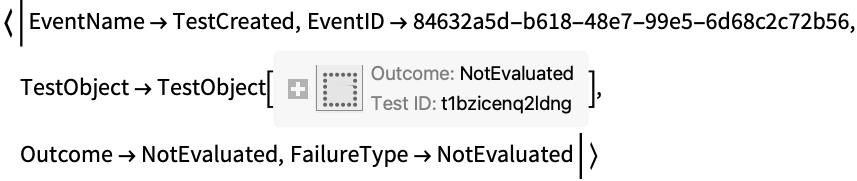
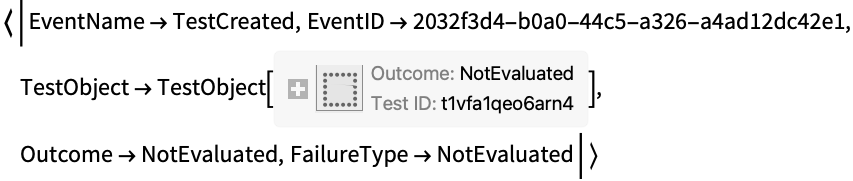
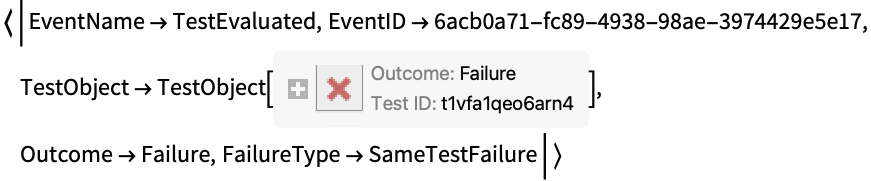
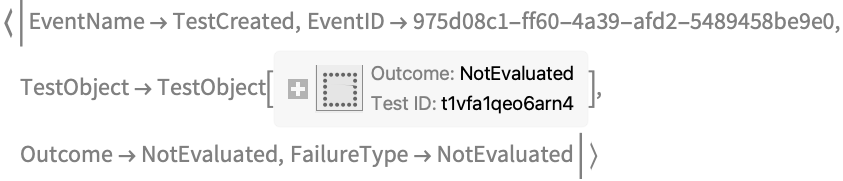
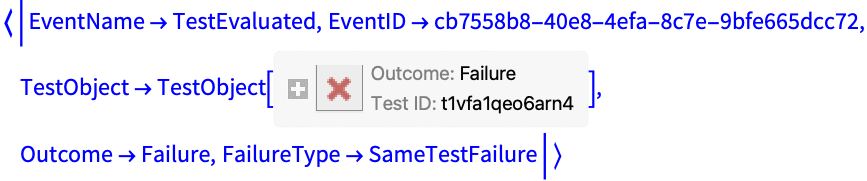
使用特殊键 "UnhandledEvent" 记录所有事件:
TestReport[
	{TestCreate[1, 1], TestCreate[0, 1]},
	HandlerFunctions -> <|"UnhandledEvent" -> Print|>
	]


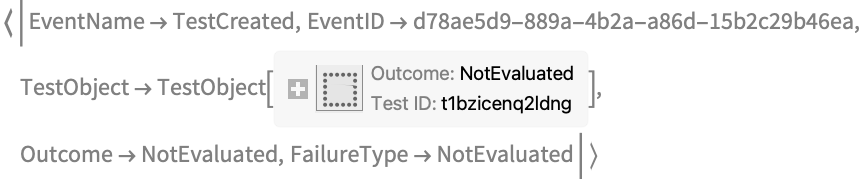
TestReport[
	{TestCreate[1, 1], TestCreate[0, 1]},
	HandlerFunctions -> <|
	"UnhandledEvent" -> Function[Print[Style[#, Gray]]],
	"TestEvaluated" -> Function[Print[Style[#, Blue]]]
	|>
	]


HandlerFunctionsKeys (1)
使用 HandlerFunctionsKeys 来选择在使用 HandlerFunctions 时关注的键:
TestReport[
	TestCreate[0, 1],
	HandlerFunctions -> <|"UnhandledEvent" -> Print|>,
	HandlerFunctionsKeys -> {"EventName", "EventID"}
	]



如果某事件不能提供你所要求的密钥,则其不会出现在 Association 中:
TestReport[
	TestCreate[0, 1],
	HandlerFunctions -> <|"UnhandledEvent" -> Print|>,
	HandlerFunctionsKeys -> {"EventName", "TestObject"}
	]



MemoryConstraint (2)
report = TestReport[{TestCreate[Head @ RandomImage[], Image]}, MemoryConstraint -> Quantity[250, "Bytes"]]test = First @ report["Results"]test["ActualOutput"]特定的 TestCreate 选项覆盖在 TestReport 层面上设置的选项:
TestReport[{TestCreate[Head @ RandomImage[], Image, MemoryConstraint -> Quantity[250, "Bytes"]]}, MemoryConstraint -> Quantity[10, "Megabytes"]]ProgressReporting (1)
TestReport[
	Table[
	TestCreate[RandomInteger[], 1],
	20000
	]
	]
使用选项 ProgressReporting 关闭该功能:
TestReport[
	Table[
	TestCreate[RandomInteger[], 1],
	20000
	],
	ProgressReporting -> False
	]
如要在全局范围内禁用进度报告,简单的方法是覆盖 $ProgressReporting:
Block[
	{$ProgressReporting = False},
	TestReport[
	Table[
	TestCreate[RandomInteger[], 1],
	10000
	],
	ProgressReporting -> False
	]
	]
SameTest (2)
将 SameTest 应用于给定测试:
TestReport[{
	TestCreate[RandomInteger[10], _Integer], TestCreate[RandomReal[10], _Real]
	},
	SameTest -> MatchQ
]TestReport[{
TestCreate[1 + 1, 2],
TestCreate[1. + 10 ^ -14, 1]
},
SameTest -> (Chop[#1 - #2, 10^-12] == 0&)
]特定的 TestCreate 选项会覆盖在 TestReport 层面上设置的选项:
TestReport[{
	TestCreate[RandomInteger[10], _Integer], TestCreate[{1, 2, 3}, {3, 2, 1}, SameTest -> (Sort[#1] == Sort[#2] &)]},
	SameTest -> MatchQ
	]
TestEvaluationFunction (1)
TimeConstraint (2)
Simplify[2Sin[10x + 11y + z]Cos[10x + 10y + 10t]]//AbsoluteTimingreport = TestReport[{TestCreate[Simplify[2Sin[10x + 11y + z]Cos[10x + 10y + 10t]], 2 Cos[10 (t + x + y)] Sin[10 x + 11 y + z]]}, TimeConstraint -> Quantity[1, "Seconds"]]test = First @ report["TestResults"]test["ActualOutput"]特定的 TestCreate 选项会覆盖在 TestReport 层面设置的选项:
TestReport[{TestCreate[Simplify[2Sin[10x + 11y + z]Cos[10x + 10y + 10t]], 2 Cos[10 (t + x + y)] Sin[10 x + 11 y + z], TimeConstraint -> Quantity[5, "Seconds"]]}, TimeConstraint -> Quantity[1, "Seconds"]]应用 (1)
report = TestReport[{
	FileNameJoin[{"ExampleData", "ExampleTestFile.nb"}],
	TestCreate[Sin[E] > Cos[E]],
	TestCreate[MatrixQ[{{1, 2, 3}, {4, 5, 6, 7}}]],
	TestCreate[1 / 0, ComplexInfinity]
	}]
再次使用 TestReport 将现有的 TestReportObject 合并为一个新的报告:
TestReport[
	{
	TestCreate[1 > 0],
	report
	}
	]
使用 TestReport 合并多个 TestReportObject 实例时,重复的测试将自动从报告中删除:
Length @ report["ResultList"]report = TestReport[{report, report, report}]Length @ report["ResultList"]使用属性 "ResultsByTestFileName" 可将同一文件的测试分为一组:
report["ResultsByTestFileName"]属性和关系 (2)
在 HandlerFunctions 中使用 Throw 和 Catch,在测试失败时停止测试运行:
Catch @ TestReport[
	TestCreate[0, 1],
	HandlerFunctions -> <|"TestEvaluated" -> Function[If[#Outcome != "Success", Throw[#TestObject]]]|>
	]
你也可以在 TestEvaluationFunction 中使用 Throw 和 Catch:
Catch @ TestReport[
	{
	TestCreate[1, 1],
	TestCreate[1, 2]
	},
	TestEvaluationFunction -> Function[
	With[
	{test = TestEvaluate[#]},
	If[
	test["Outcome"] === "Success",
	test,
	Throw @ test
	]
	]
	]
	]
在 HandlerFunctions 中使用 Reap 和 Sow 以收集所有事件名称:
Reap @ TestReport[
	TestCreate[0, 1],
	HandlerFunctions -> <|"UnhandledEvent" -> Function[Sow[#Event]]|>
	]
可能存在的问题 (2)
没有测试的 TestReport 会被判定为成功:
tr = TestReport[{}]tr["ReportSucceeded"]TestReport 将执行并收集独特的测试一次:
t = TestCreate[2 + 2, 4];

TestReport[{t, t, t}]TestReport[{
TestCreate[2 + 2, 4],
TestCreate[2 + 2, 4],
TestCreate[2 + 2, 4]
}]相关链接

 《Wolfram 语言入门》
文本
Wolfram Research (2014),TestReport,Wolfram 语言函数,https://reference.wolfram.com/language/ref/TestReport.html (更新于 2023 年).
CMS
Wolfram 语言. 2014. "TestReport." Wolfram 语言与系统参考资料中心. Wolfram Research. 最新版本 2023. https://reference.wolfram.com/language/ref/TestReport.html.
APA
Wolfram 语言. (2014). TestReport. Wolfram 语言与系统参考资料中心. 追溯自 https://reference.wolfram.com/language/ref/TestReport.html 年