RandomPolyhedron


RandomPolyhedron
RandomPolyhedron[spec]
给出具有指定规范 spec 的伪随机多面体.
RandomPolyhedron[spec,k]
给出 k 个伪随机多面体.
更多信息和选项
- RandomPolyhedron 给出根据特定分布绘制的 Polyhedron.
- RandomPolyhedron 通常用于测试和验证算法的时间复杂度.
- 可能的规范 spec 包括:
-
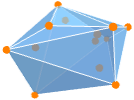
{"ConvexHull",dist,n} 来自分布 dist 的 n 个随机点的凸包 - RandomPolyhedron[{"ConvexHull",n}] 给出由来自单位正方形上的均匀分布 UniformDistribution[3] 的 n 个随机点构成的凸包.
- RandomPolyhedron[spec,{k1,k2,…}] 给出 k1×k2×… 的伪随机多面体数组.
- 每次运行 Wolfram 语言时,RandomPolyhedron 都会给出不同的伪随机多面体序列. 可通过 SeedRandom 获取可重复序列.
- RandomPolyhedron 和 Polyhedron 有同样的选项,并有以下更多选项: [所有选项的列表]
-
DataRange Automatic 生成的顶点坐标的范围 WorkingPrecision MachinePrecision 顶点坐标的精度 - 使用默认设置 DataRange Automatic 时,从 0 到 1 选择坐标.
所有选项的列表
范例
打开所有单元 关闭所有单元基本范例 (2)
范围 (4)
凸包多面体 (3)
RandomPolyhedron[{"ConvexHull", 10}]ConvexPolyhedronQ[%]RandomPolyhedron[{"ConvexHull", 20}, 2]Graphics3D[{Opacity[0.5], %}]RandomPolyhedron[{"ConvexHull", DirichletDistribution[{1, 2, 3, 4}], 10}]RandomPolyhedron[{"ConvexHull", UniformDistribution[3], 10}]RandomPolyhedron[{"ConvexHull", MultinormalDistribution[{1, 2, 3}, {{3.4, 2.4, 3.1}, {2.4, 3.5, 4}, {3.1, 4, 4.8}}], 10}]选项 (2)
DataRange (1)
DataRange 允许指定生成的顶点的范围:
RandomPolyhedron[{"ConvexHull", 5}]PolyhedronCoordinates[%]RandomPolyhedron[{"ConvexHull", 5}, DataRange -> {{-1, 1}, {-1, 1}, {-1, 1}}]PolyhedronCoordinates[%]应用 (3)
基本用法 (2)
Multicolumn[Table[Graphics3D[{Hue[t / 20], RandomPolyhedron[{"ConvexHull", 10}]}, ImageSize -> 30, Boxed -> False], {t, 80}], {8, 30}]n = Table[Floor[10 ^ i], {i, 1, 4, 1 / 40}];polys = Table[RandomPolyhedron[{"ConvexHull", i}], {i, n}];AllTrue[polys, ConvexPolyhedronQ]t = First[AbsoluteTiming[ConvexPolyhedronQ[#]]]& /@ polys;Show[{ListPlot[Transpose[{n, t}], PlotRange -> All, Joined -> True, AxesLabel -> {"n", "Time"}], Plot[Style[Evaluate[Fit[Transpose[{n, t}], {1, x}, x]], Red, Dashed], {x, 0, 10 ^ 5}]}]几何概率 (1)
polys = RandomPolyhedron[{"ConvexHull", 10}, 10000];volume = Volume /@ polys;adist = EstimatedDistribution[volume, NormalDistribution[μ, σ]]Show[Histogram[volume, Automatic, "PDF"], Plot[PDF[adist, x], {x, 0, 1}, PlotStyle -> Red, PlotRange -> All]]Mean[adist]属性和关系 (5)
用 SeedRandom 获取可重复的随机多面体:
{Graphics3D[RandomPolyhedron[{"ConvexHull", 6}]], Graphics3D[RandomPolyhedron[{"ConvexHull", 6}]]}{SeedRandom[1];Graphics3D[RandomPolyhedron[{"ConvexHull", 6}]], SeedRandom[1];Graphics3D[RandomPolyhedron[{"ConvexHull", 6}]]}用 BlockRandom 阻止 RandomPolyhedron 的使用对其他调用的影响:
{BlockRandom[Graphics3D[RandomPolyhedron[{"ConvexHull", 6}]]], Graphics3D[RandomPolyhedron[{"ConvexHull", 6}]]}用 ConvexPolyhedronQ 检查随机多面体的属性:
RandomPolyhedron[{"ConvexHull", 10}]ConvexPolyhedronQ[%]随机多面体的 OuterPolyhedron 是简单多面体:
𝒫 = RandomPolyhedron[{"ConvexHull", 10}]SimplePolyhedronQ[OuterPolyhedron[𝒫]]InnerPolyhedron[𝒫]用 PolyhedronDecomposition 将多面体分解为四面体:
RandomPolyhedron[{"ConvexHull", 6}]PolyhedronDecomposition[%, "Tetrahedron"]Graphics3D[{FaceForm[Pink], EdgeForm[{Thick, White}], %}]
Wolfram Research (2019),RandomPolyhedron,Wolfram 语言函数,https://reference.wolfram.com/language/ref/RandomPolyhedron.html.
文本
Wolfram Research (2019),RandomPolyhedron,Wolfram 语言函数,https://reference.wolfram.com/language/ref/RandomPolyhedron.html.
CMS
Wolfram 语言. 2019. "RandomPolyhedron." Wolfram 语言与系统参考资料中心. Wolfram Research. https://reference.wolfram.com/language/ref/RandomPolyhedron.html.
APA
Wolfram 语言. (2019). RandomPolyhedron. Wolfram 语言与系统参考资料中心. 追溯自 https://reference.wolfram.com/language/ref/RandomPolyhedron.html 年