

ArrayMesh
ArrayMesh[array]
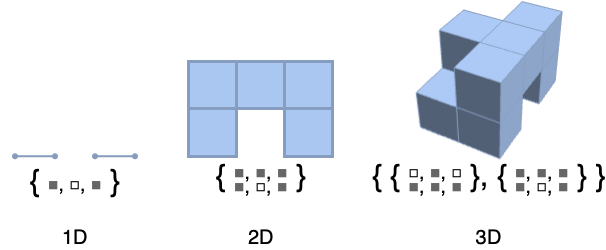
由秩为 d 的数组生成网格区域,其中各个单元具有几何维度 d,表示数组的非零值.
更多信息和选项
- ArrayMesh 由网格生成,单元为区间、正方形或立方体,网格点为均匀分布的整数点.
- ArrayMesh 对 array 的连续行向下排列,对连续列横向排列.
- ArrayMesh 具有与 MeshRegion 相同的选项,并有以下增加:
-
DataRange Automatic 要生成的网格坐标范围 DataReversed False 是否颠倒行序 - ArrayMesh 适用于 SparseArray 对象.
范例
打开所有单元 关闭所有单元基本范例 (3)
范围 (2)
ArrayMesh[{1, 1, 0, 0, 1}]ArrayMesh[{{1, 1, 0, 1}, {1, 1, 1, 1}, {0, 1, 0, 1}}]ArrayMesh[{{{1, 1}, {1, 1}, {1, 0}}, {{0, 1}, {1, 1}, {0, 0}}}]ArrayMesh 作用于 SparseArray:
ArrayMesh[SparseArray[{{x_, y_} /; Abs[x - y] < 2 -> 1}, {3, 3}]]选项 (14)
DataRange (1)
DataRange 允许指定所要生成网格的坐标范围:
ArrayMesh[{{1, 0}, {1, 1}}]MeshCoordinates[%]ArrayMesh[{{1, 0}, {1, 1}}, DataRange -> {{0, 1}, {0, 2}}]MeshCoordinates[%]DataReversed (1)
DataReversed 允许颠倒行序:
ArrayMesh[{{1, 0, 0}, {1, 1, 0}, {1, 0, 1}, {1, 1, 1}}]ArrayMesh[{{1, 0, 0}, {1, 1, 0}, {1, 0, 1}, {1, 1, 1}}, DataReversed -> True]MeshCellHighlight (2)
MeshCellHighlight 允许突出显示 ArrayMesh 的一部分:
ArrayMesh[{{1, 0}, {1, 1}}, MeshCellHighlight -> {{1, All} -> Red, {0, All} -> Green}]ArrayMesh[{{1, 0}, {1, 1}}, MeshCellHighlight -> {{1, 1} -> {Thick, Red}, {1, 2} -> {Dashed, Green}}]ArrayMesh[{{1, 0}, {1, 1}}, MeshCellHighlight -> {Line[{4, 6}] -> {Thick, Red}, Line[{5, 6}] -> {Dashed, Green}}]MeshCellLabel (2)
MeshCellLabel 可用于对 ArrayMesh 的一部分添加标签:
ArrayMesh[{{1, 0}, {1, 1}}, MeshCellLabel -> {0 -> "Index"}]ArrayMesh[{{1, 0}, {1, 1}}, MeshCellLabel -> {{1, 2} -> "x", {1, 1} -> "y"}]ArrayMesh[{{1, 0}, {1, 1}}, MeshCellLabel -> {Line[{5, 6}] -> "x", Line[{4, 6}] -> "y"}]MeshCellMarker (1)
MeshCellMarker 可用于对 ArrayMesh 的一部分进行赋值:
ArrayMesh[{{1, 0}}, MeshCellMarker -> {{0, 1} -> 1, {0, 2} -> 2, {0, 3} -> 3, {0, 4} -> 4}]使用 MeshCellLabel 显示标记:
ArrayMesh[{{1, 0}}, MeshCellMarker -> {{0, 1} -> 1, {0, 2} -> 2, {0, 3} -> 3, {0, 4} -> 4}, MeshCellLabel -> {0 -> "Marker"}]MeshCellShapeFunction (2)
MeshCellShapeFunction 可用于对 ArrayMesh 的一部分进行赋值:
ArrayMesh[{{{1, 0}}}, MeshCellShapeFunction -> {1 -> (Tube[#1, .1]&)}]ArrayMesh[{{{1, 0}}}, MeshCellShapeFunction -> {{1, 4} -> (Tube[#1, .1]&)}]ArrayMesh[{{{1, 0}}}, MeshCellShapeFunction -> {Line[{1, 2}] -> (Tube[#1, .1]&)}]MeshCellStyle (3)
MeshCellStyle 允许指定一部分 ArrayMesh 的样式化:
ArrayMesh[{{1, 0}}, MeshCellStyle -> {{1, All} -> Red, {0, All} -> Green}]ArrayMesh[{{1, 0}}, MeshCellStyle -> {{1, 1} -> {Thick, Red}, {1, 2} -> {Dashed, Green}}]ArrayMesh[{{1, 0}}, MeshCellStyle -> {Line[{3, 4}] -> {Thick, Red}, Line[{2, 4}] -> {Dashed, Green}}]ArrayMesh[{{1, 0, 0, 1}, {1, 1, 0, 1}, {1, 0, 1, 1}}, MeshCellStyle -> {{2, All} -> Black, {2, 1} -> Red, {2, {2, 3}} -> Pink}]应用 (15)
Cellular Automaton (5)
ArrayMesh[CellularAutomaton[30, {{1}, 0}, 50]]ArrayMesh /@ CellularAutomaton[{14, {2, 1}, {1, 1, 1}}, {{{{1}}}, 0}, 10]使用外部加总(Outer-totalistic)二维元胞自动机生成类似迷宫的模式:
ArrayMesh[CellularAutomaton[{746, {2, {{2, 2, 2}, {2, 1, 2}, {2, 2, 2}}}, {1, 1}}, {{Table[1, {7}]}, 0}, {{{150}}}]]c = CellularAutomaton[{224, {2, {{2, 2, 2}, {2, 1, 2}, {2, 2, 2}}}, {1, 1}}, {{{0, 1, 0}, {0, 0, 1}, {1, 1, 1}}, 0}, 8];glider = (First /@ Position[Flatten[#], 1])& /@ c;ArrayMesh[ConstantArray[1, {5, 5}], MeshCellStyle -> {{1, All} -> Black, {2, All} -> White, {2, #} -> Black}]& /@ gliderTable[ArrayMesh[CellularAutomaton[{i, {2, 1}, {1, 1}}, {{{1}}, 0}, {{{30}}}]], {i, 2, 20, 4}]Table[ArrayMesh[Mean[CellularAutomaton[{i, {2, 1}, {1, 1}}, {{{1}}, 0}, 10]]], {i, 2, 20, 4}]Image (2)
将二维图像转换为 MeshRegion:
img = [image];cells = ImageData[img];style = MapIndexed[{2, First[#2]} -> GrayLevel[#1] &, Flatten[cells]];ArrayMesh[cells, MeshCellStyle -> style]img = Image3D[RandomReal[1, {2, 3, 4}], ColorFunction -> GrayLevel]cells = Transpose[ImageData[img], {2, 3, 1}];style = MapIndexed[{3, First[#2]} -> GrayLevel[#1] &, Flatten[cells]];ArrayMesh[cells, MeshCellStyle -> style]Pattern (2)
ArrayMesh[Table[If[Mod[i, 4] == 2 && Mod[j, 4] == 2, 0, 1], {i, 11}, {j, 11}]]ArrayMesh[{{{1, 1, 1}, {1, 0, 1}, {1, 1, 1}},
{{1, 1, 1}, {1, 0, 1}, {1, 1, 1}}, {{1, 1, 1}, {1, 0, 1}, {1, 1, 1}}}]ArrayMesh[CellularAutomaton[{14, {2, 1}, {1, 1}}, {{{1}}, 0}, 10]]SeidelMesh[{r_, s_, t_}] := ArrayMesh[Table[If[Mod[i, 4] == 2 && Mod[j, 4] == 2 || Mod[i, 4] == 0 && Mod[k, 4] == 0 || Mod[j, 4] == 0 && Mod[k, 4] == 2, 0, 1], {i, 3 + r 4}, {j, 3 + s 4}, {k, 3 + t 4}]]SeidelMesh[{1, 1, 1}]HighlightMesh[BoundaryMesh[%], {Style[1, None], Style[2, Opacity[0.5]]}]SubstitutionSystem (4)
ArrayMesh[{1, 0, 1, 0, 0, 0, 1, 0, 1}]Table[Rationalize[RegionMeasure[ArrayMesh[n]]], {n, SubstitutionSystem[{1 -> {1, 0, 1}, 0 -> {0, 0, 0}}, {1}, 5]}]FindSequenceFunction[%, n]ArrayMesh[{#}]& /@ SubstitutionSystem[{1 -> {1, 0, 1}, 0 -> {0, 0, 0}}, {1}, 3]ArrayMesh /@ SubstitutionSystem[{1 -> {{1, 1, 1}, {1, 0, 1}, {1, 1, 1}}, 0 -> ConstantArray[0, {3, 3}]}, {{1}}, 3]ArrayMesh /@ SubstitutionSystem[{1 -> 1 - CrossMatrix[{1, 1, 1}], 0 -> ConstantArray[0, {3, 3, 3}]}, {{{1}}}, 3]Game Design (2)
m = Join@@ConstantArray[{{0, 1, 0, 1, 0, 1, 0, 1}, {1, 0, 1, 0, 1, 0, 1, 0}}, 4];p = First /@ Position[Flatten[m], 1];style = {{1, All} -> {Thick, Black}, {2, All} -> White, {2, #}& /@ p -> Black};r = ArrayMesh[ConstantArray[1, {8, 8}], MeshCellStyle -> style]m = Join@@ConstantArray[{{{0}, {1}, {0}, {1}, {0}, {1}, {0}, {1}}, {{1}, {0}, {1}, {0}, {1}, {0}, {1}, {0}}}, 4];p = First /@ Position[Flatten[m], 1];style = {{1, All} -> {Thick, Black}, {3, All} -> White, {3, #}& /@ p -> Black};r = ArrayMesh[ConstantArray[1, {8, 8, 1}], MeshCellStyle -> style]reg = ArrayMesh /@ {(| | | | |
| - | - | - | - |
| 1 | 0 | 0 | 0 |
| 1 | 0 | 0 | 0 |
| 1 | 0 | 0 | 0 |
| 1 | 0 | 0 | 0 |), (| | | | |
| - | - | - | - |
| 1 | 1 | 0 | 0 |
| 0 | 1 | 0 | 0 |
| 0 | 1 | 0 | 0 |
| 0 | 0 | 0 | 0 |), (| | | | |
| - | - | - | - |
| 1 | 1 | 0 | 0 |
| 1 | 0 | 0 | 0 |
| 1 | 0 | 0 | 0 |
| 0 | 0 | 0 | 0 |), (| | | | |
| - | - | - | - |
| 0 | 1 | 0 | 0 |
| 1 | 1 | 0 | 0 |
| 0 | 1 | 0 | 0 |
| 0 | 0 | 0 | 0 |), (| | | | |
| - | - | - | - |
| 1 | 0 | 0 | 0 |
| 1 | 1 | 0 | 0 |
| 0 | 1 | 0 | 0 |
| 0 | 0 | 0 | 0 |), (| | | | |
| - | - | - | - |
| 1 | 1 | 0 | 0 |
| 1 | 1 | 0 | 0 |
| 0 | 0 | 0 | 0 |
| 0 | 0 | 0 | 0 |), (| | | | |
| - | - | - | - |
| 1 | 1 | 0 | 0 |
| 0 | 1 | 1 | 0 |
| 0 | 0 | 0 | 0 |
| 0 | 0 | 0 | 0 |)}col = ColorData[97, "ColorList"];Table[MeshRegion[reg[[i]], MeshCellStyle -> {2 -> col[[i]]}], {i, 7}]属性和关系 (6)
ArrayMesh 的输出恒为全维的 MeshRegion:
ArrayMesh[RandomInteger[1, {3, 4}]]{MeshRegionQ[%], RegionDimension[%]}ArrayMesh 在一维中由区间组成:
ArrayMesh[{1, 1, 0, 0, 1}]MeshCells[%, RegionDimension[%]]ArrayMesh[{{0, 0, 1, 1}, {0, 1, 1, 0}, {1, 0, 0, 0}}]MeshCells[%, RegionDimension[%]]ArrayMesh[{{{1, 0}, {0, 1}}}]MeshCells[%, RegionDimension[%]]ArrayPlot 可用于生成图形:
arr = {{0, 1, 1, 0}, {1, 0, 1, 0}, {1, 1, 0, 1}};ArrayMesh[arr]ArrayPlot[arr]MatrixPlot 可用于生成图形:
arr = {{0, 1, 1, 0}, {1, 0, 1, 0}, {1, 1, 0, 1}};ArrayMesh[arr]MatrixPlot[arr]通过使用 BoundaryMesh 求边界网格区域:
BoundaryMesh[ArrayMesh[{{0, 1, 1, 0}, {1, 0, 1, 0}, {1, 1, 0, 1}}]]DataRange range 等价于使用 RescalingTransform[{...},range]:
ArrayMesh[{{1, 0}, {1, 1}}, DataRange -> {{1, 2}, {1, 3}}, Frame -> True]box = TransformedRegion[ArrayMesh[{{1, 0}, {1, 1}}], RescalingTransform[{{0, 2}, {0, 2}}, {{1, 2}, {1, 3}}]];MeshRegion[box, Frame -> True]文本
Wolfram Research (2016),ArrayMesh,Wolfram 语言函数,https://reference.wolfram.com/language/ref/ArrayMesh.html.
CMS
Wolfram 语言. 2016. "ArrayMesh." Wolfram 语言与系统参考资料中心. Wolfram Research. https://reference.wolfram.com/language/ref/ArrayMesh.html.
APA
Wolfram 语言. (2016). ArrayMesh. Wolfram 语言与系统参考资料中心. 追溯自 https://reference.wolfram.com/language/ref/ArrayMesh.html 年