

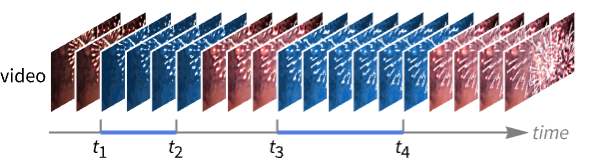
VideoIntervals
VideoIntervals[video,crit]
returns time intervals of video for which the criterion crit is satisfied.
VideoIntervals[video,crit,n]
evaluates criterion crit on partitions of n video frames.
VideoIntervals[video,crit,n,d]
evaluates crit on partitions with offset d.
VideoIntervals[{video1,video2,…},crit,…]
applies crit to a list of inputs extracted from each videoi.
Details and Options
- VideoIntervals can be used to detect time intervals of interest in a video, such as constant frame, silent audio intervals, intervals containing a specific object, etc.
- A criterion crit of a single argument gets applied to image frames or a list of image frames.
- A pure function crit can access video and audio data as well as time using the following arguments:
-
#Image video frames as Image objects #Audio a chunk of the audio as an Audio object #Time time from the beginning of the video #TimeInterval beginning and end time stamps for the current partition #FrameIndex index of the current output frame #InputFrameIndex index of the current input frame - In VideoIntervals[{video1,video2,…},crit,…], data provided to each of the arguments is a list where the
 element corresponds to the data extracted from videoi.
 - By default, partitions are offset by one frame.
- VideoIntervals supports video containers and codecs specified by $VideoDecoders.
- The following options can be given:
-
MaxItems Infinity maximum number of intervals to return VideoPadding Automatic padding to use for frames beyond last frame
Examples
open all close allBasic Examples (2)
Find video intervals with constant frames:
v = Video["ExampleData/Caminandes.mp4"];VideoIntervals[v, Max[#Image] - Min[#Image] < .01&]Find video intervals with loud audio:
v = Video["ExampleData/bullfinch.mkv"];VideoIntervals[v, First@Mean[Abs@#Audio] > .1&]Scope (6)
Specify the criterion as a pure function:
v = VideoTrim[Video["ExampleData/bullfinch.mkv"], {1, 2}];VideoIntervals[v, ImageMeasurements[#Image, "MeanIntensity"] < .47&]Specify the criterion as a normal function:
crit[assoc_] := ImageMeasurements[assoc["Image"], "MeanIntensity"] < .47VideoIntervals[v, crit]The input to the criterion function is an association with keys "Time", "TimeInterval", "Image", "FrameIndex", "InputFrameIndex" and "Audio" (if present):
v = VideoTrim[Video["ExampleData/bullfinch.mkv"], {1, 2}];inputs = {};
VideoIntervals[v, (AppendTo[inputs, #];False)&];
inputs[[1]]Evaluate the criterion on a buffer of five frames:
v = VideoTrim[Video["ExampleData/bullfinch.mkv"], {1, 2}];VideoIntervals[v, ImageMeasurements[Mean@#Image, "MeanIntensity"] < .47&, 5]If the partition size is not Automatic, the value for "Image" will be a list of images:
inputs = {};
VideoIntervals[v, (AppendTo[inputs, #];False)&, 5];inputs[[1, "Image"]]The value for "Audio" is always a single Audio object of the appropriate duration:
Duration@inputs[[1, "Audio"]]Evaluate the criterion on non-overlapping partitions of five frames:
v = Video["ExampleData/bullfinch.mkv"];VideoIntervals[v, ImageMeasurements[Mean@#Image, "MeanIntensity"] < .47&, 5, 5]Specify partition size and offset using time quantities:
v = Video["ExampleData/bullfinch.mkv"];VideoIntervals[v, ImageMeasurements[Mean@#Image, "MeanIntensity"] < .47&, Quantity[1, "Seconds"], Quantity[0.5, "Seconds"]]Compute intervals from multiple videos:
videos = {Video["ExampleData/bullfinch.mkv"], Video["ExampleData/fish.mp4"]};VideoIntervals[videos, ImageMeasurements[#Image[[1]], "MeanIntensity"] > ImageMeasurements[#Image[[2]], "MeanIntensity"]&]Options (2)
MaxItems (1)
By default, using MaxItems∞, the whole input is evaluated for possible intervals of interest:
v = Video["ExampleData/bullfinch.mkv"];Options[VideoIntervals]VideoIntervals[v, ImageMeasurements[#Image, "MeanIntensity"] < .47&]Stop the computation once n complete intervals have been detected:
VideoIntervals[v, ImageMeasurements[#Image, "MeanIntensity"] < .47&, MaxItems -> 2]VideoPadding (1)
When a video track is shorter than other tracks, black frames are used beyond its duration:
v1 = FrameListVideo[ConstantImage @* Hue /@ Most[Subdivide[10]], FrameRate -> 2];
v2 = VideoCombine[{v1, AudioGenerator["Sin", 10]}]VideoIntervals[v2, ImageMeasurements[#Image, "MeanIntensity"] < .3&]Use VideoPadding to specify a different color padding:
VideoIntervals[v2, ImageMeasurements[#Image, "MeanIntensity"] < .3&, VideoPadding -> White]Applications (2)
Find the intervals that contain the most motion in a video:
v = Video["ExampleData/bullfinch.mkv"];VideoIntervals[v, ImageMeasurements[ImageDifference@@#Image, "MeanIntensity"] > .025&, 2]Extract the corresponding frames:
VideoExtractFrames[v, Interval@@%]//ImageCollageFind the intervals that contain constant frames:
v = Video["ExampleData/Caminandes.mp4"];int = VideoIntervals[v, Max[#Image] - Min[#Image] < .1&]Delete such intervals from the video:
VideoDelete[v, int]Compare the duration of the original and resulting videos:
Duration /@ {v, %}Text
Wolfram Research (2020), VideoIntervals, Wolfram Language function, https://reference.wolfram.com/language/ref/VideoIntervals.html.
CMS
Wolfram Language. 2020. "VideoIntervals." Wolfram Language & System Documentation Center. Wolfram Research. https://reference.wolfram.com/language/ref/VideoIntervals.html.
APA
Wolfram Language. (2020). VideoIntervals. Wolfram Language & System Documentation Center. Retrieved from https://reference.wolfram.com/language/ref/VideoIntervals.html