

VideoMapTimeSeries
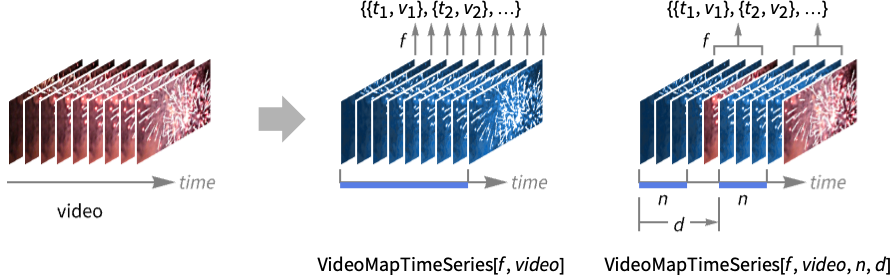
VideoMapTimeSeries[f,video]
applies f to each frame of the Video object video, returning a time series.
VideoMapTimeSeries[f,video,n]
applies f to overlapping partitions of n video frames.
VideoMapTimeSeries[f,video,n,d]
applies f to partitions with offset d.
VideoMapTimeSeries[f,{video1,video2,…},…]
applies f to a list of inputs extracted from each videoi.
Details and Options
- VideoMapTimeSeries can be used to detect temporal or spatial events in videos, such as object detection, motion detection or activity recognition.
- VideoMapTimeSeries returns a TimeSeries whose values are the results of f applied to an association including partial video data and their properties, such as video frames, audio data and time.
- The function f can access video and audio data using the following arguments:
-
#Image video frames as Image objects #Audio a chunk of the audio as an Audio object #Time time from the beginning of the video #TimeInterval beginning and end time stamps for the current partition #FrameIndex index of the current output frame #InputFrameIndex index of the current input frame - In VideoMapTimeSeries[f,{video1,video2,…},…], data provided to each of the arguments is a list where the
 element corresponds to the data extracted from videoi.
 - Using VideoMapTimeSeries[f,video,n], the partition slides by one image frame.
- Frame variables n and d can be given as a scalar specifying the number of frames or a time Quantity object.
- VideoMapTimeSeries supports video containers and codecs specified by $VideoDecoders.
- The following options can be given:
-
Alignment Center alignment of the time stamps with partitions MetaInformation None include additional metainformation MissingDataMethod None method to use for missing values ResamplingMethod "Interpolation" the method to use for resampling paths VideoPadding Automatic padding to use when input videos have different durations
Examples
open all close allBasic Examples (2)
Compute the mean of the RGB colors for every video frame and plot them:
v = Video["ExampleData/Caminandes.mp4"];ts = VideoMapTimeSeries[ImageMeasurements[#Image, "Mean"]&, v]DateListPlot[ts, PlotStyle -> {Red, Green, Blue}]Compute image distance between consecutive frames:
v = Video["ExampleData/Caminandes.mp4"];ts = VideoMapTimeSeries[ImageDistance@@#Image&, v, 2]Plot the result, showing times with significant scene change:
DateListPlot[ts, PlotRange -> All]Scope (5)
Inputs (1)
Compute a function on frames of multiple videos:
v1 = Video["ExampleData/rule30.mp4"];
v2 = Video["ExampleData/fish.mp4"];VideoMapTimeSeries[Subtract@@(Mean /@ #Image)&, {v1, v2}]ListLinePlot[%]If one video is longer than the other, use the VideoPadding option to control how the shorter one is padded:
VideoMapTimeSeries[Subtract@@(Mean /@ #Image)&, {v1, v2}, VideoPadding -> "Fixed"]ListLinePlot[%]Function Specification (2)
The function f receives an Association holding data for each partition:
v = Video["ExampleData/bullfinch.mkv"];Check the keys of the provided association:
Quiet[VideoMapTimeSeries[(Print[Keys[#]];Return[])&, v]];
Process individual video frames:
ts = VideoMapTimeSeries[ImageMeasurements[#Image, "StandardDeviation"]&, v]DateListPlot[ts, PlotRange -> All]The function f can operate on the audio data, provided as an Audio object:
v = Video["ExampleData/bullfinch.mkv"];Compute time-synchronous measurements on both image and audio data:
ts = VideoMapTimeSeries[Append[ImageMeasurements[#Image, "StandardDeviation"], AudioMeasurements[#Audio, "StandardDeviation"]]&, v]DateListPlot[ts, ...]Partition Specification (2)
Process partitions corresponding to four frames:
v = Import["http://exampledata.wolfram.com/popcorn.mov"];VideoMapTimeSeries[ImageMeasurements[Blend[#Image], "Mean"]&, v, 4]//DateListPlotSpecify a partition size using a time Quantity:
VideoMapTimeSeries[ImageMeasurements[Blend[#Image], "Mean"]&, v, Quantity[200, "Milliseconds"]]//DateListPlotBy default, the offset of one frame is used:
v = Import["http://exampledata.wolfram.com/popcorn.mov"];VideoMapTimeSeries[ImageMeasurements[Blend[#Image], "Mean"]&, v, 4]//DateListPlotVideoMapTimeSeries[ImageMeasurements[Blend[#Image], "Mean"]&, v, 4, 4]//DateListPlotSpecify an offset using a time Quantity:
VideoMapTimeSeries[ImageMeasurements[Blend[#Image], "Mean"]&, v, 4, Quantity[500, "Milliseconds"]]//DateListPlotSpecify an offset proportional to the partition size by a Scaled amount:
VideoMapTimeSeries[ImageMeasurements[Blend[#Image], "Mean"]&, v, 4, Scaled[1 / 2]]//DateListPlotOptions (3)
Alignment (1)
By default, the time stamps are aligned with the center of each partition and correspond to the value of the "Time" key:
v = Video["ExampleData/bullfinch.mkv"];Normal[VideoMapTimeSeries[#Time&, v]][[ ;; 3]]Use AlignmentRight to return the computed property at the end of each partition:
Normal[VideoMapTimeSeries[#Time&, v, Alignment -> Right]][[ ;; 3]]Use a custom alignment ranging from –1 (left) to 1 (right):
Normal[VideoMapTimeSeries[#Time&, v, Alignment -> -.5]][[ ;; 3]]The boundaries of each partition are the start time for the first frame and the end time for the last frame of the partition. They can be queried using the "TimeInterval" key:
Normal[VideoMapTimeSeries[#TimeInterval&, v]][[ ;; 3]]VideoPadding (2)
When a video track is shorter than other tracks, black frames are used beyond its duration:
v1 = FrameListVideo[Table[ConstantImage[RandomColor[]], 6], FrameRate -> 1];
v2 = VideoCombine[{v1, AudioGenerator["Sin", 10]}]RGBColor@@@Normal[Values[VideoMapTimeSeries[Mean[#Image]&, v2]]]Use VideoPadding to specify a different color padding:
RGBColor@@@Normal[Values[VideoMapTimeSeries[Mean[#Image]&, v2, VideoPadding -> Red]]]Use "Fixed" padding to repeat the last frame:
RGBColor@@@Normal[Values[VideoMapTimeSeries[Mean[#Image]&, v2, VideoPadding -> "Fixed"]]]When using a partition size larger than 1, black frames are used for the last partitions:
v = Video["ExampleData/rule30.mp4"];Information[v, "FrameCount"]ListLinePlot[VideoMapTimeSeries[Mean @* Mean /@ #Image&, v, 5]]Use no padding, resulting in partitions of different lengths:
ListPlot[VideoMapTimeSeries[Length@#Image&, v, 5, VideoPadding -> None]]Applications (2)
Find portions of a video with constant images:
v = Video["ExampleData/Caminandes.mp4"];Define a function to detect whether an image has constant pixel values:
constantQ[img_] := Boole[Total[Subtract@@ImageMeasurements[img, {"Max", "Min"}]] < .1]Apply the function to each frame and plot the result:
VideoMapTimeSeries[constantQ[#Image]&, v]//ListLinePlotCount the number of cars in each frame:
v = Video["http://exampledata.wolfram.com/cars.avi"]VideoMapTimeSeries[Length@ImageCases[#Image, Entity["Concept", "Auto::p735c"]]&, v]//ListLinePlotProperties & Relations (1)
VideoMapTimeSeries returns the results along with corresponding times in a TimeSeries:
v = Video["ExampleData/bullfinch.mkv"];VideoMapTimeSeries[ImageMeasurements[First[#Image], "MeanIntensity"]&, v, Quantity[2, "Seconds"], Quantity[2, "Seconds"]]Normal[%]Use VideoMapList to get a list of results without time stamps:
VideoMapList[ImageMeasurements[First[#Image], "MeanIntensity"]&, v, Quantity[2, "Seconds"], Quantity[2, "Seconds"]]Text
Wolfram Research (2020), VideoMapTimeSeries, Wolfram Language function, https://reference.wolfram.com/language/ref/VideoMapTimeSeries.html (updated 2021).
CMS
Wolfram Language. 2020. "VideoMapTimeSeries." Wolfram Language & System Documentation Center. Wolfram Research. Last Modified 2021. https://reference.wolfram.com/language/ref/VideoMapTimeSeries.html.
APA
Wolfram Language. (2020). VideoMapTimeSeries. Wolfram Language & System Documentation Center. Retrieved from https://reference.wolfram.com/language/ref/VideoMapTimeSeries.html