
ColorBalance
ColorBalance[image]
调整 image 中的颜色,以实现模拟中性照明效果的平衡.
ColorBalance[image,ref]
调整 image 中的颜色,使得由 ref 指定的基准色被映射到白色.
ColorBalance[image,reftarget]
映射基准色 ref 至 target.
更多信息和选项
- ColorBalance 通常用于白色或灰色平衡,消除对图像不切实际的色偏. 这通常会导致将中性颜色的对象表示为灰色.
- ColorBalance 适用于有明确的色彩空间的图像. 具有 ColorSpace->Automatic 的图像将在被调整之前转换为 "RGB" 或 "Grayscale".
- ref 或 target 均可以是下面任何一种:
-
color 明确颜色 whitepoint 已命名白点,用作 WhitePoint 的设置 temperature 由温度指定的颜色 {temperature,tint} 由温度和色调指定的颜色 {pos1,pos2,…} 原始图像中在位置 posi 处的平均颜色 markerimage 根据标记图像采样的平均颜色 - 上述平均颜色在 Lab 色彩空间被计算.
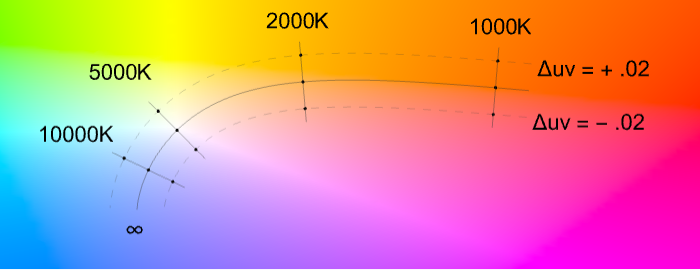
- temperature 可以以开尔文的值指定,通常范围在 2000 K 和 20,000 K 之间. tint 可以用
 的单位给出,通常范围在
  和
和  之间.
之间. - 温度和色调可以在下面的 MacAdam 色度图中表示,其中该曲线对应于辐射黑体,色调调整是等温线上的移动,与该温度曲线垂直.
- ColorBalance 取 Method 选项. 可能的设置包括:
-
"GrayScaling" 图像均值的缩放 "RGBScaling" 在 RGB 空间中的缩放 "LMSScaling" 在 LMS 空间中的缩放 "ChromaticityScaling" 在 LMS 空间的色度缩放 - 如果方法设置为 "LMSScaling",则在执行缩放时,采用 Bradford 变换矩阵在 XYZ 和 LMS 之间转换.
- 如果给出一个 {temperature,tint} 数对,则始终使用 Method"ChromaticityScaling";否则使用 Method->"LMSScaling". »
范例
打开所有单元 关闭所有单元范围 (8)
ColorBalance[[image], RGBColor[0.5, 1., 0.5]]ColorBalance[[image], {{22, 9}, {136, 27}, {139, 11}}]ColorBalance[[image], [image]]ColorBalance[[image], Quantity[4200, "Kelvins"]]ColorBalance[[image], {Quantity[4200, "Kelvins"], .02}]ColorBalance[[image], RGBColor[1., 0.85, 0.85] -> GrayLevel[1]]通过指定基准和目标 WhitePoint 执行色彩适应:
ColorBalance[[image], "D50" -> "F6"]通过指定基准色和目标 WhitePoint 执行色彩适应:
ColorBalance[[image], RGBColor[1., 0.85, 0.85] -> "D50"]选项 (6)
Method (6)
使用 Method->"RGBScaling" 在 RGB 空间重新缩放图像:
ColorBalance[[image], Method -> "RGBScaling"]当强偏色存在时,缩放 RGB 空间中的像素可能无法修复色偏:
image = [image];ColorBalance[image, Method -> "RGBScaling"]使用 Method->"LMSScaling" 在 LMS 空间缩放像素:
ColorBalance[image, Method -> "LMSScaling"]使用 Method->"ChromaticityScaling" 使平均色中性(灰色阴影):
ColorBalance[image, Method -> "ChromaticityScaling"]i = [image];ColorBalance[i, Method -> "RGBScaling"]% == ImageMultiply[i, 1 / ImageMeasurements[i, "Max"]]"ChromaticityScaling" 通常会创建更加平衡的图像:
image = [image];Table[Prepend[AbsoluteTiming[ColorBalance[image, Method -> m]], m], {m, {"RGBScaling", "LMSScaling", "ChromaticityScaling"}}]//Transpose//Grid如果颜色使用温度和色调指定,则使用 Method->"ChromaticityScaling":
image = ImageResize[ExampleData[{"TestImage", "Peppers"}], 100];ColorBalance[image, Quantity[3800, "Kelvins"], Method -> #]& /@ {Automatic, "RGBScaling", "ChromaticityScaling"}SameQ[%]image = [image];ImageMeasurements[image, "Max"]"RGBScaling" 和 "LMSScaling" 假设图像包含一个白色的物体:
ColorBalance[image, Method -> #]& /@ {"RGBScaling", "LMSScaling"}ImageMeasurements[#, "Max"]& /@ %"ChromaticityScaling" 假定平均色是中性的(即灰色):
ImageMeasurements[image, "Mean"]ColorBalance[image, Method -> "ChromaticityScaling"]ImageMeasurements[%, "Mean"]应用 (4)
水下图像 (2)
ColorBalance[[image], Method -> "LMSScaling"]如果白色像素已经存在,Method"LMSScaling" 的影响将很小或没有:
i = [image];ImageDifference[ColorBalance[i, Method -> "LMSScaling"], i]ColorBalance[i]ColorBalance[i, Binarize[i, {.5, 1}]]一天中的不同时间 (1)
i = [image];ColorBalance[i, Automatic -> Quantity[4000, "Kelvins"]]ColorBalance[i, Automatic -> Quantity[5500, "Kelvins"]]ColorBalance[i, Automatic -> Quantity[7000, "Kelvins"]]属性和关系 (2)
当图像有暗像素时,ImageAdjust 生成的结果与 "RGBscaling" 方法相似:
reddish = [image];
ImageAdjust[reddish] ==
	ColorBalance[reddish, Method -> "RGBScaling"]
通过 ColorBalance 执行的色度映射一般是不可逆的:
i = [image];ColorBalance[ColorBalance[i, "D50" -> "D65"], "D65" -> "D50"]% == i可能存在的问题 (1)
i = [image];houses = FillingTransform@Binarize[ColorDistance[i, Blue], 1.2]ColorBalance[i, houses -> Quantity[3000, "Kelvins"]]ColorBalance[i, ColorNegate@houses -> Quantity[8000, "Kelvins"]]文本
Wolfram Research (2015),ColorBalance,Wolfram 语言函数,https://reference.wolfram.com/language/ref/ColorBalance.html.
CMS
Wolfram 语言. 2015. "ColorBalance." Wolfram 语言与系统参考资料中心. Wolfram Research. https://reference.wolfram.com/language/ref/ColorBalance.html.
APA
Wolfram 语言. (2015). ColorBalance. Wolfram 语言与系统参考资料中心. 追溯自 https://reference.wolfram.com/language/ref/ColorBalance.html 年