---
title: "ImageKeypoints"
language: "en"
type: "Symbol"
summary: "ImageKeypoints[image] finds key features in image and returns their coordinates. ImageKeypoints[image, prop] gives the specified property prop for each keypoint. ImageKeypoints[video, ...] finds keypoints in frames of video."
keywords: 
- SIFT
- SURF
- FAST
- AGAST
- BRISK
- KAZE
- AKAZE
- ORB
- MSER
- keypoints
- interest points
- image feature
- corner features
- corner detect
- image corners
- image landmarks
- points of interest
- key point
- keypoint descriptor
- Speeded-Up Robust Features
- Features from Accelerated Segment Test
- Adaptive and Generic Accelerated Segment Test
- Binary Robust Invariant Scalable Keypoints
- Binary Robust Independent Elementary Features
- BRIEF descriptor
- nonlinear scale-space detector and descriptor
- Accelerated KAZE
- Oriented FAST
- Rotated BRIEF
- feature detection
- feature descriptor
- HOG
canonical_url: "https://reference.wolfram.com/language/ref/ImageKeypoints.html"
source: "Wolfram Language Documentation"
related_guides: 
  - 
    title: "Feature Detection"
    link: "https://reference.wolfram.com/language/guide/FeatureDetection.en.md"
  - 
    title: "Image Processing & Analysis"
    link: "https://reference.wolfram.com/language/guide/ImageProcessing.en.md"
  - 
    title: "Computer Vision"
    link: "https://reference.wolfram.com/language/guide/ComputerVision.en.md"
  - 
    title: "Video Analysis"
    link: "https://reference.wolfram.com/language/guide/VideoAnalysis.en.md"
  - 
    title: "Image Computation for Microscopy"
    link: "https://reference.wolfram.com/language/guide/ImageComputationForMicroscopy.en.md"
  - 
    title: "Video Computation: Update History"
    link: "https://reference.wolfram.com/language/guide/VideoComputation-UpdateHistory.en.md"
related_functions: 
  - 
    title: "ImageCorrespondingPoints"
    link: "https://reference.wolfram.com/language/ref/ImageCorrespondingPoints.en.md"
  - 
    title: "CornerFilter"
    link: "https://reference.wolfram.com/language/ref/CornerFilter.en.md"
  - 
    title: "ImageCorners"
    link: "https://reference.wolfram.com/language/ref/ImageCorners.en.md"
  - 
    title: "ImageSaliencyFilter"
    link: "https://reference.wolfram.com/language/ref/ImageSaliencyFilter.en.md"
  - 
    title: "ImageAlign"
    link: "https://reference.wolfram.com/language/ref/ImageAlign.en.md"
  - 
    title: "ImageStitch"
    link: "https://reference.wolfram.com/language/ref/ImageStitch.en.md"
---
# ImageKeypoints

ImageKeypoints[image] finds key features in image and returns their coordinates.

ImageKeypoints[image, prop] gives the specified property prop for each keypoint.

ImageKeypoints[video, …] finds keypoints in frames of video.

## Details and Options

* Image keypoints are distinct positions on an image highlighting specific image features such as shape, contrast, orientation. Corresponding keypoints are typically used for aligning images.

* ``ImageKeypoints[image]`` finds image keypoints and returns their positions as a list of ``{{x1, y1}, {x2, y2}, …}``.

* The following properties can be specified:

|     |     |
| --- | --- |
| "Confidence" | blob response, given as a positive number  |
| "ContrastSign" | $1$ if the keypoint is lighter than its surroundings, $-1$ otherwise |

| "Descriptor" | keypoint descriptor |
| "Orientation" | orientation angle, given in radians |
| "OrientedDescriptor" | keypoint-oriented descriptor |
| "PixelPosition" | pixel coordinates {x, y} in the range $0.5\leq x\leq w+0.5$, $0.5\leq y\leq h+0.5$ |
| "Position" | image coordinates {x, y} in the range $0\leq x\leq w$, $0\leq y\leq h$ (default) |
| "Scale" | keypoint scale |

* ``ImageKeypoints`` sorts the results based on the ``"Confidence"`` property of the keypoints.

* ``ImageKeypoints[image, {prop1, prop2, …}]`` returns multiple properties.

* The feature descriptors returned by ``ImageKeypoints`` are numerically robust against translation, rotation, and scale changes.

* The following options can be specified:

|                   |        |                                   |
| ----------------- | ------ | --------------------------------- |
| KeypointStrength  | 0      | minimum strength of the keypoints |
| Masking           | All    | region of interest                |
| MaxFeatures       | All    | maximum number of keypoints       |
| Method            | "SURF" | type of keypoint to return        |

* With a setting ``MaxFeatures -> n``, at most ``n`` keypoints with largest ``"Confidence"`` are returned.

* Possible method settings include:

|            |                                                                                    |
| ---------- | ---------------------------------------------------------------------------------- |
| "AGAST"    | Adaptive and Generic Accelerated Segment Test                                      |
| "AKAZE"    | Accelerated KAZE and binary descriptors                                            |
| "BRISK"    | Binary Robust Invariant Scalable Keypoints                                         |
| "FAST"     | Features from Accelerated Segment Test                                             |
| "KAZE"     | nonlinear scale-space detector and descriptor                                      |
| "ORB"      | FAST detector and Binary Robust Independent Elementary Features (BRIEF) descriptor |
| "SIFT"     | Scale-Invariant Feature Transform detector and descriptor                          |
| "RootSIFT" | SIFT keypoints with an improved descriptor                                         |
| "SURF"     | Speeded-Up Robust Features                                                         |

* When a property is not available with a specified method, the corresponding element in the result is set to ``Missing["NotAvailable"]``. »

## Examples (35)

### Basic Examples (2)

Find keypoints in an image:

```wl
In[1]:= i = [image];

In[2]:= ImageKeypoints[i]//Short

Out[2]//Short= {{102.083, 44.9319}, «35», {29.2972, 25.9931}}
```

Highlight keypoints on the image:

```wl
In[3]:= HighlightImage[i, %]

Out[3]= [image]
```

---

Count the number of points of interest in an image:

```wl
In[1]:= ImageKeypoints[[image]]//Length

Out[1]= 177
```

### Scope (10)

Keypoints of a grayscale image:

```wl
In[1]:= ImageKeypoints[[image]]//Short

Out[1]//Short= {{98.0887, 71.2329}, «191», {75.3121, 81.994}}
```

---

Keypoints of a color image:

```wl
In[1]:= ImageKeypoints[[image]]//Short

Out[1]//Short= {{163.31, 109.279}, «294», {100.572, 74.2185}}
```

---

Find keypoints in an image:

```wl
In[1]:= ImageKeypoints[[image]]

Out[1]= {{12.5, 12.5}}
```

Return the keypoint descriptor:

```wl
In[2]:= ImageKeypoints[[image], "Descriptor"]

Out[2]= {{0., 0., 0., 0., 0., 0., 0., 0., 0., 0., 0., 0., 0., 0., 0., 0., 0., 0., 0., 0., 0.199398, 0.258667, 0.30637, 0.314831, -0.187523, 0.193918, 0.2656, 0.231087, 0., 0., 0., 0., 0., 0., 0., 0., 0.199666, -0.225953, 0.313389, 0.353752, -0.176911, -0.143986, 0.271529, 0.252103, 0., 0., 0., 0., 0., 0., 0., 0., 0.00141122, -0.00412431, 0.00141122, 0.00412431, 0.000734154, -0.00214558, 0.000734154, 0.00214558, 0., 0., 0., 0.}}
```

---

Compute multiple properties:

```wl
In[1]:= ImageKeypoints[[image], {"Scale", "Orientation", "ContrastSign"}]//MatrixForm

Out[1]//MatrixForm=
(⁠|         |          |    |
| ------- | -------- | -- |
| 2.13024 | -2.78865 | 1  |
| 1.98946 | -2.95658 | -1 |
| 3.70163 | -2.88811 | -1 |
| 3.59771 | 0.810499 | 1  |
| 1.98086 | -1.26089 | 1  |
| 2.01462 | 1.11639  | -1 |
| 2.8035  | -2.80872 | 1  |
| 1.8941  | -2.78867 | 1  |⁠)
```

---

Get properties ``"Position"`` and ``"PixelPosition"`` :

```wl
In[1]:= pos = ImageKeypoints[[image], {"Position", "PixelPosition"}]

Out[1]= {{{12.5, 12.5}, {13., 13.}}}
```

The two corresponding coordinate systems are offset by half a pixel:

```wl
In[2]:= pos[[All, 1]] + 1 / 2 == pos[[All, 2]]

Out[2]= True
```

---

Get the ``"Scale"`` in pixels:

```wl
In[1]:= img = [image];

In[2]:= scales = ImageKeypoints[img, "Scale"]

Out[2]= {2.21343}
```

The scale corresponds to the size of an intrinsic region around the keypoint. Visualize the disc region 
around a ``"SURF"`` keypoint:

```wl
In[3]:= HighlightImage[img, {Thick, MapThread[Circle, {ImageKeypoints[img, "Position"], 2.5 * scales}]}, ImageSize -> 100]

Out[3]= [image]
```

---

Get the ``"Orientation"`` in radians:

```wl
In[1]:= img = [image];

In[2]:= orient = ImageKeypoints[img, "Orientation"]

Out[2]= {-1.84986, 1.08056, 1.29365, 2.05224, 0.172715, 1.86136}
```

Show keypoints with a pattern rotated based on orientation:

```wl
In[3]:=
HighlightImage[img, 
	MapThread[
	{Circle[#2, 5], Line[{#2, #2 + 5 * {Cos[#1], Sin[#1]}}]}&, 
	{orient, ImageKeypoints[img]}], 
	ImageSize -> 200]

Out[3]= [image]
```

---

Get the ``"Strength"`` score:

```wl
In[1]:=
img = [image];
strength = ImageKeypoints[img, "Confidence"];
strength//Short

Out[1]//Short= {0.0141614, 0.0115542, «101», 0.000107762, 0.000105994}
```

Display the distribution of the strength of keypoints in an image:

```wl
In[2]:= Histogram@strength

Out[2]= [image]
```

---

Get the ``"Descriptor"`` representing the distribution of pixel values inside a keypoint's neighborhood:

```wl
In[1]:= img = [image];

In[2]:= desc1  = ImageKeypoints[img, "Descriptor", MaxFeatures -> 1];
```

The descriptor is similar to the one of the rotated image:

```wl
In[3]:= desc2 = ImageKeypoints[ImageRotate@img, "Descriptor", MaxFeatures -> 1];

In[4]:= EuclideanDistance[desc1, desc2]

Out[4]= 0.0184015
```

---

The ``"ConstrastSign"`` is ``1`` for keypoints lighter than their surroundings:

```wl
In[1]:= ImageKeypoints[[image], "ContrastSign"]

Out[1]= {1}
```

The sign is ``-1`` for keypoints darker than their surroundings:

```wl
In[2]:= ImageKeypoints[[image], "ContrastSign"]

Out[2]= {-1}
```

### Options (11)

#### KeypointStrength (1)

Use a specific threshold for keypoint strength:

```wl
In[1]:= ImageKeypoints[[image], KeypointStrength -> .005]

Out[1]= {{113.393, 129.029}, {133.005, 116.205}, {134.401, 69.0896}, {169.158, 117.046}, {105.003, 119.295}, {101.015, 65.6986}, {114.445, 118.947}, {137.663, 119.282}, {20.1319, 131.889}}
```

By default, all detected keypoints are returned:

```wl
In[2]:= ImageKeypoints[[image]]//Length

Out[2]= 118
```

#### Masking (1)

By default, all keypoints are returned:

```wl
In[1]:= i = [image];

In[2]:= HighlightImage[i, ImageKeypoints[i]]

Out[2]= [image]
```

Exclude keypoints in the foreground using a mask region:

```wl
In[3]:= HighlightImage[i, ImageKeypoints[i, Masking -> [image]]]

Out[3]= [image]
```

#### MaxFeatures (1)

By default, all detected keypoints are returned:

```wl
In[1]:= img = [image];

In[2]:=
pos = ImageKeypoints[img];
HighlightImage[img, pos]

Out[2]= [image]
```

Get the 50 strongest keypoints:

```wl
In[3]:=
pos = ImageKeypoints[img, MaxFeatures -> 50];
HighlightImage[img, pos]

Out[3]= [image]
```

#### Method (8)

By default, ``"SURF"`` keypoints are computed:

```wl
In[1]:= i = [image];

In[2]:= HighlightImage[i, ImageKeypoints[i]]

Out[2]= [image]
```

Compute and visualize a different keypoint:

```wl
In[3]:= HighlightImage[i, ImageKeypoints[i, Method -> "AKAZE", MaxFeatures -> 80]]

Out[3]= [image]
```

---

``"FAST"`` and ``"AGAST"`` keypoints are defined by their location and strength at scale ``3.5`` :

```wl
In[1]:= i = [image];

In[2]:= ImageKeypoints[i, {"Position", "Confidence", "Scale"}, Method -> "FAST", MaxFeatures -> 50]//Short

Out[2]//Short= {{{264.5, 148.5}, 0.67451, 3.5}, «48», {{130.5, 16.5}, 0.341176, 3.5}}
```

Compute and visualize FAST keypoints:

```wl
In[3]:= HighlightImage[i, ImageKeypoints[i, Method -> "FAST", MaxFeatures -> 50]]

Out[3]= [image]
```

Compute and visualize AGAST keypoints:

```wl
In[4]:= HighlightImage[i, ImageKeypoints[i, Method -> "AGAST", MaxFeatures -> 50]]

Out[4]= [image]
```

---

``"BRISK"`` and ``"ORB"`` keypoints are defined by their location, scale, orientation and strength:

```wl
In[1]:= img = [image];

In[2]:= {brisk, orb} = ImageKeypoints[img, {"Position", "Scale", "Orientation", "Confidence"}, Method -> #]& /@ {"BRISK", "ORB"};

In[3]:= RandomSample[brisk, 2]

Out[3]= {{{166.453, 92.5699}, 6.10714, 1.75241, 0.20014}, {{260.066, 52.9938}, 5.13158, -1.64267, 0.210965}}

In[4]:= RandomSample[orb, 2]

Out[4]= {{{197.5, 124.5}, 15.5, 1.49664, 0.0941176}, {{243.86, 112.34}, 22.32, -1.16528, 0.0941176}}
```

Descriptors are vectors of 0s and 1s of length 512 for ``"BRISK"`` and 256 for ``"ORB"``:

```wl
In[5]:= {brisk, orb} = ImageKeypoints[img, "Descriptor", Method -> #]& /@ {"BRISK", "ORB"};

In[6]:= brisk[[1]]//Short

Out[6]//Short= {1, 0, 1, 1, 0, 0, 0, 0, 1, 1, 1, 1, 1, 1, 1, 1, 1, 1, 1, 1, 1, 1, 1, «466», 0, 0, 0, 1, 1, 0, 0, 1, 0, 0, 0, 0, 1, 0, 1, 1, 1, 1, 1, 1, 1, 1, 1}

In[7]:= orb[[1]]//Short

Out[7]//Short= {0, 1, 1, 0, 1, 1, 1, 0, 1, 0, 0, 1, 1, 1, 0, 0, 1, 1, 1, 1, 0, 1, 0, 0, «209», 1, 1, 1, 1, 1, 0, 0, 0, 1, 1, 0, 1, 1, 0, 1, 1, 1, 0, 1, 1, 1, 1, 0}

In[8]:= Dimensions[#]& /@ {brisk, orb}

Out[8]= {{1177, 512}, {1465, 256}}
```

---

``"AKAZE"`` and ``"KAZE"`` keypoints are defined by their location, scale, orientation and strength:

```wl
In[1]:= img = [image];

In[2]:= {akaze, kaze} = ImageKeypoints[img, {"Position", "Scale", "Orientation", "Confidence"}, Method -> #]& /@ {"AKAZE", "KAZE"};

In[3]:= RandomSample[akaze, 2]

Out[3]= {{{161.642, 97.1897}, 2.4, -1.46662, 0.000260203}, {{139.713, 78.3051}, 2.8541, -1.65032, 0.00300363}}

In[4]:= RandomSample[kaze, 2]

Out[4]= {{{178.257, 9.37134}, 1.73862, 1.99494, 0.00017098}, {{288.536, 46.7876}, 2.68413, 1.56546, 0.000394891}}
```

AKAZE descriptors are vectors of 0s and 1s of length 480:

```wl
In[5]:= ImageKeypoints[img, "Descriptor", Method -> "AKAZE"]//Shallow

Out[5]//Shallow= {{0, 0, 0, 1, 1, 1, 0, 0, 0, 1, «470»}, {1, 0, 1, 1, 0, 1, 1, 0, 0, 1, «470»}, {0, 0, 0, 1, 0, 1, 1, 0, 1, 1, «470»}, {0, 0, 1, 1, 1, 1, 1, 0, 0, 0, «470»}, {0, 0, 0, 1, 0, 0, 1, 0, 0, 0, «470»}, {1, 0, 0, 1, 0, 0, 1, 0, 0, 1, «470»}, {1, 0, 0, 1, 0, 0, 1, 0, 0, 1, «470»}, {0, 0, 0, 1, 0, 0, 0, 0, 0, 0, «470»}, {0, 1, 1, 0, 0, 1, 0, 1, 1, 0, «470»}, {0, 0, 0, 0, 0, 1, 0, 0, 0, 1, «470»}, «397»}

In[6]:= Dimensions[%]

Out[6]= {407, 480}
```

KAZE descriptors are vectors of 128 real numbers with unit norm:

```wl
In[7]:= ImageKeypoints[img, "Descriptor", Method -> "KAZE"]//Short

Out[7]//Short= {{0.0226858, 0.0205922, «124», 0., 0.0357642}, «799», {-«20», «126», «20»}}

In[8]:= {Dimensions[%], Norm /@ RandomSample[%, 5]}

Out[8]= {{801, 128}, {1., 1., 1., 1., 1.}}
```

---

AKAZE oriented descriptors are computed without correcting for keypoints' intrinsic orientation:

```wl
In[1]:= img = [image];

In[2]:= {kod, orientations} = Transpose@ImageKeypoints[img, {"OrientedDescriptor", "Orientation"}, Method -> "AKAZE"];
```

Oriented descriptors match descriptors for keypoints with orientation close to 0:

```wl
In[3]:= δ = MapThread[HammingDistance, {kod, ImageKeypoints[img, "Descriptor", Method -> "AKAZE"]}];

In[4]:= Pick[orientations, δ, x_ /; x < 20]

Out[4]= {0.0316352, -0.0266809, -0.00299276, 0.0270396, 0.0371633, -0.0103528, -0.0196814, -0.00434364, 0.0376635, 0.00727309, -0.0188098, 0.0127699, -0.0436393}
```

---

With the ``"SURF"`` method, a keypoint is defined by its location, scale, orientation, contrast sign and strength:

```wl
In[1]:= img = [image];

In[2]:= surf = ImageKeypoints[img, {"Position", "Scale", "Orientation", "ContrastSign", "Confidence"}];

In[3]:= RandomSample[surf, 2]

Out[3]= {{{183.544, 139.811}, 2.69173, 1.6581, -1, 0.00119424}, {{187.856, 182.848}, 7.35564, -1.16095, -1, 0.00452693}}
```

SURF descriptors consist of vectors of 64 real numbers with unit norm:

```wl
In[4]:= ImageKeypoints[img, "Descriptor", Method -> "SURF"]//Short

Out[4]//Short= {{-0.0106782, -0.0235478, «61», 0.13903}, «678», {-«21», «62», «20»}}

In[5]:= {Dimensions[%], Norm /@ RandomSample[%, 5]}

Out[5]= {{680, 64}, {1., 1., 1., 1., 1.}}
```

Oriented descriptors match descriptors for keypoints with orientation close to 0:

```wl
In[6]:= {kod, orientations} = Transpose@ImageKeypoints[img, {"OrientedDescriptor", "Orientation"}];

In[7]:= δ = MapThread[EuclideanDistance, {kod, ImageKeypoints[img, "Descriptor"]}];

In[8]:= Pick[orientations, δ, x_ /; x < 0.15]

Out[8]= {0.0651229, 0.0321778, -0.0698677, 0.0692342, 0.0413144, -0.108111, -0.0823242, -0.17065, -0.141346, -0.0485015}
```

---

The ``"SIFT"`` method uses Scale-Invariant Feature Transform to find the location of image keypoints:

```wl
In[1]:= img = [image];

In[2]:=
ImageKeypoints[img, {"Position", "Scale", "Orientation", "Confidence"}, Method -> "SIFT"];
RandomSample[%, 2]

Out[2]= {{{172.645, 110.176}, 0.90361, 1.75438, 0.0430529}, {{56.6768, 21.4274}, 1.16131, -0.370509, 0.0314519}}
```

The descriptors use histograms of orientations to construct vectors of 128 numbers:

```wl
In[3]:= desc = ImageKeypoints[img, "Descriptor", Method -> "SIFT"];

In[4]:= Short /@ RandomSample[desc, 2]

Out[4]= {{8., 6., 8., 16., 6., 1., 0., 37., 7., 64., 65., «107», 0., 4., 49., 29., 3., 0., 3., 4., 15., 22.}, {5., 23., 7., 1., 16., 50., 3., 2., 78., 43., «108», 17., 23., 0., 0., 3., 20., 125., 53., 4., 0.}}
```

Note that the norm of the descriptor is not equal to one:

```wl
In[5]:= Norm /@ RandomSample[desc, 5]

Out[5]= {511.65, 512.287, 512.149, 512.281, 511.763}
```

---

The ``"RootSIFT"`` method uses the same keypoints locations as ``"SIFT"``, but improved descriptors:

```wl
In[1]:= ImageKeypoints[[image], "Descriptor", Method -> "RootSIFT"]//Short

Out[1]//Short= {{0.0495885, 0.0369611, «124», 0.0701287, 0.0404888}, «1294», {«1»}}
```

Norm of RootSIFT descriptors is equal to one:

```wl
In[2]:= Norm /@ %//Short

Out[2]//Short= {1., 1., 1., 1., 1., 1., 1., 1., 1., 1., 1., 1., 1., «1270», 1., 1., 1., 1., 1., 1., 1., 1., 1., 1., 1., 1., 1.}
```

### Applications (5)

Visualize SURF keypoints using their scale, orientation and contrast:

```wl
In[1]:=
img = [image];
points = ImageKeypoints[img, {"Position", "Scale", "Orientation", "ContrastSign"}, MaxFeatures -> 100];
scalefactor = 2.5;
HighlightImage[img, Table[{{If[p[[4]] == 1, Yellow, Red], Circle[p[[1]], p[[2]] * scalefactor], Line[{p[[1]], p[[1]] + p[[2]] * scalefactor * {Cos[p[[3]]], Sin[p[[3]]]}}]}}, {p, points}]]

Out[1]= [image]
```

---

Visualize BRISK keypoints:

```wl
In[1]:= img = [image];

In[2]:=
points = ImageKeypoints[img, {"Position", "Scale", "Orientation"}, Method -> "BRISK", MaxFeatures -> 50];
HighlightImage[img, {FaceForm[], Table[Rotate[{Line[{p[[1]], p[[1]] + p[[2]] * {1, 0}}], Rectangle[p[[1]] + p[[2]] * {-1, -1}, p[[1]] + p[[2]] * {1, 1}]}, p[[3]]], {p, points}]}]

Out[2]= [image]
```

---

Extract local patches of fixed size around detected keypoints:

```wl
In[1]:=
img = [image];
ImageTrim[img, {#}, 12]& /@ ImageKeypoints[img, Method -> "KAZE", MaxFeatures -> 100]

Out[1]= {[image], [image], [image], [image], [image], [image], [image], [image], [image], [image], [image], [image], [image], [image], [image], [image], [image], [image], [image], [image], [image], [image], [image], [image], [image], [image], [image], [ima ... ge], [image], [image], [image], [image], [image], [image], [image], [image], [image], [image], [image], [image], [image], [image], [image], [image], [image], [image], [image], [image], [image], [image], [image], [image], [image], [image], [image]}
```

Extract patches of size proportional to the scale of keypoints:

```wl
In[2]:=
{pos, size} = Transpose@ImageKeypoints[img, {"Position", "Scale"}, Method -> "KAZE", MaxFeatures -> 100];
MapThread[ImageTrim[img, {#1}, 2 * #2]&, {pos, size}]

Out[2]= {[image], [image], [image], [image], [image], [image], [image], [image], [image], [image], [image], [image], [image], [image], [image], [image], [image], [image], [image], [image], [image], [image], [image], [image], [image], [image], [image], [ima ... ge], [image], [image], [image], [image], [image], [image], [image], [image], [image], [image], [image], [image], [image], [image], [image], [image], [image], [image], [image], [image], [image], [image], [image], [image], [image], [image], [image]}
```

---

Use keypoints to crop an image to keep the main features:

```wl
In[1]:=
imgs = {[image], [image], [image]};
ImageTrim[#, ImageKeypoints[#, KeypointStrength -> .0005], 50]& /@ imgs

Out[1]= {[image], [image], [image]}
```

Create thumbnails of uniform size:

```wl
In[2]:= ImageCrop[ImageResize[#, {{240}, {180}}], {240, 180}]& /@ %

Out[2]= {[image], [image], [image]}
```

---

Object recognition using "bag of words" on a dataset of 5,000 images 32×32 each, belonging to 10 categories:

```wl
In[1]:=
obj = ResourceObject["CIFAR-10"];
training = ResourceData[obj, "TrainingData"];
testing = Flatten[Table[training[[i + 1000 ;; i + 1099]], {i, 1, 50000, 5000}]];training = Flatten[Table[training[[i ;; i + 499]], {i, 1, 50000, 5000}]];
```

Compute keypoint descriptors on 256×256 images and create the codebook of visual words:

```wl
In[2]:=
AbsoluteTiming[
	kp = ParallelTable[
	ImageKeypoints[ImageResize[i, 256], "Descriptor"], {i, training[[All, 1]]}
	];]

Out[2]= {71.4052, Null}
```

The codebook contains all image descriptors of length 64:

```wl
In[3]:=
codebook = Flatten[kp, 1];
Dimensions[codebook]

Out[3]= {311552, 64}
```

Find 100 visual codewords using $k$-means clustering:

```wl
In[4]:=
AbsoluteTiming[
	clust = ClusteringComponents[codebook, 100, 1, Method -> "KMeans", PerformanceGoal -> "Speed"];]

Out[4]= {237.932, Null}

In[5]:=
codewords = Table[
	p = Flatten@Position[clust, i];
	Mean[codebook[[p]]], 
	{i, Max@clust}];
```

Image features are defined as the normalized counts of all the codewords:

```wl
In[6]:= nf = Nearest[codewords -> Automatic];

In[7]:=
imageCodewordsFeatureExtract[image_ ? ImageQ] := imageCodewordsFeatureExtract[ImageKeypoints[ImageResize[image, {256, 256}], "Descriptor"]];
imageCodewordsFeatureExtract[keypoints_List] := Module[
	{h}, 
	h = N@BinCounts[First@nf[#, 1] & /@ keypoints, {1, Length@codewords + 1}];
	h / Total[h]
	];

In[8]:= imageCodewordsFeatureExtract[RandomSample[training][[1, 1]]]//Histogram

Out[8]= [image]
```

Construct a classifier trained on extracted image features:

```wl
In[9]:=
t = Table[imageCodewordsFeatureExtract[kp[[i]]] -> training[[i, 2]], 
	{i, Length@training}];

In[10]:= classifier = Classify[t];
```

Evaluate the classifier on test data:

```wl
In[11]:= cm = ClassifierMeasurements[classifier, Table[imageCodewordsFeatureExtract[First@sample] -> Last@sample, {sample, testing}]];

In[12]:= cm["ConfusionMatrixPlot"]

Out[12]= [image]
```

### Properties & Relations (7)

Not all properties are supported for all methods:
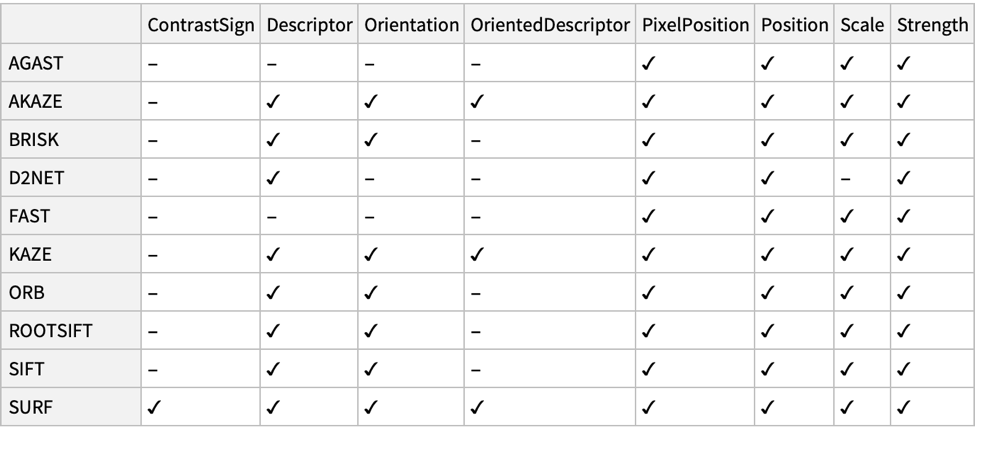
[image]

``Missing["NotAvailable"]`` is returned when a property is not available with the specified method:

```wl
In[1]:= ImageKeypoints[[image], {"Position", "Descriptor"}, Method -> "FAST", MaxFeatures -> 5]

Out[1]= {{{63.5, 26.5}, Missing["NotAvailable"]}, {{40.5, 25.5}, Missing["NotAvailable"]}, {{73.5, 33.5}, Missing["NotAvailable"]}, {{70.5, 34.5}, Missing["NotAvailable"]}, {{30.5, 56.5}, Missing["NotAvailable"]}}
```

---

``"FAST"`` method does not find contrast sign:

```wl
In[1]:= ImageKeypoints[[image], {"Position", "ContrastSign"}, Method -> "AGAST", MaxFeatures -> 4]

Out[1]= {{{63.5, 26.5}, Missing["NotAvailable"]}, {{40.5, 25.5}, Missing["NotAvailable"]}, {{35.5, 18.5}, Missing["NotAvailable"]}, {{70.5, 21.5}, Missing["NotAvailable"]}}
```

---

``"BRISK"`` method does not compute oriented descriptors:

```wl
In[1]:= ImageKeypoints[[image], {"Position", "OrientedDescriptor"}, Method -> "BRISK", MaxFeatures -> 4]

Out[1]= {{{40.1538, 24.8089}, Missing["NotAvailable"]}, {{64.3475, 26.6642}, Missing["NotAvailable"]}, {{72.5489, 33.3772}, Missing["NotAvailable"]}, {{71.1165, 33.8744}, Missing["NotAvailable"]}}
```

---

``"SURF"`` and ``"KAZE"`` descriptors are typically compared using the Euclidean distance:

```wl
In[1]:= img = [image];

In[2]:= kp = ImageKeypoints[img, {"Position", "Descriptor"}, MaxFeatures -> 11, Method -> "KAZE"];
```

Distances between the strongest keypoint and each of the next 10 strongest:

```wl
In[3]:=
best = kp[[1, 2]];
distances = Table[EuclideanDistance[best, d], {d, kp[[2 ;; , 2]]}]

Out[3]= {0.284856, 0.807054, 1.07525, 0.847216, 0.619306, 0.949614, 1.26073, 0.838188, 0.766492, 0.844206}
```

``"AKAZE"``, ``"BRISK"`` and ``"ORB"`` descriptors are typically compared using the Hamming distance:

```wl
In[4]:= kp = ImageKeypoints[img, {"Position", "Descriptor"}, MaxFeatures -> 11, Method -> "BRISK"];
```

Distances between the strongest keypoint and each of the next 10 strongest:

```wl
In[5]:=
best = kp[[1, 2]];
distances = Table[HammingDistance[best, d], {d, kp[[2 ;; , 2]]}]

Out[5]= {192, 214, 226, 232, 239, 194, 227, 215, 137, 146}
```

---

Cluster the keypoints based on their descriptors:

```wl
In[1]:=
img = [image];
k = ImageKeypoints[img, {"Position", "Descriptor"}, MaxFeatures -> 80];
clust = FindClusters[k[[All, 2]] -> k[[All, 1]], 3];
colors = ColorData[3] /@ Range[Length[clust]];
HighlightImage[img, Transpose[{colors, clust}]]

Out[1]= [image]
```

---

``ImageCorners`` may be used as keypoints:

```wl
In[1]:= img = [image];
```

Computer corners using radius 3.5 for similarity to the scale of some keypoint detectors:

```wl
In[2]:= corners = ImageCorners[img, 3.5, MaxFeatureDisplacement -> 1, MaxFeatures -> 10]

Out[2]= {{282.5, 153.5}, {278.5, 149.5}, {175.5, 72.5}, {165.5, 71.5}, {144.5, 137.5}, {173.5, 147.5}, {177.5, 144.5}, {43.5, 104.5}, {155.5, 141.5}, {75.6551, 92.2091}}

In[3]:= HighlightImage[img, {White, corners}]

Out[3]= [image]
```

Use ``CornerFilter`` to get the strength of detected corners:

```wl
In[4]:=
cf = CornerFilter[img, 3.5];
strengths = ImageValue[cf, corners];
Transpose[{corners, strengths}]

Out[4]= {{{282.5, 153.5}, 0.0235995}, {{278.5, 149.5}, 0.0172156}, {{175.5, 72.5}, 0.0140622}, {{165.5, 71.5}, 0.0140085}, {{144.5, 137.5}, 0.0136904}, {{173.5, 147.5}, 0.0125365}, {{177.5, 144.5}, 0.0120774}, {{43.5, 104.5}, 0.0120057}, {{155.5, 141.5}, 0.0116413}, {{75.6551, 92.2091}, 0.008462}}
```

Top 10 FAST keypoints:

```wl
In[5]:= ImageKeypoints[img, {"Position", "Confidence"}, Method -> "FAST", MaxFeatures -> 10]

Out[5]= {{{264.5, 148.5}, 0.67451}, {{177.5, 144.5}, 0.670588}, {{239.5, 147.5}, 0.662745}, {{251.5, 147.5}, 0.635294}, {{245.5, 147.5}, 0.619608}, {{188.5, 144.5}, 0.607843}, {{242.5, 147.5}, 0.6}, {{173.5, 147.5}, 0.552941}, {{281.5, 155.5}, 0.52549}, {{248.5, 147.5}, 0.517647}}
```

Top 10 AGAST keypoints:

```wl
In[6]:= ImageKeypoints[img, {"Position", "Confidence"}, Method -> "AGAST", MaxFeatures -> 10]

Out[6]= {{{264.5, 148.5}, 0.67451}, {{177.5, 144.5}, 0.670588}, {{239.5, 147.5}, 0.662745}, {{251.5, 147.5}, 0.635294}, {{245.5, 147.5}, 0.619608}, {{188.5, 144.5}, 0.607843}, {{173.5, 147.5}, 0.552941}, {{281.5, 155.5}, 0.52549}, {{275.5, 147.5}, 0.490196}, {{20.5, 101.5}, 0.490196}}
```

---

``ImageCorrespondingPoints`` gives the locations for keypoints that have matching descriptors:

```wl
In[1]:= {img1, img2} = {[image], [image]};

In[2]:= {pos1, pos2} = ImageCorrespondingPoints[img1, img2];

In[3]:= MapThread[HighlightImage, {{img1, img2}, {pos1, pos2}}]

Out[3]= {[image], [image]}
```

Compute keypoints on both images:

```wl
In[4]:= {k1, k2} = ImageKeypoints[#, {"Position", "Descriptor"}, MaxFeatures -> 100]& /@ {img1, img2};
```

Take two keypoints with and without a corresponding point in the second image:

```wl
In[5]:= {m, n} = {k1[[23]], k1[[24]]};
```

Compute all distances between descriptors for these keypoint to all keypoints in the second image:

```wl
In[6]:=
δm = EuclideanDistance[m[[2]], #]& /@ k2[[All, 2]];
δn = EuclideanDistance[n[[2]], #]& /@ k2[[All, 2]];

In[7]:= Histogram[#, ImageSize -> 200]& /@ {δm, δn}

Out[7]= {[image], [image]}
```

The second-to-nearest ratio is typically used to decide whether a keypoint has a corresponding point:

```wl
In[8]:=
{bestm, secondbestm} = TakeSmallestBy[k2, EuclideanDistance[m[[2]], #[[2]]]&, 2];
{bestn, secondbestn} = TakeSmallestBy[k2, EuclideanDistance[n[[2]], #[[2]]]&, 2];

In[9]:= EuclideanDistance[m[[2]], secondbestm[[2]]] / EuclideanDistance[m[[2]], bestm[[2]]]

Out[9]= 2.65124

In[10]:= EuclideanDistance[n[[2]], secondbestn[[2]]] / EuclideanDistance[n[[2]], bestn[[2]]]

Out[10]= 1.049
```

The keypoint with a correspondence is red; the other one is yellow:

```wl
In[11]:=
{HighlightImage[img1, {Red, m[[1]], Yellow, n[[1]]}, ImageSize -> 250], 
	HighlightImage[img2, {White, k2[[All, 1]], Yellow, bestn[[1]], Red, bestm[[1]]}, ImageSize -> 250]}

Out[11]= {[image], [image]}
```

## See Also

* [`ImageCorrespondingPoints`](https://reference.wolfram.com/language/ref/ImageCorrespondingPoints.en.md)
* [`CornerFilter`](https://reference.wolfram.com/language/ref/CornerFilter.en.md)
* [`ImageCorners`](https://reference.wolfram.com/language/ref/ImageCorners.en.md)
* [`ImageSaliencyFilter`](https://reference.wolfram.com/language/ref/ImageSaliencyFilter.en.md)
* [`ImageAlign`](https://reference.wolfram.com/language/ref/ImageAlign.en.md)
* [`ImageStitch`](https://reference.wolfram.com/language/ref/ImageStitch.en.md)

## Related Guides

* [Feature Detection](https://reference.wolfram.com/language/guide/FeatureDetection.en.md)
* [Image Processing & Analysis](https://reference.wolfram.com/language/guide/ImageProcessing.en.md)
* [Computer Vision](https://reference.wolfram.com/language/guide/ComputerVision.en.md)
* [Video Analysis](https://reference.wolfram.com/language/guide/VideoAnalysis.en.md)
* [Image Computation for Microscopy](https://reference.wolfram.com/language/guide/ImageComputationForMicroscopy.en.md)
* [Video Computation: Update History](https://reference.wolfram.com/language/guide/VideoComputation-UpdateHistory.en.md)

## History

* [Introduced in 2010 (8.0)](https://reference.wolfram.com/language/guide/SummaryOfNewFeaturesIn80.en.md) \| [Updated in 2012 (9.0)](https://reference.wolfram.com/language/guide/SummaryOfNewFeaturesIn90.en.md) ▪ [2014 (10.0)](https://reference.wolfram.com/language/guide/SummaryOfNewFeaturesIn100.en.md) ▪ [2017 (11.1)](https://reference.wolfram.com/language/guide/SummaryOfNewFeaturesIn111.en.md) ▪ [2021 (13.0)](https://reference.wolfram.com/language/guide/SummaryOfNewFeaturesIn130.en.md) ▪ [2025 (14.2)](https://reference.wolfram.com/language/guide/SummaryOfNewFeaturesIn142.en.md)